12
EN
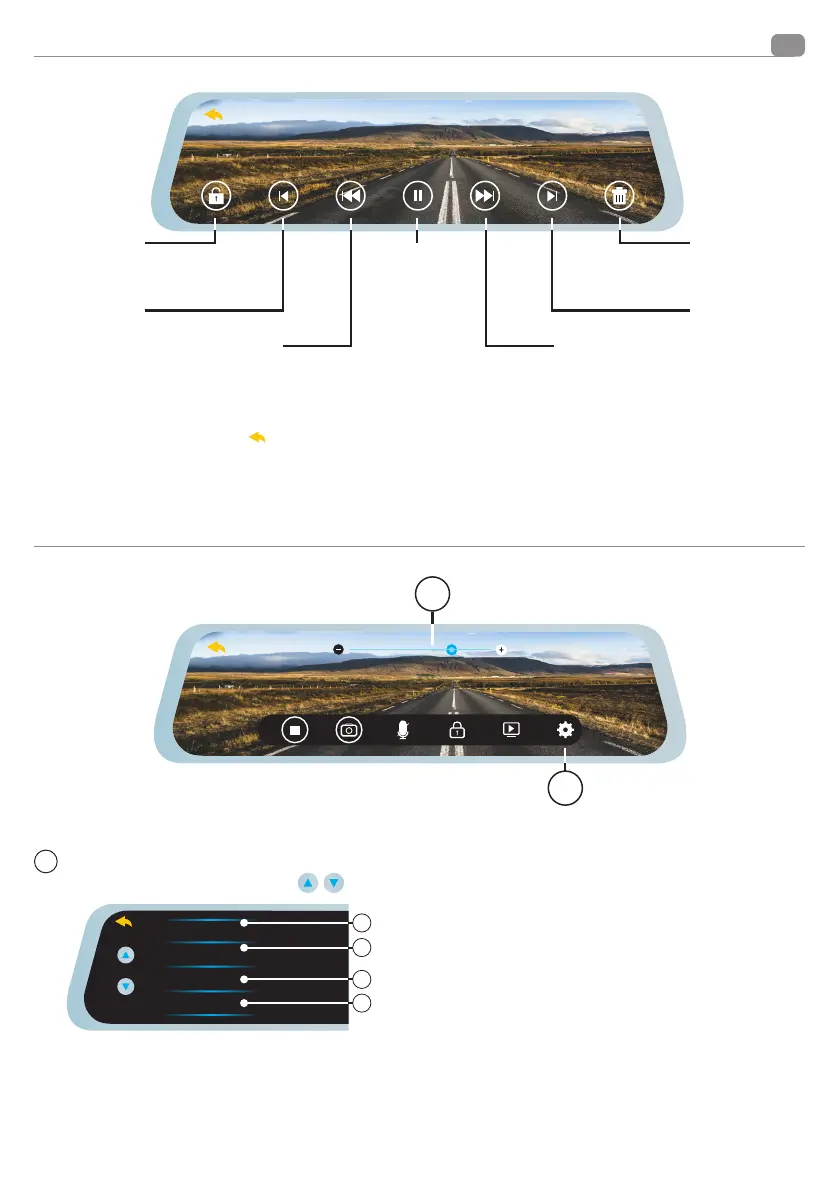
Playback menu functions
Setup menu functions
Press to enter the settings menu.
Display the functions with the keys
Movie Mode
Movie Clip Time
Night mode
Exposure
FHD
HD
2
3
4
1
1 VIDEO MODE: Selects the video quality,
FULLHD 1080p or HD 720p
2 FOOTAGE TIME: Selects the recording loop length (1/3/5
minutes)
3 NIGHT MODE: Activates or deactivates the night driving mode.
4 EXPOSURE ADJUSTMENT: Increase in positive or negative per
-
centage the front camera exposure by increasing or decreasing
the perceived brightness.
F
Press to lock
videos avoiding
overwriting
Press to move
to the previous
video or picture Fast
rewind
Playback
Pause
Fast forward
Press to move
to the next
video or picture
Press to delete
the video
or picture
Pressing the arrow at the top left
will bring you back to the previous menu.
1
2
1


 To Next Page