13
EN
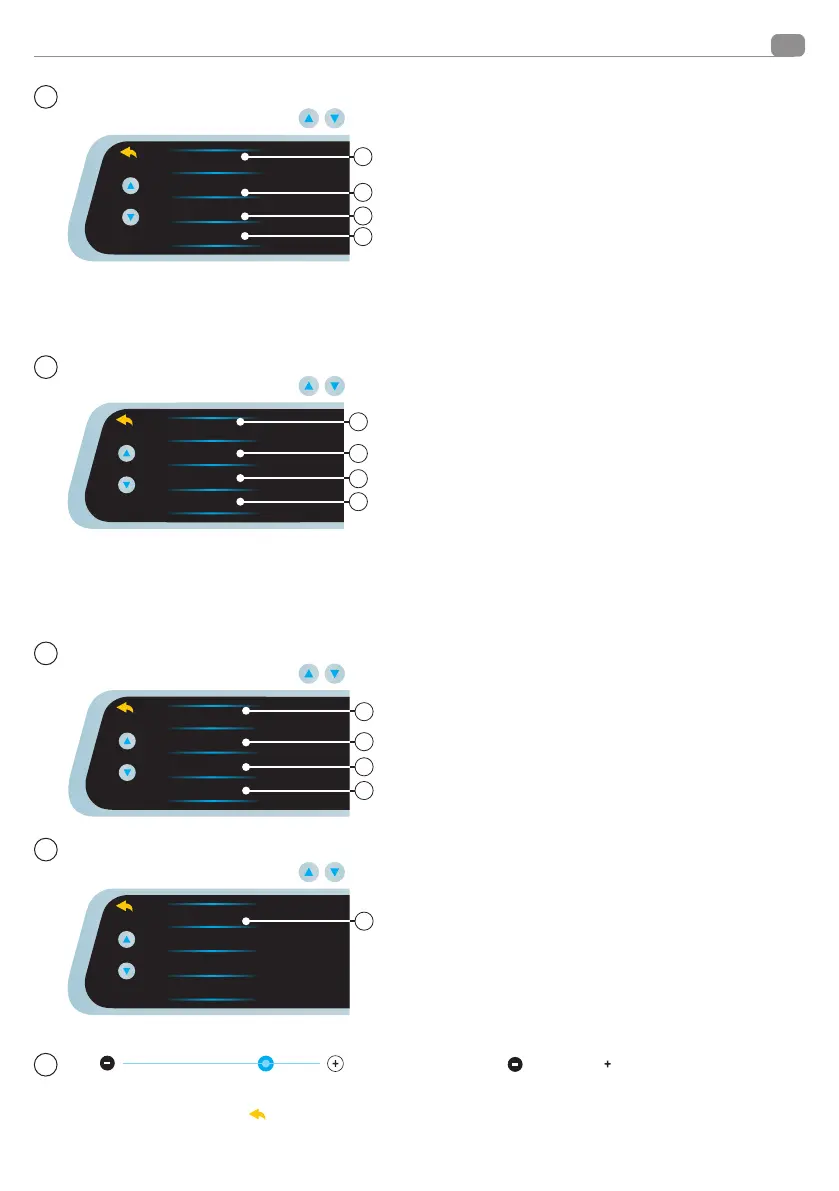
Setup menu functions
Press to enter the settings menu.
Display the functions with the keys
Video Time Lapse
Timelpase Rec Time
Smart LCD Brightness
Protect level
OFF
1FPS
4FPS
6
8
5
7
5 VIDEO TIME LAPSE : settings are available, but not the real
function. DO NOT ENABLE.
6 TIMELAPSE TIME REC: Settings are available, but not
the real function. DO NOT ENABLE
7 SMART LCD BRIGHTNESS Activates and deactivates the
Brightness function of the screen. Increases the brightness of the
screen, but not the camera.
8 PROTECT LEVEL: Selects video lock sensitivity during an acci
-
dent. The sensitivity can be set in 3
levels, high, medium, low, or off. If activated, on impact,
the recording is blocked and no longer overwritten. It will be
saved in the appropriate folder see page 5 menu 5 p. 3/4 ( blo
-
cked videos).
Press to enter the settings menu.
Display the functions with the keys
Parking Monitoring
LCD Power Safe
Language
Volume
OFF
ON
10
11
12
9
9 PARKING MONITORING: Activates or deactivates the Parking
Monitor.
To use the Parking Monitor, the G-sensor function must also be
active (see step 8 “PROTECT LEVEL” ). If the functions are enabled
and the power supply is fixed and not supplied by a cigarette
lighter (optional câble), the VM494 will wake up for 30 seconds if
a bump or vibration occur, blocking the video that subsequently
will not be overwritten and will be displayed in the LOCKED
videos folder (Page 5, Step 5, Function C,D)
10 LCD POWER SAFE:
Activate this function to turn the screen off automatically, after
1 minute/3 minutes, the recording will continue normally.
11 LANGUAGE: Select language
12 VOLUME: Press to select the touch volume.
Press to enter the settings menu.
Display the functions with the keys
Flicker
Clock Sengs
Format SD-Card
Reset Setup
50 Hz
60 Hz
14
15
16
13
13 FREQUENCY: Sets the OCD frequency in Hz.
14 CLOCK SETTING: Press to set date and time.
15 FORMAT SD-CARD: Press to format the SD-Card.
16 RESET SETUP: By pressing you can reset the mirror to the
factory data, all data and settings will be deleted.
Press to enter the settings menu.
Display the functions with the keys
FW Version 966-20185423
17
17-FW VERSION: Device version.
The bar shows the set brightness level. You can use the touch
screen to decrease
or increase the brightness level.
Pressing the arrow at the top left
will bring you back to the previous menu.
2
1
1
1
1


 To Next Page