
 Need help?
Do you have a question about the Photogenic ION and is the answer not in the manual?
Guide to unpacking components, inspecting for damage, and preparing the inverter for first use.
How to power the unit ON and OFF by pressing and holding the red power button.
Explanation of the four LEDs that show the remaining battery capacity.
Meaning of the Power LED states: Off, Green, Orange, and Red.
Details on the 0.5A USB port for powering portable electronics like phones and MP3 players.
Steps for connecting the charger to the inverter or battery pack for charging.
Instructions on how to safely disconnect devices and switch off power before replacing the battery.
Step-by-step guide to releasing the latch and sliding the battery pack off the inverter.
Instructions on aligning the battery pack, pressing it down, and securing it to the inverter.
Guidance on cleaning the unit and contacting Photogenic for repairs.
Details on the two-year limited warranty for the inverter and 90-day for the battery.
List of all parts included in the standard Photogenic ION Inverter package.
Description of the heavy-duty ION case for protecting and organizing the kit and batteries.
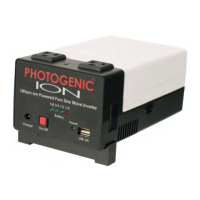
The Photogenic ION is a lithium-ion powered pure sine wave inverter designed to provide portable power for studio lights, particularly Photogenic monolights and other compatible monolights, in locations where conventional AC power is unavailable or unreliable. It is a lightweight and compact power supply, with the inverter and battery enclosed in strong, high-impact polymer housings.
The primary function of the Photogenic ION is to convert the DC power from its internal lithium-ion battery into AC power, specifically a pure sine wave, suitable for operating professional photographic lighting equipment. This allows photographers to use their studio lights on location without being tethered to a wall outlet. The device also includes a USB port for charging or powering small electronic devices.
Inverter Power Output: 120W Continuous Inverter Output Voltage: 120VAC +/-3%, 60Hz Inverter Wave Form: Pure Sine Wave USB Power Output: 5VDC, 500mA Number of Standard Output Outlets: 2, 3-prong, 120VAC Battery Type: LiCox NiyMnzO2 Lithium Ion Battery Pack Battery Volt/Amp-Hour: 14.8V / 8.8Ah Battery Watt-Hours (Energy): 130 Watt-Hours Battery Current: 30ADC Peak / 15ADC Average Battery Cutoff Voltage: 12VDC Battery Charger Input Range: 100VAC to 265VAC, 50/60Hz Battery Charger Output (Maximum): 16.8VDC / 3A Battery Charging Time: 3 to 4 hours to full charge Full Charge Voltage (From Charger): 16.8VDC System Protection Features: Over Load, Over Temperature, Over Charge/Discharge, Over Current, Short Circuit Cooling System: Fan Control Weight of ION System: 3.5 lbs. (Including 2.0 lbs. battery and strap) Dimensions of ION Inverter System: 3 1/8" x 4 3/8" x 7 1/2" Housing: High Impact ABS-PC
Approximate Flashes Per Charge (examples):
On/Off Button: The unit is powered ON or OFF by pressing and holding the red power button for 2 seconds.
LED Battery Status Indicators: Four LEDs on the front panel indicate the battery charge level:
Power LED Indicator: This LED shows the inverter's operational status:
USB Port: A 0.5A USB port is available for powering portable electronic devices like cellular phones and MP3 players. Users should note that some devices requiring more than 0.5A may not charge properly.
Charger Connector: The battery can be charged while attached to the inverter or separately. To charge, ensure the inverter is OFF. Plug the charger's AC power cord into a suitable source, then plug the charger into the inverter's front panel connector. The charger's LED will be red during charging and turn green when fully charged. The battery pack can also be charged directly by plugging the charger into its dedicated port.
Replaceable Battery Pack: The battery pack is designed for easy removal and installation. To remove, press and hold the release latch on the side of the inverter and slide the battery pack off. To install, align the four round posts on the battery pack with the four slots on the inverter housing, firmly press the battery pack down, and slide it until it aligns and locks with the release latch.
Connecting Monolights: Ensure monolights and modeling lamps are powered off before plugging them into the AC power outlets on the inverter's panel. After connecting, power ON the inverter. It is important not to operate monolights and modeling lamps simultaneously, as this can quickly drain the battery, slow recycle times, and potentially overheat the system. The inverter is not designed for continuous loads higher than 120 Watts, as this can cause overheating and shutdown, and degrade monolight recycling performance.
Mounting: The Photogenic ION can be mounted using the included ION Multi-Clamp and strap. The Multi-Clamp attaches to a light stand, and the inverter hangs securely in its slot. The Multi-Clamp opens from 0" to 1.25" and is made of durable aluminum. The flexible strap allows for various configurations, including shoulder carry or additional stand mounting.
Routine Maintenance: To ensure long life and maximum performance, users should wipe dust from the battery, inverter contacts, AC outlets, and control panel using a clean, dry cloth.
Service: Users should not attempt to make any internal repairs to the product. All service work should be referred to a qualified service person or returned to the factory. Unauthorized service voids the warranty and can be dangerous.
Safety Precautions:
Warranty: Photogenic® Professional Lighting warrants the ION Pure Sine Wave Inverter to be free from defects in material and workmanship for two (2) years from the date of purchase. The warranty covers repair or replacement at Photogenic®'s choice. It does not cover damages from abuse, accident, modification, disassembly, or use beyond its intended purpose. Using non-Photogenic batteries or chargers will void the warranty. Lithium-ion batteries are considered consumable and have a limited 90-day warranty.
 General
| Brand | Photogenic |
|---|---|
| Model | ION |
| Category | Portable Generator |
| Language | English |

 To Next Page