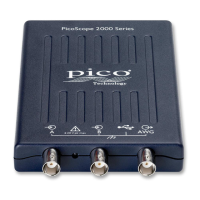
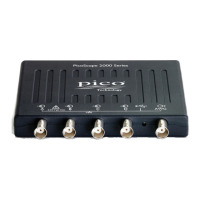
The PicoScope 2200A Series PC Oscilloscopes are compact, portable units designed to replace traditional bench-top oscilloscopes. They function as an oscilloscope, spectrum analyzer, or high-speed data acquisition interface, connecting to any Windows PC via USB.
Function Description:
The PicoScope 2200A Series offers a range of models (2204A, 2205A, 2206A, 2207A, 2208A) with varying performance specifications. These devices are designed for measuring signals within a range of ±20 V. They are equipped with BNC oscilloscope connectors for signal inputs, which have an impedance of 1 MΩ, making them compatible with standard scope probes, including x10 attenuated types.
A key feature is the built-in Arbitrary Waveform Generator (AWG) connector on the front panel. This AWG can generate various built-in waveforms (like sine and square waves) and arbitrary waveforms defined by the user. This output can be used to drive a test signal into an external circuit or one of the oscilloscope's input channels.
The oscilloscopes utilize PicoScope software, which transforms a PC into a full-featured oscilloscope, spectrum analyzer, and meter display. The software makes full use of the PC's display, storage, user interface, and networking capabilities. Application Programming Interfaces (APIs) are available for all models in the 2200A range, allowing users to write their own programs in their chosen programming language to control all features of the scope.
Important Technical Specifications:
- Number of Channels: All models in the 2200A Series have 2 channels.
- Vertical Resolution: 8 bits.
- Analog Bandwidth:
- PicoScope 2204A: 10 MHz
- PicoScope 2205A: 25 MHz
- PicoScope 2206A: 50 MHz
- PicoScope 2207A: 100 MHz
- PicoScope 2208A: 200 MHz
- AWG Bandwidth: 100 kHz for 2204A/2205A, and 1 MHz for 2206A/2207A/2208A.
- Maximum Sampling Rate (Real-time, one channel in use):
- PicoScope 2204A: 100 MS/s
- PicoScope 2205A: 200 MS/s
- PicoScope 2206A: 500 MS/s
- PicoScope 2207A/2208A: 1 GS/s
- Maximum Sampling Rate (Real-time, two channels in use):
- PicoScope 2204A: 50 MS/s
- PicoScope 2205A: 100 MS/s
- PicoScope 2206A: 250 MS/s
- PicoScope 2207A/2208A: 500 MS/s
- Equivalent-time (ETS) Sampling Rate:
- PicoScope 2204A: 2 GS/s
- PicoScope 2205A: 4 GS/s
- PicoScope 2206A: 5 GS/s
- PicoScope 2207A/2208A: 10 GS/s
- Buffer Size (shared between enabled channels):
- PicoScope 2204A: 8 k
- PicoScope 2205A: 16 k
- PicoScope 2206A: 32 k
- PicoScope 2207A: 40 k
- PicoScope 2208A: 48 k
- Dimensions (including connectors): 142 x 92 x 19 mm (5.6 x 3.6 x 0.8 in.).
- Operating System Requirements: Windows XP (SP3), Windows Vista, Windows 7, Windows 8 (not Windows RT), supporting both 32-bit and 64-bit versions.
- USB Port Requirements: USB 2.0 or USB 3.0 port (USB 1.1 is an absolute minimum but will result in greatly reduced speed).
- Operating Temperature: 0 °C to +40 °C (+20 to +30 °C for quoted accuracy).
- Storage Temperature: -20 °C to +60 °C.
- Operating Humidity: 5% to 85% RH (non-condensing).
- Storage Humidity: 5% to 95% RH (non-condensing).
- Overload Protection: Front-panel BNC inputs are designed to withstand accidental overloads up to ±100 V. However, the specified measuring range is ±20 V.
Usage Features:
- Portability: The compact size and USB connectivity allow the unit to be easily transported and used with any Windows PC.
- Flexibility: Functions as an oscilloscope, spectrum analyzer, or high-speed data acquisition interface.
- Programmability: APIs enable custom software development for controlling all scope features.
- Software Upgrades: Free software upgrades are available for download from the Pico Technology website, ensuring long-term support and access to new features.
- Probe Compensation: Users are recommended to compensate each oscilloscope probe before use. This involves connecting the probe to the AWG output, running PicoScope software, setting the AWG to generate a 1 kHz 1 volt square wave, and following the probe's compensation instructions.
- Installation: The device requires PicoScope software to be installed on the PC before connecting the oscilloscope via USB. This ensures proper device recognition. The installation process is guided by an included Installation Guide.
- Moving to another USB port: For Windows XP SP3, moving the oscilloscope to a different USB port will trigger the "New Hardware Found Wizard" again, requiring a repeat of the driver installation steps. For Windows Vista, 7, and 8, this process is automatic.
- Coupling Mode: The PicoScope software allows switching between AC and DC coupling. AC coupling filters out very low-frequency components, suitable for viewing small AC signals superimposed on a DC offset. DC coupling is used for measuring the absolute value of a signal.
- Streaming Mode: A data collection mode where the oscilloscope continuously samples and returns data to the computer. This allows for the capture of more data than the oscilloscope's memory buffer at sampling rates over 1 MS/s (PC dependent), particularly useful for long timebases.
- Block Mode: A fast data collection mode that achieves the fastest possible sampling rates. Data is collected as fast as possible, then transferred to the PC. During transfer, the oscilloscope cannot sample new data.
- Equivalent Time Sampling (ETS): A technique for constructing a picture of a repetitive signal by accumulating information over many similar wave cycles, providing better time resolution than a single cycle. Not suitable for one-shot signals.
Maintenance Features:
- Care of the Product: The product contains no user-serviceable parts. Repair, servicing, and calibration must be performed by Pico Technology or an approved service provider.
- Cleaning: When cleaning, use a soft cloth and a solution of mild soap or detergent in water. Avoid allowing water to enter the oscilloscope casing.
- Warranty: Pico Technology provides a five-year warranty against defects in material and workmanship from the date of delivery. The warranty does not cover defects caused by fair wear and tear, willful damage, negligence, abnormal working conditions, failure to follow advice on storage/installation/use/maintenance, or alterations/repairs without Pico Technology's consent.
- Technical Support: Pico Technology offers technical support for the lifetime of the product.
- Returns: Customers can return the product for a full refund within fourteen days of purchase if not completely satisfied.

 Need help?
 General

 To Next Page