Then the sensor will automatically select the appropriate receiving
channel (R, G, or B channel), while remembering the threshold
value
The display screen will alternately display the threshold and the
received channel. If R is displayed, it indicates that the red channel
is selected, if G is displayed, the green channel is selected, and B
indicates that the blue channel is selected.
In C and CI color modes: Two point calibration:
The display screen displays the word SET1. Then align the spot
with the background and press the SET button again. The sensor
will determine the threshold and display it. The default threshold is
900
When CI is selected as the working mode, all three indicator lights
of STB C I will light up. If the working mode is selected as C Mode,
only STB C will light up, and I will not light up.
In AUTO color mode: Two point calibration:
Align the spot directly with the color code of object, and press the
SET key.The display screen displays the word SET1
Then align the spot with the background and press the SET key
again. The sensor will determine the threshold and display it.
The default threshold is 800.When performing self-learning in
AUTO, the sensor will automatically select either C mode or CI
mode.When the color difference between the object and the
background is significant, the sensor will choose C mode.When
the object is in contact with the background.When the color
difference is not significant, the sensor will choose C I mode。
When CI is selected as the working mode, all three indicator lights
of STB C I will light up. If the working mode is selected as C
mode, only STB C will light up and I will not light up。
Add self-learning during self-learning (ADD function):
In AUTO C CI mode,After pressing the SET key, the display
screen shows SET1. Then press and hold the SET key again, the
display screen will alternately display SET and ADD.Under the
ADD function, select CI, the default threshold is 700, 800, or 900,
This data is selected in the menu THRD.The ADD self-learning
function is suitable for highly reflective and bright objects in
lithium batteries or photovoltaics,
It has a very good effect.
Select L.ON or D.ON; press NO/NC and hold on 3s, will appear
L.ON or D.on. At this time, short pressing the NO/NC or MODE
key will switch. Move the object at this time, and the sensor will
automatically learn all the color of the object.
Adjust threshold function: short press MODE key or NO/NC
keys, threshold value will flash and display, press MODE key at
this time, The threshold value will decrease, and pressing
NO/NC will increase the threshold value.
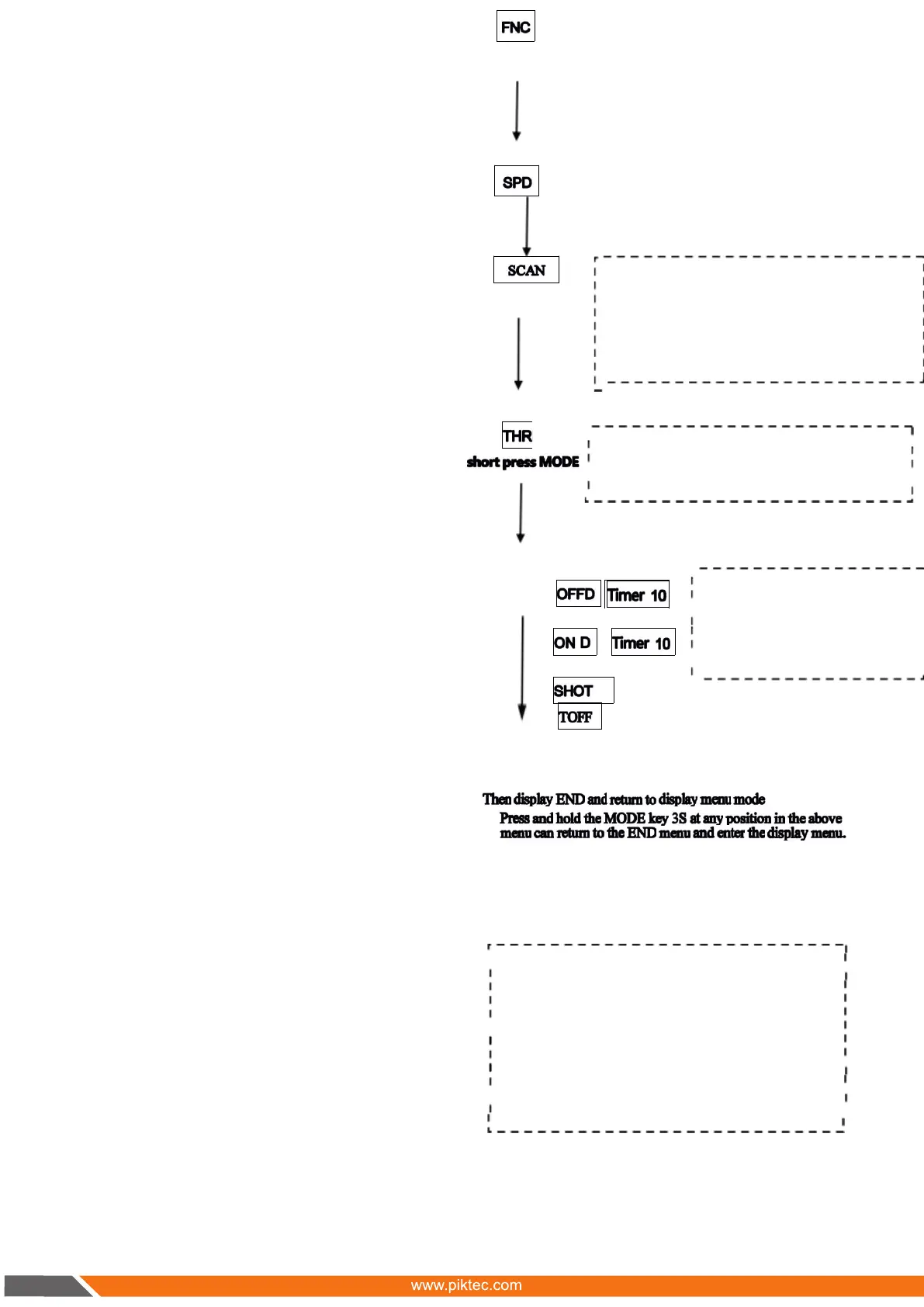
FNC is function menu, short press NO/NC Then
switch between AUTO, C, MARK, and
CI. Short press MODE at this time, Confirmed
the current function menu , And return to
display FNC. Defaultbe AUTO function.
SPD stands for Speed,it’s the response time. under SPD
status short press NO/NC, then response time switch
between HSP 1,10,100 and 500. HSP is 160US response
time, 1, 10, 100,500 unit is MS. Short press MODE
Confirm the response time and return to the SPD menu.
The default is 10MS, if the object is a highlightedobject, it
is best to set the time to 100 or 500MS.
short pres s
SCAN represents the scanning cycle, The sensor have
four cycles: A B C D,When multiple sensors are used
too close, mutual interference will occur, At this point,
setting the SCAN cycle to A or B or C or D will not
interferewith each other. Default A, the scanning cycle of
A B C and D will gradually increase, so the reaction
time will also gradually increase.
The THRD menu is used to set the threshold data for
adding self-learning to ADD, They are 700, 800, 900.
M defaults be 800. You can also press the NO/NC
button to switch between 700, 800, and 900.
Enter delay mode TOFF
Press NO/NC key, switch between
TOFF,OFD,OND and SHOT. Short
press MODE key, enterinto timer menu.
PressNO/NC key,than the data will
increase to 9999MS, and switch to
1MS. Pressat this time
S hort press Mode key
When the user selects MARK mode, the THRD menu will be
replaced with the LIST menu. at LIST menu status, short press
NO/NC to enter next menu
LIST manual include AUTO,RGB, R ,G ,B five option.
AUTO means,under MARK mode, sensor automatically
selects R,G, or B when self-learning. If the RGB menu is
selected, the sensor will select three RGB channels during
self-learning. If R, G, or B channels are selected, during self-
learning, the sensor selects R, G, or B according to the
specified channel, and the sensor will not automatically
select the channel.When the operator is very experienced,
choosing RGB or R or G or B would be convenient. Default
be AUTO.
s hort press
s hort press
02


 To Next Page
 Loading...