11
3.2.10. How to Update Firmware
Open the Pimax Play on your PC. Navigate to "Device Settings → Check for Updates" in the client. Pimax Play; The system will check the
currently installed software and firmware version, and will prompt you to perform an update if there is a new version available on the server.
CAUTION READ CAREFULLY
When updating the device firmware, the headset must be paired with the controllers to perform the OTA update:
Before updating the firmware, please check the power of the headset and controllers. We that you only perform updates when
the power of the headset and controllers More than 3 battery lights
Please do not unplug the USB cable or turn off the computer when updating the device firmware;
3.3. Standalone VR
3.3.1. Standalone VR System Specifications
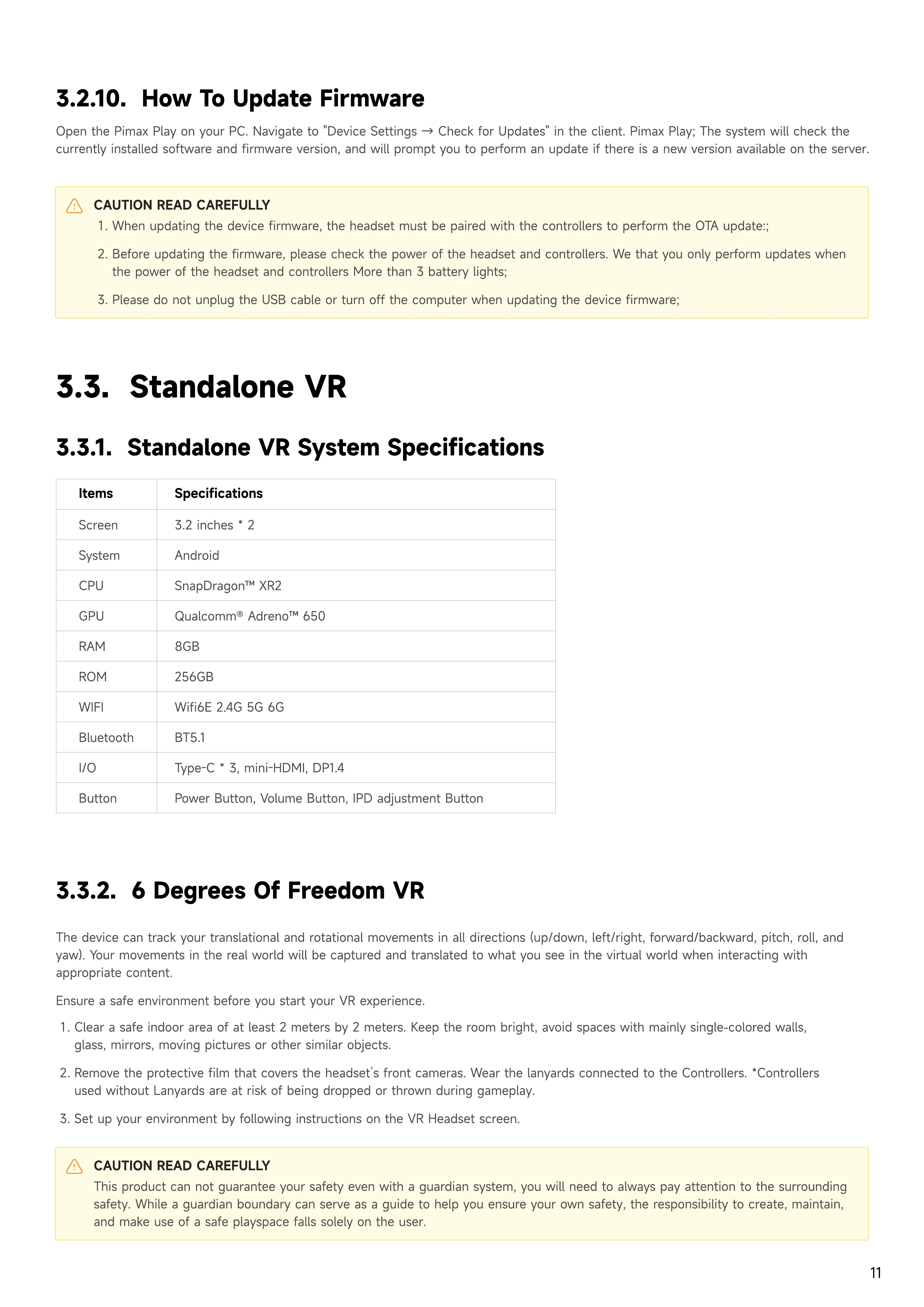
3.2 inches *
Androi
SnapDragon™ XR
Qualcomm® Adreno™ 65
8G
256G
Wifi6E 2.4G 5G 6
BT5.
Type-C * 3, mini-HDMI, DP1.
Power Button, Volume Button, IPD adjustment Button
Scree
Syste
CP
GP
RA
RO
WIF
Bluetoot
I/
Button
Items Specifications
3.3.2.
6
D
e
g
rees
o
f Freedom VR
The device can track your translational and rotational movements in all directions
(
up/down, left/right, forward/backward, pitch, roll, and
yaw
)
.
Y
our movements in the real world will be captured and translated to what you see in the virtual world when interacting with
appropriate content
Ensure a safe environment before you start your VR experience.
Clear a safe indoor area of at least 2 meters by 2 meters.
K
eep the room bright, avoid spaces with mainly single
-
colored walls,
glass, mirrors, moving pictures or other similar objects
Remove the protective film that covers the headset
’
s front cameras. Wear the lanyards connected to the Controllers. *Controllers
used without
L
anyards are at risk of being dropped or thrown during gameplay
Set up your environment by following instructions on the VR Headset screen.
CAUTION READ CAREFULLY
This product can not guarantee your safety even with a guardian system, you will need to always pay attention to the surrounding
safety. While a guardian boundary can serve as a guide to help you ensure your own safety, the responsibility to create, maintain,
and make use of a safe playspace falls solely on the user.


 To Next Page
 Loading...