10
3.2.9. How to Adjust the Headset for a Comfortable Fit and View
Step 1:
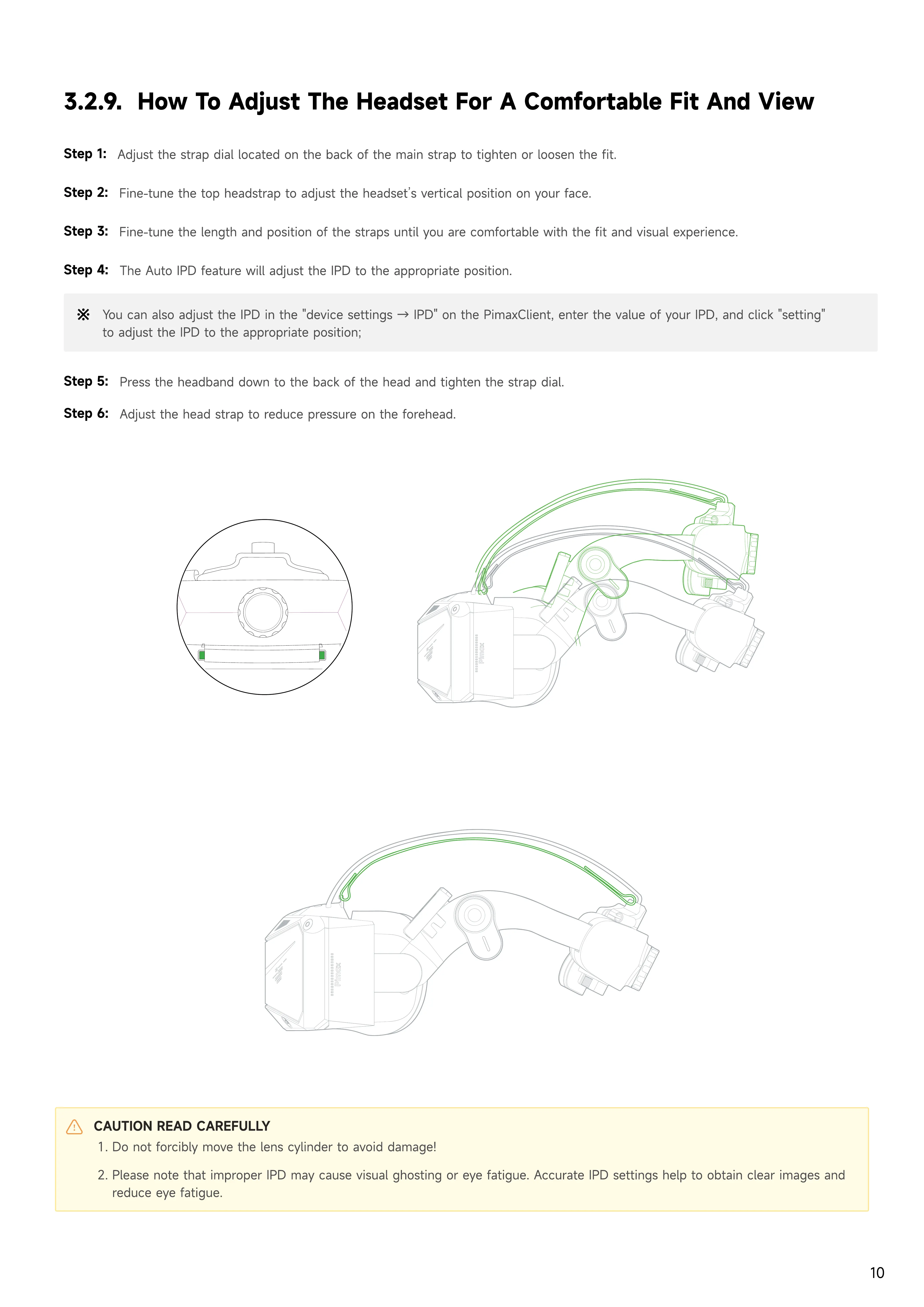
Adjust the strap dial located on the back of the main strap to tighten or loosen the fit.
Step 2:
Fine-tune the top headstrap to adjust the headset’s vertical position on your face.
Step 3:
Fine-tune the length and position of the straps until you are comfortable with the fit and visual experience.
Step 4:
The Auto IPD feature will adjust the IPD to the appropriate position.
Step 5:
Press the headband down to the back of the head and tighten the strap dial.
You can also adjust the IPD in the "device settings → IPD" on the PimaxClient, enter the value of your IPD, and click "setting"
to adjust the IPD to the appropriate position;
CAUTION READ CAREFULLY
Do not forcibly move the lens cylinder to avoid damage
Please note that improper IPD may cause visual ghosting or eye fatigue. Accurate IPD settings help to obtain clear images and
reduce eye fatigue.
Step 6:
Adjust the head strap to reduce pressure on the forehead.


 To Next Page