13
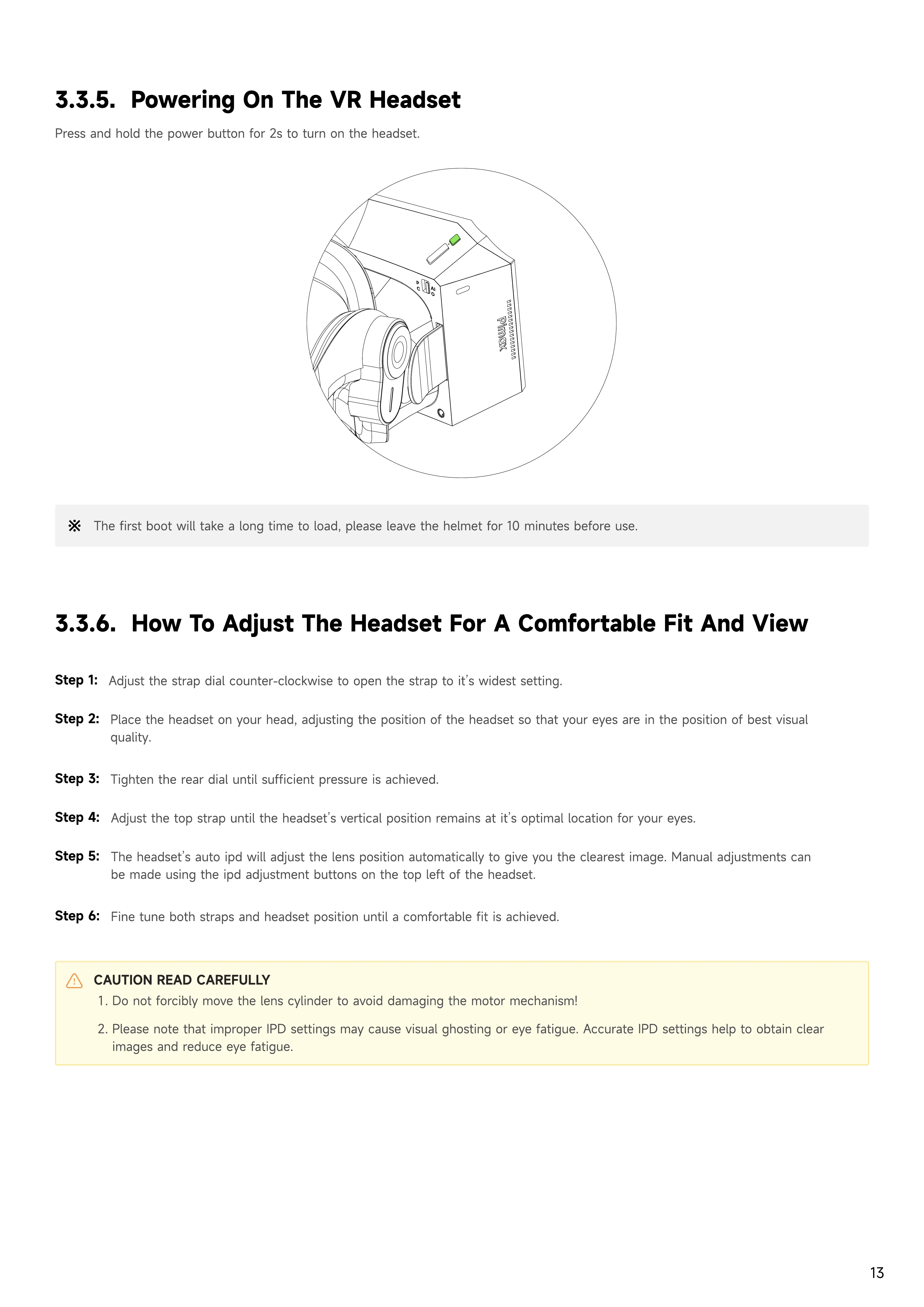
3.3.5. Powering on the VR Headset
Press and hold the power button for 2s to turn on the headset.
3.3.6. How to adjust the Headset for a Comfortable Fit and View
Step 1:
Adjust the strap dial counter-clockwise to open the strap to it’s widest setting.
Step 2:
Place the headset on your head, adjusting the position of the headset so that your eyes are in the position of best visual
quality.
Step 3:
Tighten the rear dial until sufficient pressure is achieved.
Step 4:
Adjust the top strap until the headset’s vertical position remains at it’s optimal location for your eyes.
Step 5:
The headset’s auto ipd will adjust the lens position automatically to give you the clearest image. Manual adjustments can
be made using the ipd adjustment buttons on the top left of the headset.
CAUTION READ CAREFULLY
D
o not forcibly move the lens cylinder to avoid damaging the motor mechanism
Please note that improper
I
P
D
settings may cause visual ghosting or eye fatigue. Accurate
I
P
D
settings help to obtain clear
images and reduce eye fatigue.
Step
6
:
F
ine tune both straps and headset position until a comfortable fit is achieved.
P
C
AI
O
The first boot will take a long time to load, please leave the helmet for 1
0
minutes before use.


 To Next Page