14
3.3.7. Product Details (AIO)
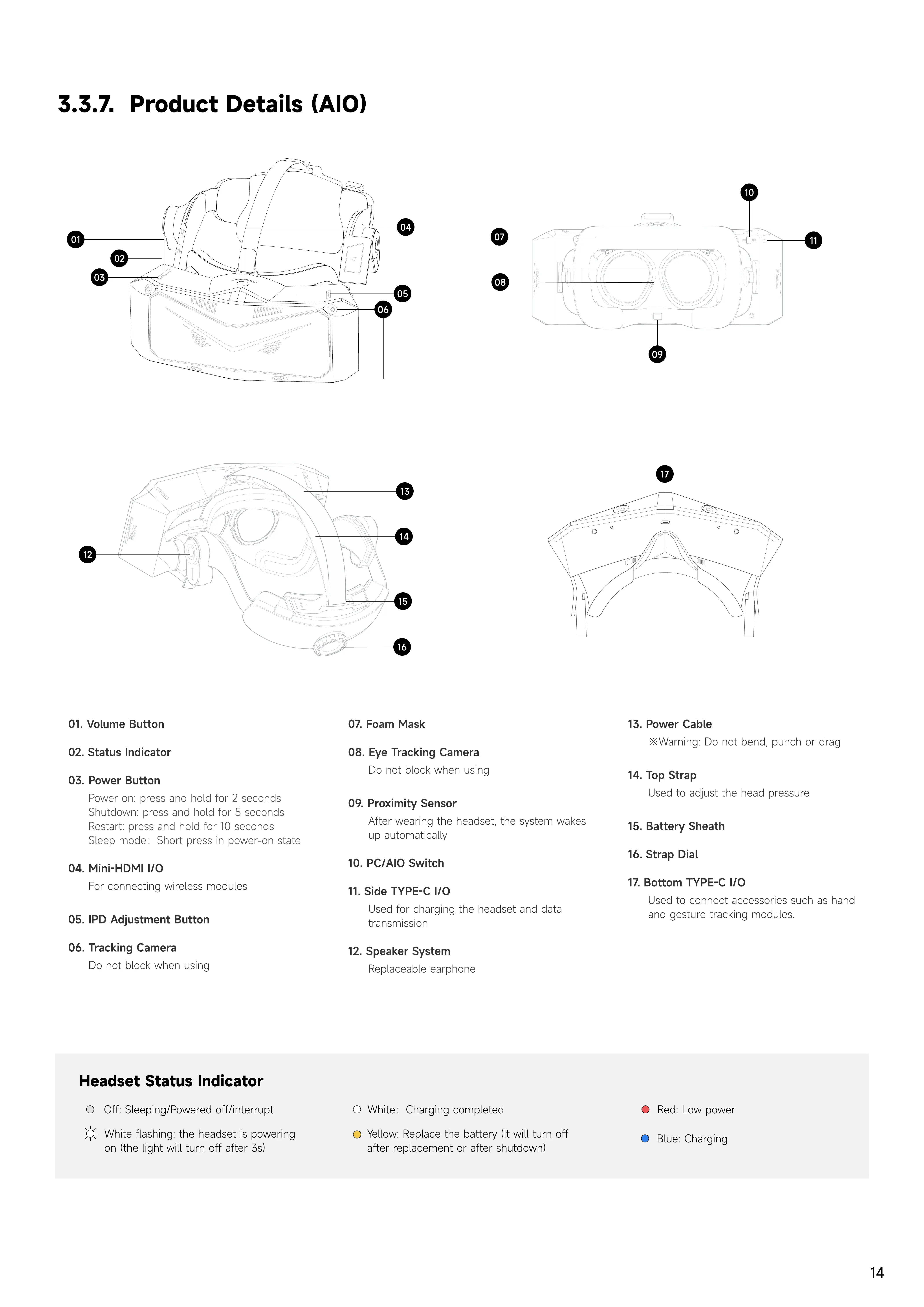
01. Volume button
02. Status indicator
03. Power button
Power on: press and hold for 2 second
Shutdown: press and hold for 5 second
Restart: press and hold for 10 second
Sleep mode:Short press in power-on state
04. Mini-HDMI I/O
For connecting wireless modules
05. IPD adjustment button
06. Tracking Camera
Do not block when using
07. Foam mask
08. Eye Tracking Camera
Do not block when using
09. Proximity Sensor
After wearing the headset, the system wakes
up automatically
10. PC/
A
IO Switc
h
11. Side T
Y
PE-C I/O
U
sed for charging the headset and data
transmission
12. S
p
eaker System
Replaceable earphone
13. Power Ca
b
le
※W
arning: Do not bend, punch or drag
14. To
p
Stra
p
U
sed to ad
j
ust the head pressure
15.
B
attery S
h
eat
h
16. Stra
p
Dial
17.
B
ottom T
Y
PE-C I/O
U
sed to connect accessories such as hand
and gesture tracking modules
.
H
eadset
S
tatus I
n
dicator
Y
ellow: Replace the battery
(I
t will turn off
after replacement or after shutdown
)
Red:
L
ow power
W
hite:
C
harging completed
W
hite flashing: the headset is powering
on
(
the light will turn off after
3
s
)
B
lue:
C
harging
O
ff: Sleeping
/
Powered off
/
interrupt
07
08
11
01
02
03
06
13
14
15
16
05
12
09
10
17
04


 To Next Page