15
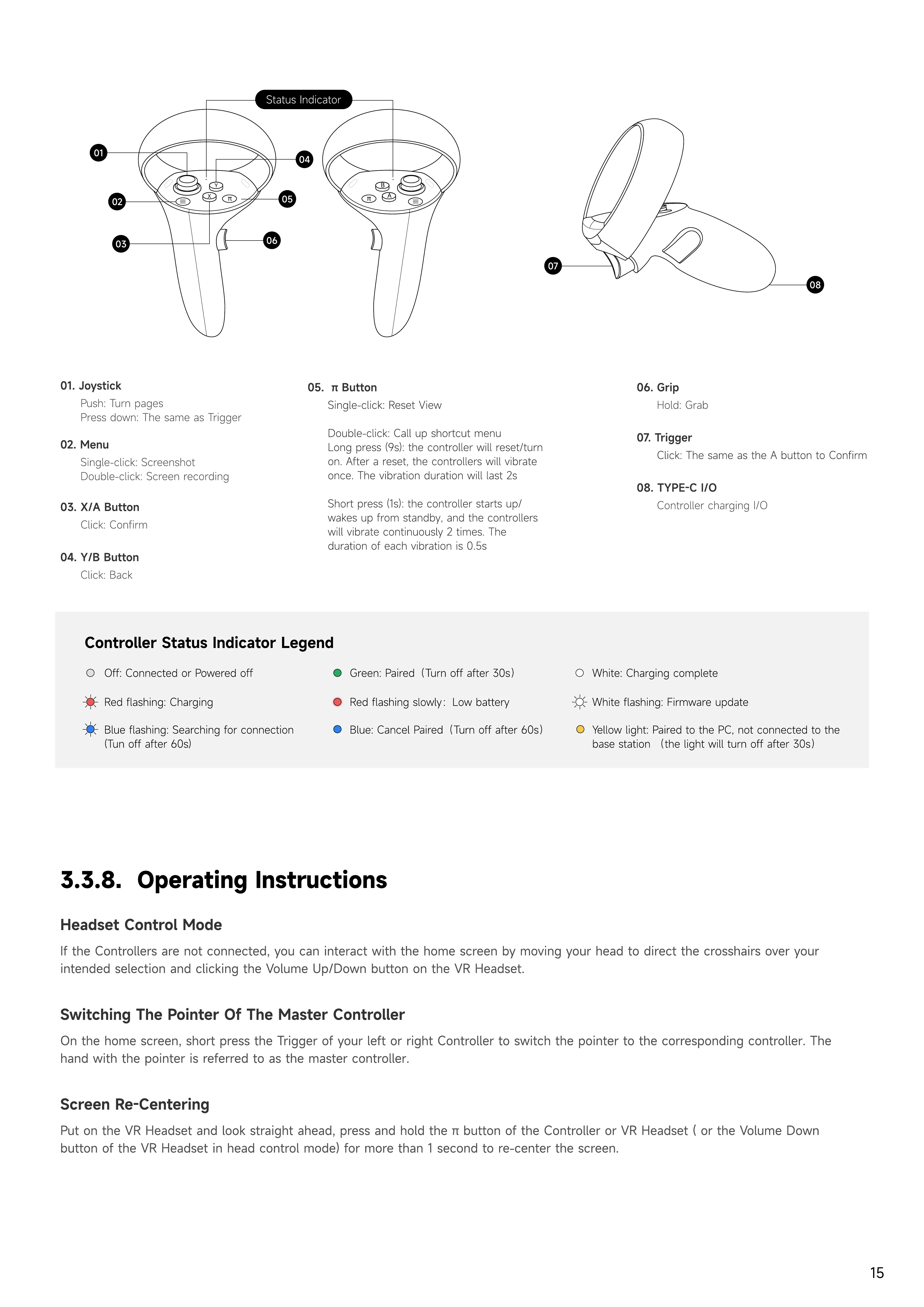
03. X/A button
Click: Confirm
06.
Grip
Hold: Grab
01.
Joystick
Push: Turn page
Press down: The same as Trigger
07. Trigger
Click: The same as the A button to Confirm
04. Y/B button
Click: Back
08. TYPE-C I/O
Controller charging I/O
02. Menu
Single-click: Screensho
Double-click: Screen recording
05.
π button
Single-click: Reset Vie
Double-click: Call up shortcut men
Long press (9s): the controller will reset/turn
on. After a reset, the controllers will vibrate
once. The vibration duration will last 2
Short press (1s): the controller starts up/
wakes up from standby, and the controllers
will vibrate continuously 2 times. The
duration of each vibration is 0.5s
Y
ellow light: Paired to the PC, not connected to the
base station
(
the light will turn off after
3
0s
)
Controller
Status
Indicator
Legend
Red flashing slowly
:
Low battery
W
hite: Charging complete
Blue flashing: Searching for connection
(Tun off after
6
0s)
Red flashing: Charging
W
hite flashing:
F
irmware update
Blue: Cancel Paired
(
Turn off after
6
0s
)
Green: Paired
(
Turn off after
3
0s
)
Off: Connected or Powered off
Headset
Control
Mode
If the Controllers are not connected, you can interact with the home screen by moving your head to direct the crosshairs over your
intended selection and clicking the Volume Up/Down button on the VR Headset.
Switching
the
pointer
of
the
master
Controller
O
n the home screen, short press the
T
rigger of your left or right Controller to switch the pointer to the corresponding controller.
T
he
hand with the pointer is referred to as the master controller.
Screen
r
e
-c
entering
P
ut on the VR Headset and look straight ahead, press and hold the
π
button of the Controller or VR Headset
(
or the Volume Down
button of the VR Headset in head control mode
)
for more than
1
second to re
-
center the screen.
3.3.8. Operating Instructions
A
B
π
X
Y
π
07
02
08
06
05
04
Status Indicator
01
03


 To Next Page
 Loading...