06
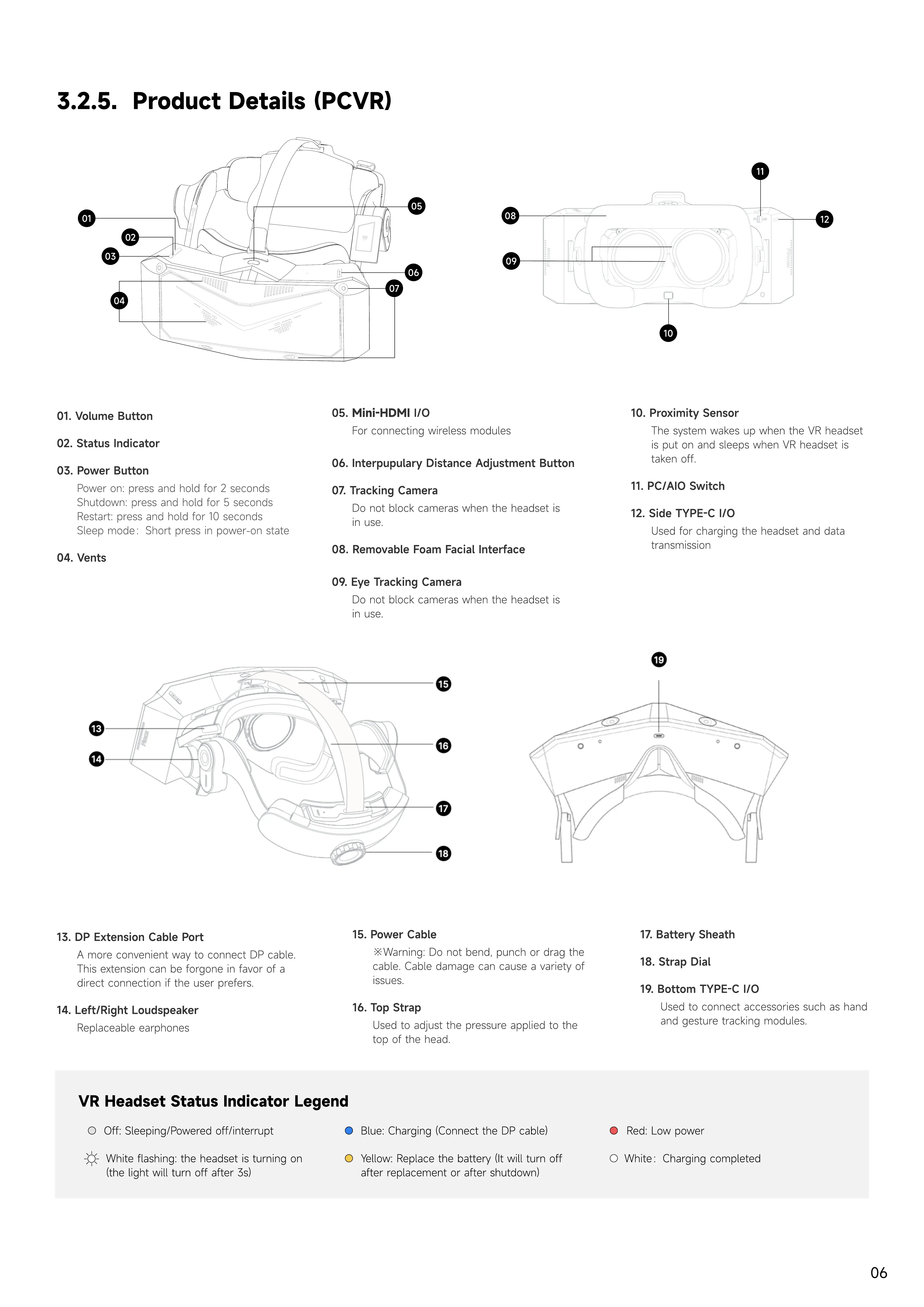
3.2.5. Product Details (PCVR)
03. Power button
Power on: press and hold for 2 second
Shutdown: press and hold for 5 second
Restart: press and hold for 10 second
Sleep mode:Short press in power-on state
06. Interpupulary Distance Adjustment Button
10. Proximity Sensor
The system wakes up when the VR headset
is put on and sleeps when VR headset is
taken off.
13. DP extension cable port
A more convenient way to connect DP cable.
This extension can be forgone in favor of a
direct connection if the user prefers.
01. Volume button
11. PC/AIO Switch
07. Tracking Camera
Do not block cameras when the headset is
in use.
04. Vents
08. Removable Foam Facial Interface
02. Status
i
ndicator
0
5
.
M
i
n
i
-H
D
MI
I/O
F
or connecting wireless modules
0
9
.
E
ye Tracking Camera
Do not block cameras when the headset is
in use.
12. Side T
Y
P
E-
C I/O
U
sed for charging the headset and data
transmission
14.
L
eft/Right
L
oudspeaker
Replaceable earphones
1
5
. Power Cable
※W
arning: Do not bend
,
punch or drag the
cable.
C
able damage can cause a variety of
issues.
16. Top Strap
U
sed to ad
j
ust the pressure applied to the
top of the head.
1
9
. Bottom T
Y
P
E-
C I/O
U
sed to connect accessories such as hand
and gesture tracking modules.
17. Battery Sheath
18. Strap Dial
VR
H
eadset
S
tatus
In
dicator
L
e
g
e
n
d
Y
ellow: Replace the battery
(I
t will turn off
after replacement or after shutdown
)
Red:
L
ow power
W
hite:
C
harging completed
W
hite flashing: the headset is turning on
(
the light will turn off after
3
s
)
B
lue:
C
harging
(C
onnect the DP cable
)
O
ff: Sleeping
/
Powered off
/
interrupt
08
09
12
01
02
03
07
06
10
11
05
04


 To Next Page
 Loading...