07
3.2.6. Controller Functionality and Controls
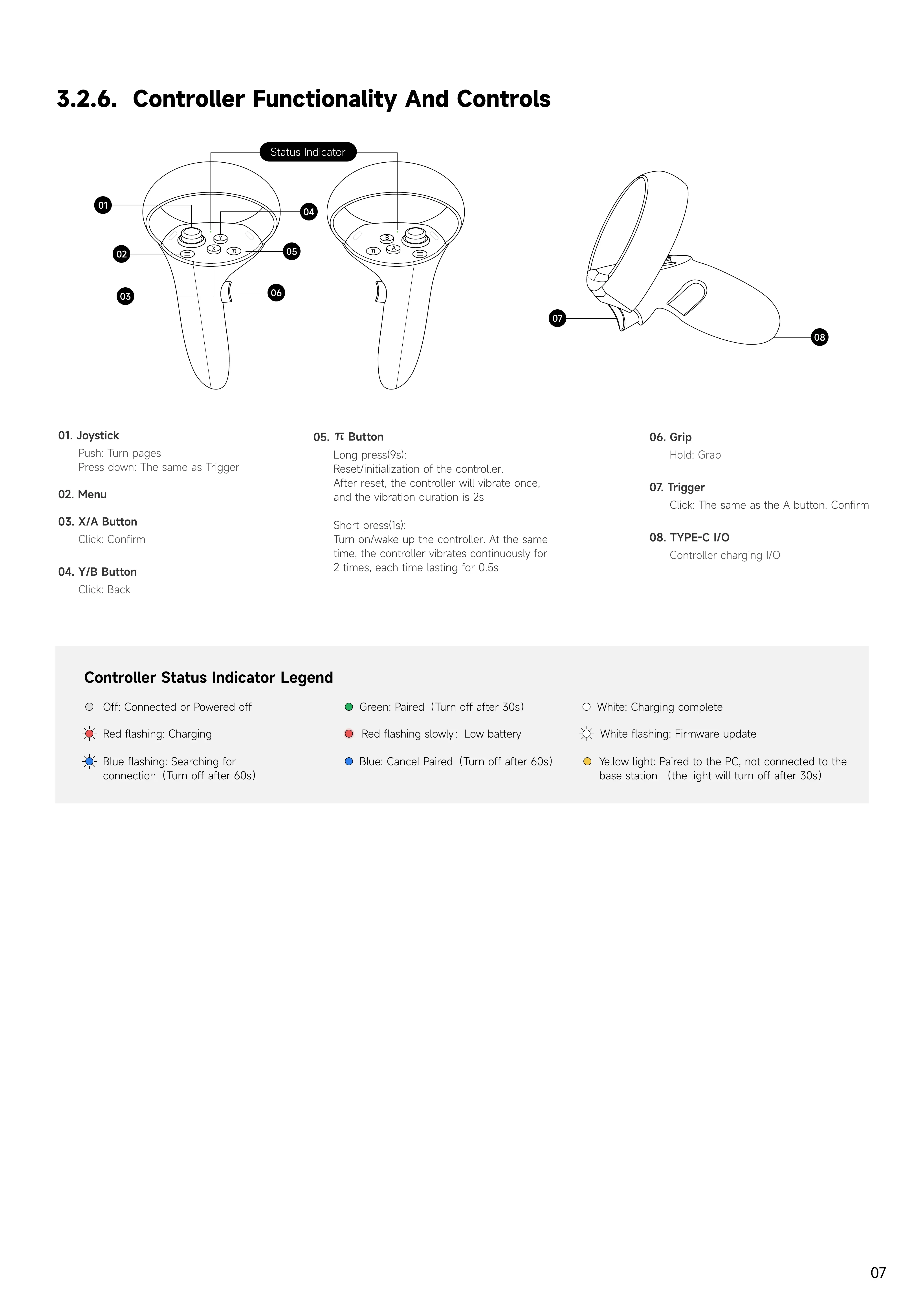
03. X/A button
Click: Confirm
06. Grip
Hold: Grab
01. Joystick
Push: Turn page
Press down: The same as Trigger
07. Trigger
Click: The same as the A button. Confirm
04. Y/B button
Click: Back
08. TYPE-C I/O
Controller charging I/O
02. Menu
05.
button
Long press(9s):
Reset/initialization of the controller.
After reset, the controller will vibrate once,
and the vibration duration is 2
Short press(1s):
Turn on/wake up the controller. At the same
time, the controller vibrates continuously for
2 times, each time lasting for 0.5s
Y
ellow light: Paired to the PC, not connected to the
base station
(
the light will turn off after
3
0s
)
Controller
Status
Indicator
Legend
Red flashing slowly
:
Low battery
W
hite: Charging complete
Blue flashing: Searching for
connection
(
Turn off after
6
0s
)
Red flashing: Charging
W
hite flashing:
F
irmware update
Blue: Cancel Paired
(
Turn off after
6
0s
)
Green: Paired
(
Turn off after
3
0s
)
Off: Connected or Powered off
A
B
π
X
Y
π
07
02
08
06
05
04
Status Indicator
01
03


 To Next Page