EasyManua.ls Logo

pingbingding WA-8807 - User Manual

pingbingding WA-8807
8 pages
Print Icon
To Next Page IconTo Next Page
Loading...
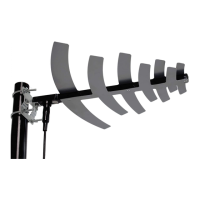
Amplified Digital Outdoor HDTV Antenna – 50 miles range
Model: WA-8807
Thank you for your purchase and your support! Digital Television is an advanced
broadcasting technology that has transformed the television viewing experience.
DTV enables broadcasters to offer television with better picture and sound quality,
and multiple channels of programming. Since June 13, 2009, full-power television
stations nationwide have been required to broadcast exclusively in a digital format.
We invite you to visit our website at www.pingbingding.com for other high-quality
products.
Main Technical and Features:
*Extremely High Performance for UHF Band only
*50 mile maximum range possible. Individual experiences may vary.
Receive range: UHF
Frequency: 470-860MHz
UHF gain: 28dB
Max output level: 95dBu
Impedance: 75Ω
www.pingbingding.com
Customer Service
E-mail: service@pingbingding.com
ATSC
Compatible
HDTV
Compatible
1
Question and Answer IconNeed help?

Do you have a question about the pingbingding WA-8807 and is the answer not in the manual?

Summary

Package Contents

Connecting and Mounting the Antenna

Connecting to TV or Set-Top Box

Connect the antenna to a TV with a built-in tuner or a digital set-top box.

Mounting the Antenna

Instructions for mounting the antenna horizontally, vertically, or on a wall.

Antenna Usage Instructions

Setup and Powering

Connect antenna to amplifier, then amplifier to TV/converter box. Power using wall adapter or USB.

Antenna Features, Tips, and Scanning

Key Features

Boosts reception, enhances performance in remote areas, preserves signal purity.

Usage Tips

Advice on trying with/without amplifier, checking tower locations, and rescanning.

Channel Scanning Procedure

Steps for scanning channels after connecting and positioning the antenna.

Placement Options and FAQs

Antenna Placement Tips

Guidance on optimizing antenna placement for better signal reception based on location.

Frequently Asked Questions

Answers to common user queries regarding channel reception and picture quality.

Troubleshooting Common Issues

Cannot Receive Signal

Steps to resolve issues when no TV signal is detected, including checking connections and rescanning.

Missing Specific Channel

Troubleshooting steps for when a known channel is not received, involving repositioning and rescanning.

No Channels Received

Solutions for when the antenna receives no channels, checking TV tuner and signal obstructions.

Poor Reception or Freezing

Advice for weak signal issues, suggesting repositioning the antenna to a higher location.

Overview

This document is a user manual for the Pingbingding WA-8807 Amplified Digital Outdoor HDTV Antenna.

Function Description

The Pingbingding WA-8807 is an amplified digital outdoor HDTV antenna designed to receive digital television broadcasts. It is compatible with ATSC and HDTV signals, offering improved picture and sound quality, and multiple channels of programming. The antenna is specifically designed for outdoor use and boasts a maximum range of 50 miles, though individual experiences may vary based on location and environmental factors. It includes a detachable amplifier with gain control, allowing users to adjust signal strength for optimal reception depending on their distance from broadcast towers. The antenna supports both horizontal and vertical mounting options, as well as wall mounting, to facilitate the best possible signal acquisition.

Important Technical Specifications

  • Model: WA-8807
  • Receive Range: UHF
  • Frequency: 470-860MHz
  • UHF Gain: 28dB
  • Max Output Level: 95dBu
  • Impedance: 75 Ω
  • Maximum Range: 50 miles (individual experiences may vary)
  • Amplifier Power: AC 120V (via wall adapter) or DC 5V (via USB cable)
  • Coaxial Cable Length: 32 ft (75 Ω signal cable)
  • Support Tube Diameter: 30mm - 45mm (for pole mounting)

Usage Features

Installation and Setup: The antenna can be mounted horizontally or vertically on a pole using the provided U-bolts, hex cap screws, wing nuts, and twisting metal. Alternatively, it can be wall-mounted using drywall screws, wallplugs, and metallic screws. The manual provides detailed diagrams for each mounting method.

Connection Options: The antenna can be connected to a TV with a built-in digital tuner or to a digital set-top box.

  1. To a TV with built-in digital tuner: Connect the antenna's cable to the input jack of the amplifier, then connect the amplifier's built-in cable to the antenna port on the TV.
  2. To a digital set-top box: Connect the antenna's cable to the input jack of the amplifier, then connect the amplifier's built-in cable to the antenna port on the set-top box, and finally connect the set-top box to the TV.

Amplifier with Gain Control: The WA-8807 includes a detachable amplifier with adjustable gain control.

  • For distances 25-35 miles from the tower: It is recommended to connect the antenna without the amplifier.
  • For distances 35-50 miles from the tower: It is recommended to connect the antenna with the amplifier.
  • The gain control allows users to fine-tune the signal strength. Less gain is recommended for closer proximity to broadcast towers, while more gain is suitable for greater distances.
  • The power adapter must always be connected to the amplifier, regardless of the gain control setting, for the antenna to function correctly. Power can be supplied via the included wall adapter (AC 120V) or a USB port on the TV (DC 5V) using the provided USB cable.

Channel Scanning: After mounting and connecting the antenna, a channel scan must be performed on the TV or digital converter box.

  • General Instructions:
    1. Select MENU on the remote control.
    2. Select Channel Settings or Tuner Settings.
    3. Select Signal Source.
    4. Select Antenna or Air (not Cable).
    5. Select Channel Search or Channel Scan.
  • When to Scan:
    • Anytime the antenna is moved.
    • Every month.
    • If a channel is lost.
    • Scanning finds all available channels, including newly added or changed ones.

Troubleshooting: The manual provides guidance for common issues:

  • No signal: Check connections, re-scan for channels, reposition the antenna (higher or facing the broadcast tower).
  • Missing specific channel: Reposition the antenna to avoid obstructions, try horizontal/vertical mounting, and re-scan.
  • No channels from antenna: Ensure TV is in the correct mode, re-scan, check for obstructions, or verify TV/STB has a built-in digital tuner and supports HD digital tuning.
  • Poor reception: Reposition the antenna to a higher location and re-scan.
  • Picture/sound freezes or boxes in picture: Move the antenna to a different location or aim it towards the broadcast tower to improve weak or intermittent signals.

Maintenance Features

  • Regular Channel Scans: It is recommended to run a channel scan every month, or whenever the antenna is moved, to ensure all available channels are detected and updated.
  • Antenna Placement Optimization: Users are encouraged to experiment with different outdoor locations and orientations (horizontal, vertical, wall-mounted) to find the optimal spot for reception. Testing the antenna's performance before final mounting is advised.
  • Signal Strength Adjustment: The detachable amplifier with gain control allows for continuous adjustment of signal strength to adapt to changing environmental conditions or distance from broadcast towers.
  • External Resources: The manual recommends using websites like antennaweb.org and fcc.gov/general/digital-television to find local broadcast towers and DTV reception maps, which can aid in optimal antenna placement and troubleshooting.
  • Cleaning: While not explicitly detailed, as an outdoor antenna, periodic cleaning to remove dirt, dust, and debris would be beneficial to maintain optimal performance and longevity.
  • Component Replacement: The package contents list various screws, nuts, and other small parts, suggesting that individual components could be replaced if damaged, though specific replacement instructions are not provided.

pingbingding WA-8807 Specifications

General IconGeneral
Brandpingbingding
ModelWA-8807
CategoryAntenna
LanguageEnglish