Dazzle DVD Recorder
Normalement fournis
Périphérique
(L'illustration n'est qu'un
exemple)
1 CD-ROM:
- Instant DVD Recorder
Notice abrégée
Également nécessaires...
Câble vidéo RCA
- OU -
Câble S-vidéo Câble audio RCA
(non fournis !)
Avid Technology GmbH se réserve le droit de modifier à tout moment le contenu de l'emballage. Le
contenu de l'emballage peut donc différer du contenu représenté et/ou indiqué ici. Les caractéristiques
techniques peuvent être modifiées à tout moment sans avis préalable. S'il manque quelque chose
dans l'emballage, veuillez vous adresser à votre distributeur.
Attention : Dazzle DVD Recorder nécessite Windows XP (Service Pack 2 au moins) ou Windows Vista
(32 bits uniquement). Votre système doit impérativement être conforme à ces exigences.
Avid Technology GmbH certifie que le produit est conforme aux exigences fondamen-
tales et autres conditions afférentes de la directive européenne 89/336/CEE. Les dé-
clarations de conformité CE et FCC ainsi que les déclarations de construction identi-
que sont disponibles à l'adresse suivante :
http://www.pinnaclesys.com/compliance.
1 - Installation du logiciel
1. Insérez le CD Instant DVD Recorder dans le lecteur de CD-ROM de votre ordinateur. Cliquez sur
setup.exe sur le CD si le programme d'installation ne démarre pas automatiquement.
2. Suivez les instructions qui s'affichent à l'écran.
2 - Installation du matériel
Reliez le périphérique à un port USB 2.0 de votre ordinateur.
Remarque : après avoir redémarré l'ordinateur, si vous voyez s'afficher la boîte de dialogue Ajout de
nouveau matériel, veuillez suivre les instructions s'affichant à l'écran.
3 - Raccordement d'appareils vidéo analogiques et
édition de vidéos
Reliez les sorties de votre appareil vidéo analogique aux entrées correspondantes du périphérique.
Instant DVD Recorder vous permet de graver vos vidéos rapidement et simplement en mode Direct-to-
Disc – c'est-à-dire que vous gravez directement à partir d'une source vidéo sur le DVD de votre choix,
sans avoir besoin de sauvegarder préalablement le film sur le disque dur ! Il vous suffit pour cela de
raccorder votre source vidéo analogique, de démarrer Instant DVD Recorder et votre DVD vidéo est
gravé en quelques étapes seulement.
Assistance technique en cas de besoin : http://www.pinnaclesys.com/support
© 2008 Avid Technology GmbH 8420-00822-01 R1

 Need help?
 General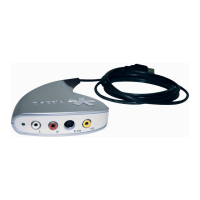

 To Next Page
