The Pinnacle MovieBox DV is a professional-quality movie-making device designed for capturing, editing, and outputting video. It supports both MS Windows and Apple Macintosh operating systems, offering flexibility for various users. The device acts as a real-time video converter between DV (Blue book SD 625-50, SD 525-60) video compression format and analog video, supporting both directions in half-duplex.
System Requirements (MS Windows):
- Processor: Intel Pentium or AMD Athlon, 800 MHz (1.5 GHz or higher recommended).
- RAM: 256 MB (512 MB recommended).
- Operating System: Windows 98SE, Windows Millennium, Windows 2000, Windows XP (Windows XP recommended).
- Ports: 1394/FireWire port.
- Graphics Card: DirectX compatible (ATI Radeon or Nvidia Geforce recommended).
- Sound Card: DirectX compatible (Creative Labs Audigy recommended).
- Disk Space: 500 MB for software installation, minimum 1 GB for project and temp files.
- Peripherals: Speakers, mouse, CD-ROM drive.
- DVD Drive: Required for tutorial, electronic manual, and some bonus content. (CD-ROM versions can be ordered separately if no DVD drive is available).
- Optional: CD burner for Video CDs/Super Video CDs, DVD burner for DVDs, ProLogic compatible audio system for surround sound mixes. Some features require product activation via the internet.
System Requirements (Apple Macintosh):
- Operating System: Apple Macintosh OS9 and above for iMovie, Apple Macintosh OS X for iMovie and FinalCut.
- Peripherals: Mouse, CD-ROM drive.
- Ports: 1394/FireWire link.
- Video Equipment: Compatible with any DV or Digital8 camcorder/VCR (for output to camcorder, it must be enabled to record from DV Input), and any analog (8mm, Hi8, VHS, SVHS, VHS-C) camcorder/VCR.
Package Contents:
The MovieBox DV package includes the MovieBox DV unit, IEEE-1394 cables (6x6 and 6x4), a power supply, the Studio Manual and Quick Install Guide, and disks with Studio and Content software.
Installation (MS Windows):
- Insert the Studio CD-ROM. If Autorun is enabled, Setup will run automatically; otherwise, double-click Setup.exe.
- Select your preferred language.
- The installer will check for previous Studio versions. If found, you may be prompted to insert the previous version's CD-ROM.
- Personalize the installation by entering your name, country, optional e-mail, and serial number.
- Register your copy of Studio, preferably via an internet connection. Registration provides a free bonus effect pack, technical support, updates, and special offers.
- Agree to the Studio software license terms.
- Choose "Typical" installation (recommended). "Custom" is for advanced users.
- Click "Next" until installation is complete.
- Restart your PC if prompted.
- Insert the Studio Content DVD. If Autorun is enabled, Setup will run automatically; otherwise, double-click Setup.exe. (Content can be ordered on CD-ROMs if no DVD drive is available).
- Install any additional effects or content from upgrade CD-ROMs/DVDs.
Installation (Apple Macintosh):
MovieBox DV supports iMovie and FinalCut. Ensure all necessary Apple Macintosh updates are installed before connecting and running MovieBox DV.
Connecting the MovieBox DV and Video Devices:
Always turn OFF your computer, MovieBox DV, and video equipment before making any connections.
- Audio In: Left (1), Right (2).
- Video In: Composite (3), S-video (4), DV Port A (5).
Outputs:
- Audio Out: Right (6), Left (7).
- Video Out: Composite (8), S-video (9), DV Port B (10).
User Interface / Controls:
- LEDs: One green LED for each video source (S-video, Composite video, DV Port A, DV Port B). DV port LEDs are active when DV mode is selected as input. S-video or Composite video LEDs are off when those modes are selected. The Power LED should be on.
- Mode Select Button: Toggles between video sources (e.g., "DV to analog video", "Composite to DV", "S-video to DV").
- Reset Button: Resets MovieBox DV to the last selected operating mode. Note: It takes a few seconds for the MovieBox DV to start in the last selected operating mode after power-on or reset.
Standalone Operation:
The MovieBox DV can function as a standalone solution. In this mode, a DV camcorder can be connected to DV Port A or DV Port B. DV Port A is automatically disabled if an analog input is selected and re-enabled if DV is selected. DV Port B is always active.
Front Panel (Dip Switches):
Opening the front panel reveals six dip switches, defaulting to "Off". Changes to dip switch positions require a reset or power cycle of the MovieBox DV to take effect.
- Dip Switches 1 and 2 (Audio Rate):
- Off/Off: 48 kHz 16 Bit
- On/Off: 32 kHz 12 Bit
- Off/On: 44.1 kHz 16 Bit
- On/On: 32 kHz 16Bit
- Note: These changes only affect "Analog to DV" mode.
- Dip Switch 3: Reserved.
- Dip Switch 4 (Audio Input Level):
- Off (default): 1 V (RMS)
- On: 2 V (RMS) - Use if connected devices output higher audio levels to prevent overmodulation.
- Dip Switches 5 and 6 (Country Selection): Allows selection of country-specific video standards for analog inputs/outputs. Default covers most countries, with exceptions for Japan, Paraguay, Uruguay, Brazil, and Argentina.
Technical Specifications:
- Video Conversion: Real-time between DV (Blue book SD 625-50, SD 525-60) and analog video (bi-directional, half-duplex).
- Video Format: CCIR 601, NTSC/PAL/SECAM: 50/60 fields, 720x480 / 720x576, YUV 4:1:1 / 4:2:0 chroma sub-sampling. SECAM support only on analog input.
- Automatic Detection: Automatically detects video standard on analog and digital inputs.
- Analog Output: Uses the same TV standard as the active input (PAL if SECAM is used on input).
- Digital Output: Uses the same video standard as the active input.
- DV Data Rate: 25 MBits/second standard DV data rate for both directions.
- Standalone Functionality:
- DV-to-Analog.
- Analog-to-DV with default values for audio format and video settings.
- Manual selection of video and audio source via Mode Select button.
- Automatic selection based on available signal when powered on or reset.
- Locked DV In/Out Audio Formats:
- 32 kHz, 12 Bit, stereo (selectable channel A/B or C/D).
- 48 kHz, 16 Bit, stereo.
- Unlocked DV In/Out Audio Formats:
- 32 kHz, 16 Bit, stereo.
- 44.1 kHz, 16 Bit, stereo.
- A/V Connections (one set for input and output): Composite and S-Video, unbalanced stereo audio.
- User Interface/Controls: Green LED for each video source, Mode Select button, Reset button, green Power LED.
- Plug&Play: Installation for basic functions does not require software.
- Hardware Compatibility: Connects to Intel PC, AMD, and Apple Macintosh systems.
Warranty:
Pinnacle Systems, Inc. provides a 24-month limited hardware warranty against defects in materials and workmanship from the original purchase date. If a defect occurs during this period, Pinnacle will repair or replace the product (postage prepaid, with proof of purchase). Replacement products are covered for the remainder of the original warranty or 90 days, whichever is longer.
Warranty Exclusions:
The warranty does not cover defects from: (a) accident, misuse, abuse, neglect; (b) improper operation, maintenance, installation, adjustment, alteration, or modification; or (c) repairs/disassembly not performed by Pinnacle. This limited warranty is Pinnacle's sole warranty, excluding all other express or implied warranties, including merchantability, fitness for a particular purpose, and non-infringement. The product is sold "AS IS," and Pinnacle is not liable for direct, indirect, special, incidental, or consequential damages. Exclusions and limitations are valid only to the extent permitted by applicable law.

 Need help?
 General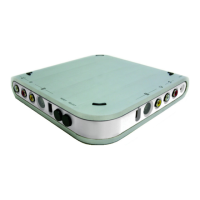

 To Next Page