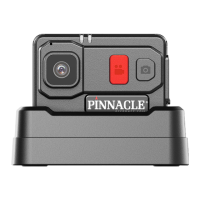
The device described in the manual is the Pinnacle PR7, a body-worn camera designed for professional use, likely in law enforcement, security, or similar fields. It is part of the Pinnacle Response line of body-worn cameras, a brand that has been producing such devices since 2007. The PR7 is presented as a robust and user-friendly camera with features aimed at ensuring reliable video and audio capture in various operational scenarios.
Function Description
The primary function of the Pinnacle PR7 is to record audio and video footage. It is a body-worn device, meaning it is designed to be attached to a person's clothing or uniform to capture events from their perspective. The camera supports both live recording and pre-record functionality, allowing users to capture events that occurred shortly before the manual recording was initiated. It also includes Wi-Fi connectivity, enabling data transfer and potentially remote management or live streaming, although the manual primarily focuses on its use for data transfer. The device is equipped with LED indicators to provide clear status updates to the user regarding recording, charging, Wi-Fi status, and storage capacity.
Important Technical Specifications
While specific numerical technical specifications like resolution, frame rate, or battery capacity are not explicitly detailed in the provided pages, several key operational specifications can be inferred:
- Charging Time: The camera takes approximately 3 hours to reach a full charge when placed in the supplied charging dock. Charging via a computer USB slot or aftermarket cables will increase this time.
- Storage Capacity Indication: The device provides an LED indication when storage capacity falls below 15%, turning LED 1 RED to alert the user.
- Battery Level Indication: The charging dock features an LED display to show the battery level of the PR7. The camera itself also indicates charging status (RED LED 1) and full charge status (BLUE LED 1 with footage, GREEN LED 1 with no footage).
- Wi-Fi Functionality: The PR7 includes Wi-Fi, which can be turned on or off. Wi-Fi automatically turns off if no footage is being recorded, likely to conserve battery or ensure recording priority. LED 3 indicates Wi-Fi connection status (fast flash when searching for SSID, fast flash once per second when connected).
- Pre-record Duration: While not specified, the pre-record function can be activated/deactivated by holding a button for 3 seconds.
- Tagging: The device supports tagging video footage by pressing a button once, which is confirmed by a blue LED flash.
Usage Features
The PR7 is designed with ease of use in mind, featuring intuitive controls and clear visual feedback:
- Recording Activation: To start recording, the user slides down the "Record Shutter Switch" located on the front of the camera, marked "AUDIO VIDEO." Recording stops by sliding the shutter back up to the off position.
- Pre-record Activation: The pre-record function is activated or deactivated by holding the side button for 3 seconds.
- Video Tagging: A single press of the side button allows users to tag a video, which can be useful for marking important events within the footage for later review.
- Standby Mode: The camera can be put into or taken out of standby mode by holding a button for 5 seconds.
- Wi-Fi Control: Wi-Fi can be toggled on or off by double-clicking a button (likely the same button used for standby).
- LED Indicators:
- Indication LED 1 (Front): Flashes GREEN during normal recording, flashes RED when recording with less than 15% memory or battery, flashes BLUE slowly when pre-record is active and not recording. Also indicates charging status (RED while charging, BLUE when fully charged with footage, GREEN when fully charged with no footage).
- Indication LED 2 (Top): Not explicitly detailed in its function but is present.
- Indication LED 3 (Front): Flashes BLUE quickly when searching for a Wi-Fi SSID, flashes BLUE once per second when connected to an SSID, and is solid BLUE when transferring data via Wi-Fi.
- General Condition Indicators: All LEDs flash in a "Wig Wag" pattern (LED 1 Red, LED 2 Green) when memory is full. No LEDs illuminate when the PR7 is in standby off mode.
Maintenance Features
The manual outlines basic maintenance and troubleshooting steps to ensure the device operates correctly:
- Charging: The device should be charged before first use and regularly thereafter using the supplied charging dock and wall plug. Using alternative charging methods (e.g., computer USB) may increase charging time.
- Reset Procedure: If the camera encounters an issue, a soft reset can be performed by holding both buttons for 5 seconds.
- Customer Support: For issues that cannot be resolved by a reset, users are directed to contact Pinnacle Response support at support@pinnacleresponse.com.
- Data Management (Implied): The Wi-Fi functionality and the indication for full memory suggest that regular data offloading and management are expected maintenance tasks, though the specifics of this process are not detailed in the provided pages. The charging dock likely also serves as a data transfer point.
The Pinnacle PR7 appears to be a robust and straightforward body-worn camera, emphasizing clear operational status indicators and essential recording functionalities for professional users.

 Need help?
 General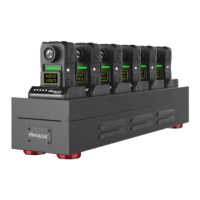

 To Next Page