EasyManua.ls Logo

Pioneer 2-DIN - User Manual

Pioneer 2-DIN
2 pages
Print Icon
To Next Page IconTo Next Page
Loading...
2-DIN 12.301179-09
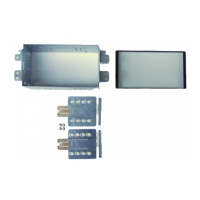
Installation kit includes the following items:
* 1X 2-ISO 100 mm. metal bracket
* 1X Radio trom
* 1X Radio trim D3 (thin trim)
* 2X Mounting plates
* 2X Mounting spacers
* 2X Radio removal keys
* 4X Screws
Installation manual for:
Kia Carens
* Mount the plates.
Use this hole
Use this hole
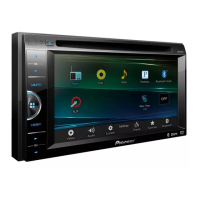
Pioneer HD1BT
We advice to use the following positions.
Other positions are also possible.
Use position 1 marked with a cross.
Use position 14 & 16 marked with an arrow.
Measured from left to right.
Pioneer Avic D3
We advice to use the following positions.
Other positions are also possible.
Use position 1 marked with a cross.
Use position 11 & 13 marked with an arrow
Measured from left to right.
Question and Answer IconNeed help?

Do you have a question about the Pioneer 2-DIN and is the answer not in the manual?

Summary

Installation Process

Remove Plastic Panel

Remove the plastic panel at the location indicated by the arrows during installation.

Remove Dashboard and Gear Lever Panel

Remove the panel surrounding the gear lever and two screws to detach the original dashboard.

Remove Original Radio Bracket

Remove the existing bracket that holds the original radio unit.

Mount 2-DIN Metal Bracket

Install the 2-DIN metal bracket and secure it with four screws.

Install Headunit and Panels

Place the new headunit into position and reattach the dashboard panels.

Connect Wiring Harnesses

Connect all necessary wiring harnesses and verify that all connections are secure.

Summary

Installation Process

Remove Plastic Panel

Remove the plastic panel at the location indicated by the arrows during installation.

Remove Dashboard and Gear Lever Panel

Remove the panel surrounding the gear lever and two screws to detach the original dashboard.

Remove Original Radio Bracket

Remove the existing bracket that holds the original radio unit.

Mount 2-DIN Metal Bracket

Install the 2-DIN metal bracket and secure it with four screws.

Install Headunit and Panels

Place the new headunit into position and reattach the dashboard panels.

Connect Wiring Harnesses

Connect all necessary wiring harnesses and verify that all connections are secure.

Overview

This document provides an installation manual for a 2-DIN car stereo system, specifically designed for the Kia Carens. The model number for this installation kit is 12.301179-09. The manual details the components included in the kit and provides step-by-step instructions for installing a Pioneer head unit into the vehicle's dashboard.

Function Description:

The primary function of this product is to facilitate the installation of a 2-DIN Pioneer car stereo (head unit) into a Kia Carens vehicle. It provides the necessary mechanical components and instructions to replace the original factory radio with an aftermarket Pioneer unit, ensuring a secure fit and integrated appearance within the dashboard. The kit is designed to adapt the standard 2-DIN dimensions of Pioneer head units to the specific dashboard opening and mounting points of the Kia Carens.

Important Technical Specifications:

  • Compatibility: Specifically designed for Kia Carens vehicles.
  • Head Unit Type: Compatible with 2-DIN Pioneer head units.
  • Kit Model Number: 12.301179-09.
  • Included Components:
    • 1X 2-ISO 100 mm. metal bracket: This is the main mounting frame that holds the new head unit. The "2-ISO 100 mm" likely refers to the standard double-DIN size and a specific depth or mounting standard.
    • 1X Radio trim: A cosmetic frame that surrounds the installed head unit, providing a finished look.
    • 1X Radio trim D3 (thin trim): An alternative or additional trim piece, possibly for specific Pioneer models or aesthetic preferences.
    • 2X Mounting plates: These plates attach to the sides of the Pioneer head unit and then secure it to the metal bracket.
    • 2X Mounting spacers: Used to adjust the depth or alignment of the head unit within the bracket or dashboard.
    • 2X Radio removal keys: Tools specifically designed to remove the original factory radio from the Kia Carens dashboard without causing damage.
    • 4X Screws: Fasteners for securing the components, likely for attaching the mounting plates to the head unit or the metal bracket to the dashboard.
  • Recommended Mounting Positions (Pioneer HD1BT):
    • Position 1 (marked with a cross).
    • Positions 14 & 16 (marked with an arrow), measured from left to right.
  • Recommended Mounting Positions (Pioneer Avic D3):
    • Position 1 (marked with a cross).
    • Positions 11 & 13 (marked with an arrow), measured from left to right.
    • These specific positions refer to holes on the mounting plates or the metal bracket, indicating where screws should be placed for optimal fitment of these particular Pioneer models.

Usage Features:

The installation process involves several steps, designed to be followed sequentially:

  1. Dashboard Disassembly:
    • Remove the plastic panel at specific locations indicated by arrows. This is typically a trim piece that covers screws or clips.
    • Remove the panel around the gear lever. This step is crucial for accessing the lower part of the center console.
    • Remove two screws that secure the original dashboard components.
    • Carefully remove the original dashboard section using a plastic wedge to prevent scratching or damage.
  2. Original Radio Removal:
    • Once the dashboard is partially disassembled, remove the original radio bracket and the factory radio itself. This may involve using the provided radio removal keys.
  3. New Bracket Installation:
    • Place the 2-DIN metal bracket (from the kit) into the dashboard opening.
    • Secure the bracket by tightening four screws. This forms the new mounting foundation for the Pioneer head unit.
  4. Head Unit Preparation:
    • Mount the provided mounting plates to the sides of the Pioneer head unit. The manual specifically recommends certain hole positions for Pioneer HD1BT (positions 1, 14, 16) and Pioneer Avic D3 (positions 1, 11, 13). These positions ensure correct alignment and depth.
    • Use the mounting spacers if necessary to achieve the desired fit.
  5. Head Unit Installation:
    • Slide the prepared Pioneer head unit into the newly installed 2-DIN metal bracket.
    • Secure the head unit to the bracket using screws.
  6. Wiring:
    • Connect all necessary wiring harnesses. This includes power, ground, speaker wires, antenna, and any auxiliary inputs/outputs specific to the Pioneer unit (e.g., USB, Bluetooth microphone, reverse camera). The manual emphasizes checking connections carefully.
  7. Reassembly:
    • Replace all removed panels and trim pieces, ensuring they snap back into place securely and without gaps.
    • Install the provided radio trim around the new head unit for a clean, factory-like finish.

Maintenance Features:

This manual primarily focuses on installation rather than ongoing maintenance of the device itself. However, implicit maintenance considerations include:

  • Careful Handling: The use of plastic wedges for dashboard removal is a maintenance-oriented tip, preventing damage to the vehicle's interior during installation.
  • Secure Connections: The instruction to "check the connections carefully" is a preventative maintenance measure, ensuring reliable operation and avoiding future electrical issues.
  • Proper Fastening: Ensuring all screws are tightened correctly prevents rattling, movement, and potential damage to the head unit or dashboard over time.
  • Component Integrity: The kit provides specific components (brackets, trims) designed for durability and a long-lasting fit, reducing the need for future adjustments or replacements if installed correctly.
  • Tool Usage: The inclusion of radio removal keys highlights the importance of using appropriate tools to avoid damaging the original components, which might be needed for reinstallation if the aftermarket unit is ever removed.

In summary, this installation kit and manual provide a comprehensive solution for integrating a 2-DIN Pioneer car stereo into a Kia Carens, ensuring a professional and secure fit while guiding the user through each step of the process.

Pioneer 2-DIN Specifications

General IconGeneral
BrandPioneer
Model2-DIN
CategoryCar Receiver
LanguageEnglish

Related product manuals