This document is a user manual for the Pioneer International BSG175A8R Wired Controller, an air conditioning unit. It provides detailed instructions for installation, operation, and maintenance of the device.
Function Description
The Pioneer International BSG175A8R Wired Controller is designed to manage the functions of an air conditioning unit. It allows users to control various operating modes, temperature settings, fan speed, and other features to maintain a comfortable indoor environment. The controller features a liquid crystal display that shows current settings and status icons.
Key Functions:
- Mode Setting: Allows selection between Auto, Cooling, Dehumidification, Fan, and Heating modes.
- Temperature Setting: Users can increase or decrease the desired temperature within a range of 20°C-25°C (68°F-77°F) for cooling/dehumidification and 22°C-26°C (72°F-79°F) for heating.
- Fan Speed Setting: Adjusts the indoor unit's fan speed. The controller supports multiple fan speed display types, which can vary depending on the unit type. In dehumidification mode, the fan speed is fixed to low and cannot be adjusted.
- Swing Setting: Controls the swing function of the air conditioner, allowing adjustment of airflow direction. The controller supports five swing positions (Position1 to Position5) and an "OFF" setting.
- Timer Setting: Enables users to set a turn-on or turn-off time for the unit. The timer range is 0.5-24 hours, with a minimum gap of 0.5 hours.
- Turbo Function: Provides a quick boost in cooling or heating by running the unit at maximum capacity for a short period.
- Sleep Function: Optimizes comfort and energy saving during sleep by gradually adjusting temperature settings.
- Quiet Function: Reduces noise levels for a quieter operation.
- ECO Function: Designed to save energy by setting limited values for temperature in cooling or heating mode. The initial minimum cooling setting temperature is 25°C (77°F), and the initial heating maximum limited setting temperature is 22°C (72°F).
- Lock Function: Prevents unauthorized changes to settings by locking the controller.
- Wi-Fi Function: Allows for remote control and monitoring (though specific details on Wi-Fi functionality are not extensively covered in the provided excerpts, it is listed as a function).
- E-Heater Function: Activates an auxiliary electric heater.
- Anti-Ice Function: Prevents ice formation on the evaporator coil.
- Defrost Function: Initiates a defrost cycle to remove ice from the outdoor unit.
- Fresh Air Function: Activates fresh air intake.
- PM2.5 Function: Indicates the presence of PM2.5 particles and likely activates a related air purification function.
- Shield Function: (Details not provided in excerpt, but listed as an icon).
Important Technical Specifications
The manual primarily focuses on the controller's interface and operation rather than detailed technical specifications of the air conditioning unit itself. However, it does mention:
- Communication Distance: The recommended length for the communication distance between the main board and wired controller is 20m (maximum recommended length is 8m). This implies a wired connection for control signals.
- Temperature Range:
- Cooling/Dehumidification: 20°C-25°C (68°F-77°F)
- Heating: 22°C-26°C (72°F-79°F)
- ECO Function (Cooling): Initial minimum setting temperature 25°C (77°F).
- ECO Function (Heating): Initial maximum limited setting temperature 22°C (72°F).
- Timer Range: 0.5-24 hours, with 0.5-hour increments.
Usage Features
The BSG175A8R Wired Controller is designed for user-friendly operation with a clear liquid crystal display and intuitive button controls.
Display Features:
- Liquid Crystal Display: Shows various icons and numerical values indicating the current operating mode, temperature, fan speed, timer settings, and other statuses.
- Icons: A comprehensive set of icons represents functions like Vertical Swing, Horizontal Swing, Sleep, ECO, Dry, Light, Memory, Lock, Wi-Fi, Auto, Cooling, Dehumidification, Fan, Heating, Quiet, Turbo, Access control, N/A, E-Heater, Anti-ice, Defrost, Clean, Fresh air, Group, Master, PM2.5, Shield, TEMP, Fan speed, and Timer.
- Temperature Display: Shows the set temperature in Celsius or Fahrenheit.
- Time Display: Shows the current time or timer settings.
- Error Code Display: In case of a malfunction, the display will show an error code (e.g., CL, H0, H1, etc.) to help diagnose the problem.
Button Features:
- Mode Button (M): Cycles through operating modes (Auto, Cooling, Dehumidification, Fan, Heating). Also used for locking/unlocking the controller (press for 5s) and switching between Centigrade and Fahrenheit (press M and "S" for 5s).
- Fan Button: Adjusts the fan speed.
- Increase Button (∧): Increases temperature, timer settings, or navigates through options.
- Decrease Button (∨): Decreases temperature, timer settings, or navigates through options.
- Function Button: Selects various functions like CLEAN, ECO, SLEEP, TURBO, QUIET, etc.
- ON/OFF Button: Turns the unit on or off.
Operation Highlights:
- Intuitive Control Flow: Most functions are accessed by pressing the corresponding button or a combination of buttons, often with visual feedback on the LCD.
- Visual Confirmation: The display provides clear icons and numerical values to confirm selected settings.
- Error Reporting: The controller displays error codes to alert users to specific issues, facilitating troubleshooting.
Maintenance Features
The manual outlines several maintenance-related features and instructions to ensure the longevity and optimal performance of the air conditioning unit.
- Clean Reminder (CL Error Code): The wired controller will display "CLEAN" icon blinking as a reminder to clean the filter. Pressing the ON/OFF button for 5 seconds will cancel this reminder.
- Error Code Diagnostics: The controller displays specific error codes (e.g., H0, H1, E0, CJ, etc.) for various malfunctions, such as high exhaust temp. protection, overcapacity protection, compressor overload protection, anti-frost protection, system high pressure protection, system low pressure protection, refrigerant/valve stop protection, auxiliary heat adhesion protection, communication errors, indoor/outdoor temp. sensor open/short circuit, wired controller temp. sensor fault, defrost or heating oil return, indoor unit report outdoor unit fault, water full protection, refrigerant leakage failure, and gas sensor failure. This feature is crucial for quick diagnosis and repair.
- Filter Cleaning: When a "CL" error occurs, users are instructed to turn off the power, clean the filter, and then turn the code off. If the code disappears after cleaning and power cycling, the issue is resolved.
- Professional Service: For persistent errors or complex issues, the manual advises contacting the unit and contact service center. It also warns against attempting to repair the wired controller by oneself.
- Environmental Responsibility: The manual includes a symbol indicating that the product should not be disposed of with other household wastes throughout the EU. It encourages users to return used devices to the retailer or a designated collection system for environmental recycling.
Installation and Disassembly:
- Wired Controller Installation: Detailed steps are provided for installing the wired controller, including pulling out the twisted pair wire, fixing the base plate with screws, and inserting the signal wire into the slot.
- Signal Wire Connection: Instructions for connecting the signal wire through a rubber band and securing it to the indoor unit circuit board. The communication distance between the main board and wired controller should not exceed 20m (recommended 8m).
- Disassembly: Steps for disassembling the wired controller are also provided, which involves removing the base plate and disconnecting the wires.
General Maintenance Advice:
- Read Manual Carefully: Emphasizes the importance of reading the manual before installation and use.
- Avoid Self-Repair: Strongly advises against removing or repairing the wired controller by oneself.
- Proper Environment: Recommends installing the wired controller in a humid-free area and away from direct sunlight.
- Handle with Care: Warns against beating, tossing, or frequently assembling/disassembling the wired controller.
- Dry Hands: Instructs users to operate the wired controller with dry hands.
- Power Supply: Advises cutting off the power supply of wires embedded in the wall to avoid electrical shock.
- Electromagnetic Interference: Notes that abnormal operation can be caused by electromagnetic interference and provides steps to ensure proper wiring to avoid communication faults.

 Need help?
 General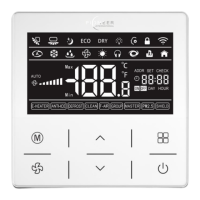

 To Next Page