EasyManua.ls Logo

Pioneer CU-SA004 - Page 7

Pioneer CU-SA004
12 pages
Print Icon
To Next Page IconTo Next Page
To Previous Page IconTo Previous Page
Loading...
REMOTE
CONTROL
OF
TV
.*
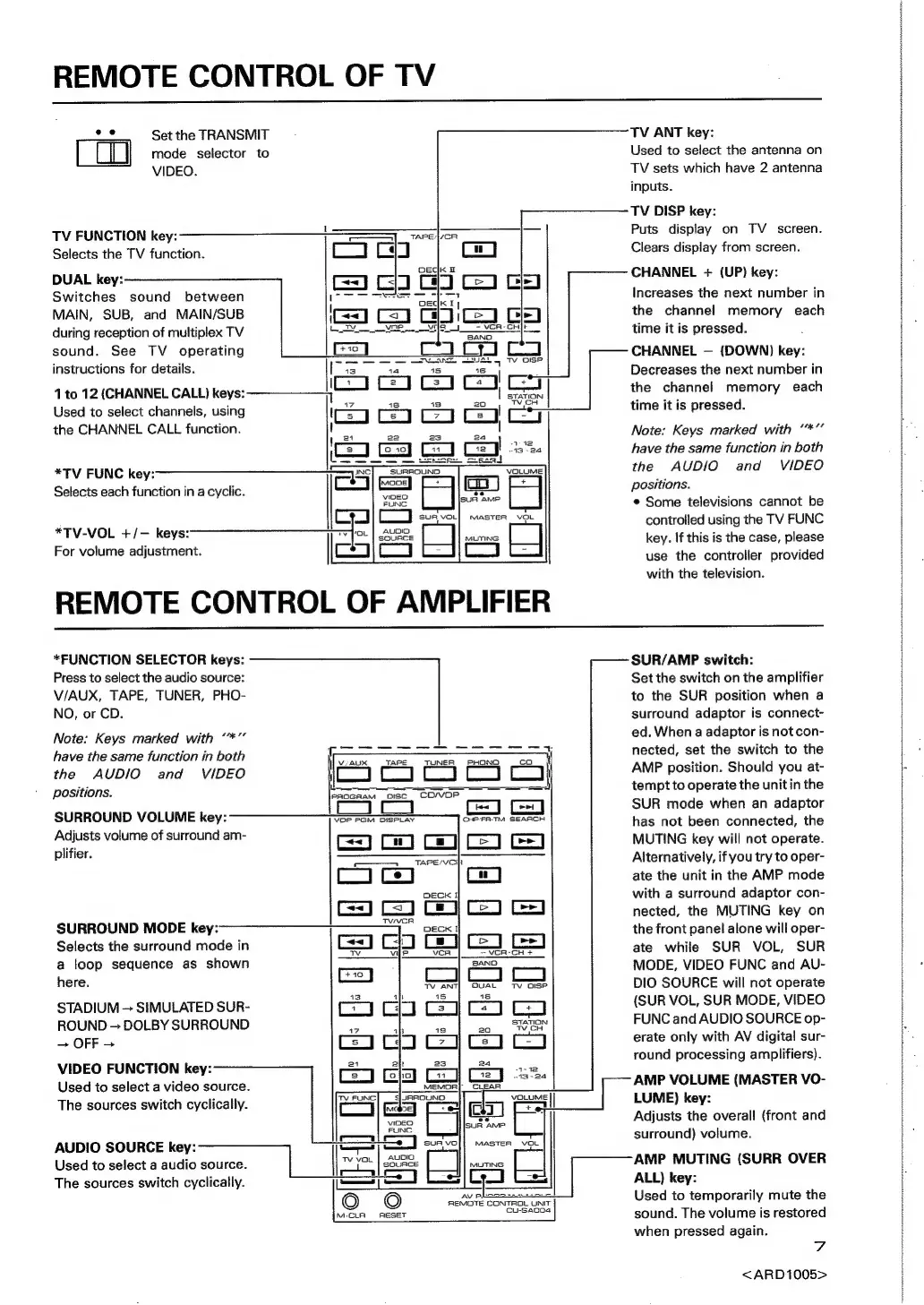
Set
the
TRANSMIT
mode
selector
to
VIDEO.
TV
FUNCTION
key:
Selects
the
TV
function.
DUAL
key:
Switches
sound
between
MAIN,
SUB,
and
MAIN/SUB
during
reception
of
multiplex
TV
sound.
See
TV
operating
instructions
for
details.
=
|
=
|[is”
14
ren
|
ess
1
to
12
(CHANNEL
CALL)
keys:
ic
a)
co
a
Peed
Used
to
select
channels,
using
the
CHANNEL
CALL
function.
SURROUND
VIDEO
FUNG
Cy
*TV-VOL
+/-—
keys:
For
volume
adjustment.
[c
aS
cy
REMOTE
CONTROL
OF
AMPLIFIER
*TV
FUNC
key:
Selects
each
function
in
a
cyclic.
TV
ANT
key:
Used
to
select
the
antenna
on
TV
sets
which
have
2
antenna
inputs.
TV
DISP
key:
Puts
display
on
TV
screen.
Clears
display
from
screen.
CHANNEL
+
(UP)
key:
Increases
the
next
number
in
the
channel
memory
each
time
it
is
pressed.
CHANNEL
—
(DOWN)
key:
Decreases
the
next
number
in
the
channel
memory
each
time
it
is
pressed.
“gee
Note:
Keys
marked
with
have
the
same
function
in
both
the
AUDIO
and
VIDEO
positions.
¢
Some
televisions
cannot
be
controlled
using
the
TV
FUNC
key.
If
this
is
the
case,
please
use
the
controller
provided
with
the
television.
*FUNCTION
SELECTOR
keys:
Press
to
select
the
audio
source:
V/AUX,
TAPE,
TUNER,
PHO-
NO,
or
CD.
Note:
Keys
marked
with
**”
have
the
same
function
in
both
[
=e
a
ae
ee
——i
the
AUDIO
and
VIDEO
iL
CJC_C_1J
Co}
POSITIONS:
a
oe
eae
SURROUND
VOLUME
key:
Adjusts
volume
of
surround
am-
CHP’FA-TM
SEARCH
plifier.
——
TAP
E/VCI
Cc
on
DECK
I
GJ
Ce)
SURROUND
MODE
key:
Selects
the
surround
mode
in
a
loop
sequence
as
shown
here.
—
TV
ANT]
OUAL
Tv
oISP
STADIUM
~
SIMULATED
SUR-
CO
coloco
ROUND
—
DOLBY
SURROUND
‘2
|
co
SON
—
OFF
-
CJ
Goa
VIDEO
FUNCTION
key:
446
Go
cy
Used
to
select
a
video
source.
CIC
a
:
The
sources
switch
cyclically.
‘ama
|
ar
oa
On
AUDIO
SOURCE
key:
—
ol
=
vo||
master
=
Used
to
select
a
audio
source.
|
!
LG
es
axe
(J
ran
The
sources
switch
cyclically.
—
EL
©
REMOTE
|
UNIT
M-CLA
AESET
a
sac3s|
SUR/AMP
switch:
Set
the
switch
on
the
amplifier
to
the
SUR
position
when
a
surround
adaptor
is
connect-
ed,
When
a
adaptor
is
not
con-
nected,
set
the
switch
to
the
AMP
position.
Should
you
at-
tempt
to
operate
the
unitin
the
SUR
mode
when
an
adaptor
has
not
been
connected,
the
MUTING
key
will
not
operate.
Alternatively,
if
you
try
to
oper-
ate
the
unit
in
the
AMP
mode
with
a
surround
adaptor
con-
nected,
the
MUTING
key
on
the
front
panel
alone
will
oper-
ate
while
SUR
VOL,
SUR
MODE,
VIDEO
FUNC
and
AU-
DIO
SOURCE
will
not
operate
(SUR
VOL,
SUR
MODE,
VIDEO
FUNC
and
AUDIO
SOURCE
op-
erate
only
with
AV
digital
sur-
round
processing
amplifiers).
AMP
VOLUME
(MASTER
VO-
LUME)
key:
Adjusts
the
overall
(front
and
surround)
volume.
AMP
MUTING
(SURR
OVER
ALL)
key:
Used
to
temporarily
mute
the
sound.
The
volume
is
restored
when
pressed
again.
7
<ARD1005>
op