EasyManua.ls Logo

Pioneer CU-SA004 - Page 9

Pioneer CU-SA004
12 pages
Print Icon
To Next Page IconTo Next Page
To Previous Page IconTo Previous Page
Loading...
USE
OF
LEARNING
FUNCTIONS
Using
the
remote
control
unit
of
your
VCR
to
program
the
playback
command.
¢
It
is
recommended
that
the
name
of
the
key
and
its
func-
tion
correspond.
This
convenient
when
operating
equipment.
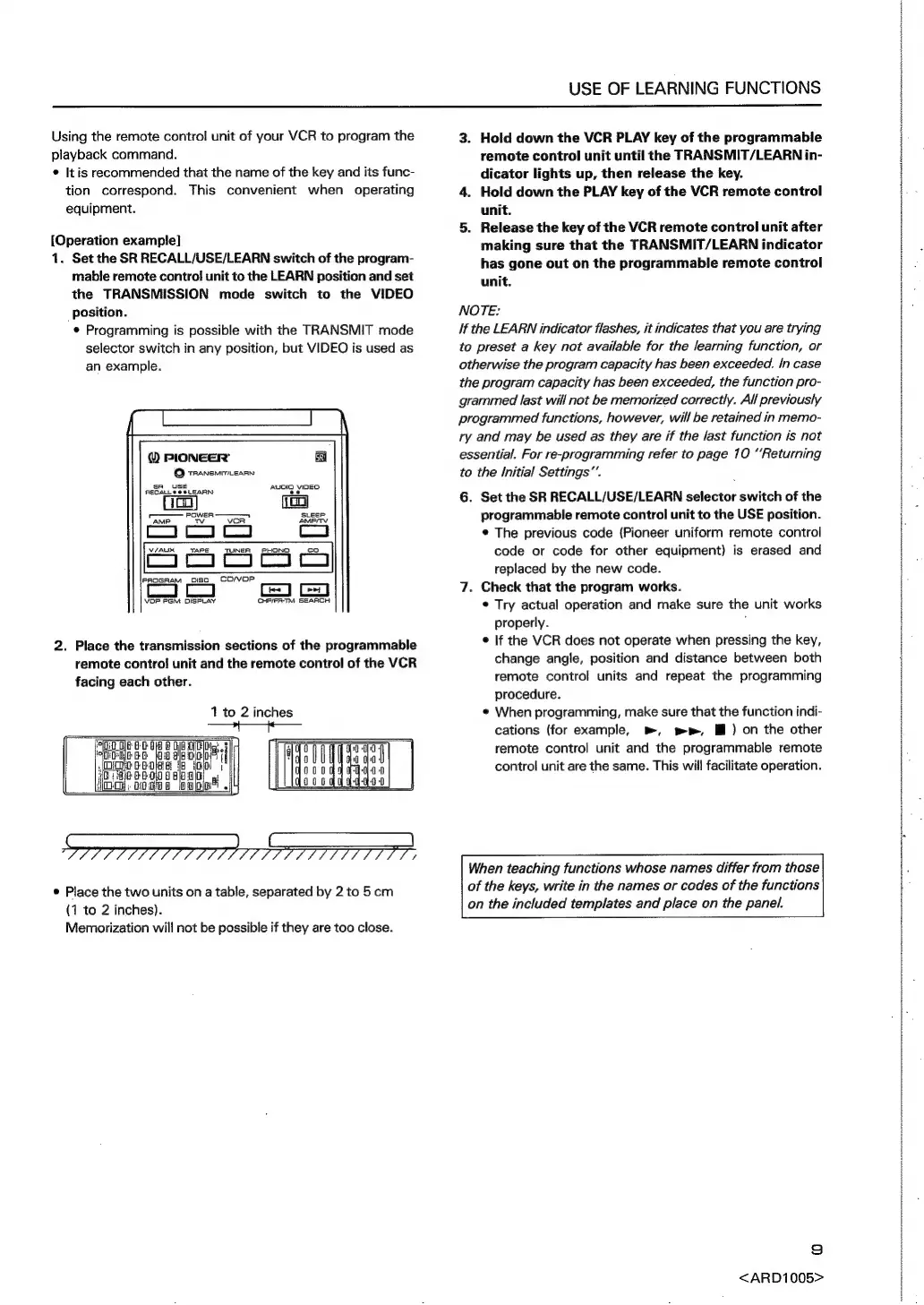
[Operation
example]
1.
Set
the
SR
RECALL/USE/LEARN
switch
of
the
program-
mable
remote
control
unit
to
the
LEARN
position
and
set
the
TRANSMISSION
mode
switch
to
the
VIDEO
position.
¢
Programming
is
possible
with
the
TRANSMIT
mode
selector
switch
in
any
position,
but
VIDEO
is
used
as
an
example.
®
PIONEER’
©
tRaNsmiTiesrnn
AUDIO
VIDEO
ee
sR
USE
RECALLS
@
@LEARN
—
PaweR
————
AMP
TV
vcoR
V/AUX
TAPE
TUNER
PHONO
co
en
i
a
a
Pe
PROGRAM
osc,
=CO/VOP
CHRIFR-TM
SEARCH
VOP
PGM
DISPLAY
2.
Place
the
transmission
sections
of
the
programmable
remote
control
unit
and
the
remote
control
of
the
VCR
facing
each
other.
1
to
2
inches
©
Place
the
two
units
on
a
table,
separated
by
2
to
5cm
(1
to
2
inches).
Memorization
will
not
be
possible
if
they
are
too
close.
3.
Hold
down
the
VCR
PLAY
key
of
the
programmable
remote
control
unit
until
the
TRANSMIT/LEARN
in-
dicator
lights
up,
then
release
the
key.
4.
Hold
down
the
PLAY
key
of
the
VCR
remote
control
unit.
5.
Release
the
key
of
the
VCR
remote
control
unit
after
making
sure
that
the
TRANSMIT/LEARN
indicator
has
gone
out
on
the
programmable
remote
control
unit.
NOTE:
If
the
LEARN
indicator
flashes,
it
indicates
that
you
are
trying
to
preset
a
key
not
available
for
the
learning
function,
or
otherwise
the
program
capacity
has
been
exceeded.
In
case
the
program
capacity
has
been
exceeded,
the
function
pro-
grammed
last
will
not
be
memorized
correctly.
All
previously
programmed
functions,
however,
will
be
retained
in
memo-
ry
and
may
be
used
as
they
are
if
the
last
function
is
not
essential.
For
re-programming
refer
to
page
10
“Returning
to
the
Initial
Settings”.
6.
Set
the
SR
RECALL/USE/LEARN
selector
switch
of
the
programmable
remote
control
unit
to
the
USE
position.
¢
The
previous
code
(Pioneer
uniform
remote
control
code
or
code
for
other
equipment)
is
erased
and
replaced
by
the
new
code.
7.
Check
that
the
program
works.
©
Try
actual
operation
and
make
sure
the
unit
works
properly.
;
¢
If
the
VCR
does
not
operate
when
pressing
the
key,
change
angle,
position
and
distance
between
both
remote
control
units
and
repeat
the
programming
procedure.
¢
When
programming,
make
sure
that
the
function
indi-
cations
(for
example,
»,
wp,
Mf)
on
the
other
remote
control
unit
and
the
programmable
remote
control
unit
are
the
same.
This
will
facilitate
operation.
When
teaching
functions
whose
names
differ
from
those
of
the
keys,
write
in
the
names
or
codes
of
the
functions
on
the
included
templates
and
place
on
the
panel.
=)
<ARD1005>