EasyManua.ls Logo

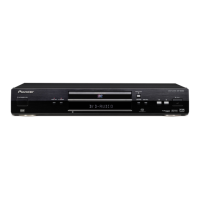
Pioneer DV-656A - User Manual

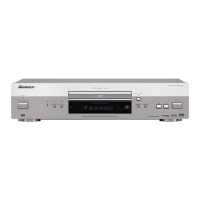
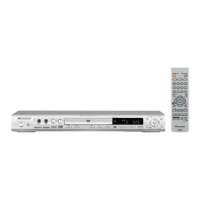
Pioneer DV-656A
148 pages
Print Icon
To Next Page IconTo Next Page
Loading...
DVD Player
Reproductor DVD
DV-656A
Operating Instructions
Manual de instrucciones

Table of Contents

Other manuals for Pioneer DV-656A

Question and Answer IconNeed help?

Do you have a question about the Pioneer DV-656A and is the answer not in the manual?

Summary

01 Before You Start

Features

Overview of the player's key capabilities and technologies.

Whats in the box

Lists all accessories included with the DVD player.

Remote Control Usage

Guidelines for effective operation of the remote control.

Disc Compatibility

Details playable disc types, formats, PC-created discs, and region codes.

02 Connecting Up

Rear Panel Connectors

Overview and identification of all input/output ports on the player's rear.

Basic Connections

Guide to simple setup using supplied cables for stereo audio and video.

Advanced Video Outputs

Details on using S-Video, AV Connector, and Component Video outputs.

Audio Connections

Instructions for connecting multichannel analog and digital audio outputs.

System Control Connections

How to connect for remote control of multiple Pioneer components.

03 Controls and Displays

Front Panel Controls

Layout and function of buttons and indicators on the player's front panel.

Front Panel Display

Explanation of indicators, symbols, and character display elements.

Remote Control Functions

Detailed guide to all buttons on the remote control and their operations.

04 Getting Started

TV System Setup

Configuring the player's TV system settings for optimal picture display.

Initial Player Setup

Guide for first-time setup, including language, TV type, and basic configuration.

On-Screen Display Navigation

How to use graphical menus and navigate options.

Setup Navigator Guide

Step-by-step walkthrough for initial player configuration using the Setup Navigator.

Basic Playback Controls

Introduction to fundamental playback operations using front panel and remote.

05 Playing Discs

Disc Navigation

Using the Disc Navigator to browse and select content on discs.

Playback Modes

Detailed guide on scanning, slow motion, frame advance, looping, repeat, and random play.

Program Playback

Creating, editing, and managing custom playback sequences.

Audio and Subtitle Options

Switching subtitles, DVD-Video audio language, and CD/DVD audio channels.

Screen and Angle Adjustments

Using zoom features and switching camera angles during playback.

Disc Information Display

How to view track, chapter, title, and other disc-related information.

06 The Audio Settings Menu

Audio DRC

Dynamic Range Control for Dolby Digital audio to balance quiet and loud sounds.

Virtual Surround Sound

Simulating surround sound effects using only two speakers.

Channel Level Adjustment

Setting individual channel levels for 5.1 analog audio outputs.

07 The Video Settings Menu

Video Picture Adjustments

Customizing video quality settings such as contrast, sharpness, and color.

Custom Picture Presets

Creating and saving personalized video picture settings.

08 The Initial Settings Menu

Initial Settings Overview

Guide to accessing and configuring player preferences.

Digital Audio Output Settings

Configuring digital audio formats including Dolby Digital, DTS, PCM, and MPEG.

Video Output and Screen Settings

Setting aspect ratio, AV connector output, S-Video, and still picture modes.

Language Preferences

Selecting preferred languages for audio, subtitles, DVD menus, and auto language.

Display and Screen Saver Settings

Configuring OSD language, on-screen displays, angle indicator, background, and screen saver.

Parental Controls and Passwords

Setting up parental lock levels, country codes, and managing user passwords.

Playback and Disc Options

Configuring bonus group access, auto disc menu, group playback, and playback modes.

Speaker and Audio Configuration

Setting audio output mode, speaker installation, and channel levels for surround sound.

09 Additional Information

Disc and Player Care

Guidelines for handling, storing, cleaning discs, and player maintenance.

Screen Aspect Ratio and TV Compatibility

Understanding disc aspect ratios, TV types, and picture presentation.

Player Reset and Audio Output Details

Procedure to reset player settings and details on audio output configurations.

Language and Country Code Lists

Reference lists for language and country codes used in settings.

Glossary and Troubleshooting

Definitions of technical terms and solutions for common operational problems.

Technical Specifications

Detailed specifications of the DVD player's hardware and performance.

Summary

01 Before You Start

Features

Overview of the player's key capabilities and technologies.

Whats in the box

Lists all accessories included with the DVD player.

Remote Control Usage

Guidelines for effective operation of the remote control.

Disc Compatibility

Details playable disc types, formats, PC-created discs, and region codes.

02 Connecting Up

Rear Panel Connectors

Overview and identification of all input/output ports on the player's rear.

Basic Connections

Guide to simple setup using supplied cables for stereo audio and video.

Advanced Video Outputs

Details on using S-Video, AV Connector, and Component Video outputs.

Audio Connections

Instructions for connecting multichannel analog and digital audio outputs.

System Control Connections

How to connect for remote control of multiple Pioneer components.

03 Controls and Displays

Front Panel Controls

Layout and function of buttons and indicators on the player's front panel.

Front Panel Display

Explanation of indicators, symbols, and character display elements.

Remote Control Functions

Detailed guide to all buttons on the remote control and their operations.

04 Getting Started

TV System Setup

Configuring the player's TV system settings for optimal picture display.

Initial Player Setup

Guide for first-time setup, including language, TV type, and basic configuration.

On-Screen Display Navigation

How to use graphical menus and navigate options.

Setup Navigator Guide

Step-by-step walkthrough for initial player configuration using the Setup Navigator.

Basic Playback Controls

Introduction to fundamental playback operations using front panel and remote.

05 Playing Discs

Disc Navigation

Using the Disc Navigator to browse and select content on discs.

Playback Modes

Detailed guide on scanning, slow motion, frame advance, looping, repeat, and random play.

Program Playback

Creating, editing, and managing custom playback sequences.

Audio and Subtitle Options

Switching subtitles, DVD-Video audio language, and CD/DVD audio channels.

Screen and Angle Adjustments

Using zoom features and switching camera angles during playback.

Disc Information Display

How to view track, chapter, title, and other disc-related information.

06 The Audio Settings Menu

Audio DRC

Dynamic Range Control for Dolby Digital audio to balance quiet and loud sounds.

Virtual Surround Sound

Simulating surround sound effects using only two speakers.

Channel Level Adjustment

Setting individual channel levels for 5.1 analog audio outputs.

07 The Video Settings Menu

Video Picture Adjustments

Customizing video quality settings such as contrast, sharpness, and color.

Custom Picture Presets

Creating and saving personalized video picture settings.

08 The Initial Settings Menu

Initial Settings Overview

Guide to accessing and configuring player preferences.

Digital Audio Output Settings

Configuring digital audio formats including Dolby Digital, DTS, PCM, and MPEG.

Video Output and Screen Settings

Setting aspect ratio, AV connector output, S-Video, and still picture modes.

Language Preferences

Selecting preferred languages for audio, subtitles, DVD menus, and auto language.

Display and Screen Saver Settings

Configuring OSD language, on-screen displays, angle indicator, background, and screen saver.

Parental Controls and Passwords

Setting up parental lock levels, country codes, and managing user passwords.

Playback and Disc Options

Configuring bonus group access, auto disc menu, group playback, and playback modes.

Speaker and Audio Configuration

Setting audio output mode, speaker installation, and channel levels for surround sound.

09 Additional Information

Disc and Player Care

Guidelines for handling, storing, cleaning discs, and player maintenance.

Screen Aspect Ratio and TV Compatibility

Understanding disc aspect ratios, TV types, and picture presentation.

Player Reset and Audio Output Details

Procedure to reset player settings and details on audio output configurations.

Language and Country Code Lists

Reference lists for language and country codes used in settings.

Glossary and Troubleshooting

Definitions of technical terms and solutions for common operational problems.

Technical Specifications

Detailed specifications of the DVD player's hardware and performance.

Pioneer DV-656A Specifications

General IconGeneral
Progressive ScanYes
Remote ControlYes
HDMI OutputNo
Disc Formats SupportedVCD, SVCD
Video OutputComponent, Composite, S-Video
Audio DAC24-bit
Output Resolution480p
Audio OutputDigital audio coaxial, Digital audio optical, RCA analog audio x 2

Related product manuals