EasyManua.ls Logo

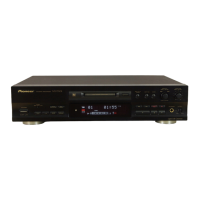
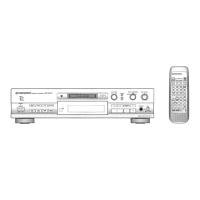
Pioneer MJ-D508 - Service Manual

Pioneer MJ-D508
72 pages
Print Icon
To Next Page IconTo Next Page
Loading...
ORDER NO.
PIONEER ELECTRONIC CORPORATION 4-1, Meguro 1-Chome, Meguro-ku, Tokyo 153-8654, Japan
PIONEER ELECTRONICS SERVICE, INC. P.O. Box 1760, Long Beach, CA 90801-1760, U.S.A.
PIONEER ELECTRONIC (EUROPE) N.V . Haven 1087, Keetberglaan 1, 9120 Melsele, Belgium
PIONEER ELECTRONICS ASIACENTRE PTE. LTD. 253 Alexandra Road, #04-01, Singapore 159936
PIONEER ELECTRONIC CORPORATION 1999
7. GENERAL INFORMATION .............................. 49
7.1 DIAGNOSIS ................................................ 49
7.1.1 TROUBLESHOOTING ...................... 49
7.1.2 DISASSEMBLY ................................. 52
7.2 PARTS ....................................................... 55
7.2.1 IC ....................................................... 45
7.2.2 DISPLAY ........................................... 66
8. PANEL FACILITIES AND SPECIFICATIONS
....................................................... 68
MINIDISC RECORDER
RRV2144
MJ-D508
1. SAFETY INFORMATION.................................... 2
2. EXPLODED VIEWS AND PARTS LIST ............. 4
3. BLOCK DIAGRAM AND SCHEMATIC DIAGRAM
....................................................... 12
4. PCB CONNECTION DIAGRAM ....................... 28
5. PCB PARTS LIST ............................................. 37
6. ADJUSTMENT.................................................. 41
CONTENTS
T–ZZE MAY 1999 Printed in Japan
Type
Power Requirement
Remarks
Model
MJ-D508
THIS MANUAL IS APPLICABLE TO THE FOLLOWING MODEL(S) AND TYPE(S).
KUXJ AC120V
MYXJ AC220–230V
MYXJGR/FR
AC220–230V
NVXJ AC230V
DAC
MODE
INPUT
SELECTOR
DISPLAY
/CHARA
NAME
CLIP
REC/PLAY
MODE
SYNCHRO
REC
DIGITAL
REC LEVEL
4 ¢
ANALOG
REC LEVEL
EDIT/NO
!⁄
&*#
NAME
PUSH ENTER
LEVELPHONES
MIN MAX
A–B
0 EJECTDISC LOADING MECHANISM
POWER
MINIDISC RECORDER
OFF - ON
DIGITAL
NR
TIMER
REC OFF PLAY
vC¿Û.?˘
1
0
2
3
4
5
6
7
8
9
10

Other manuals for Pioneer MJ-D508

Questions and Answers

  • S
    Sean RoyAug 17, 2025
    What to do if my Pioneer MJ-D508 Minidisc Recorder says 'Can't REC'?
    • P
      Paige DavisAug 17, 2025
      If your Pioneer Minidisc Recorder displays 'Can't REC', it might be due to defects occurring during recording or playback. Check the disc for scratches, dust, fingerprints, or black spots.
  • M
    montgomeryjohnAug 20, 2025
    What causes the 'Defect' error on my Pioneer MJ-D508 and how to fix it?
    • N
      npetersAug 20, 2025
      If your Pioneer Minidisc Recorder displays 'Defect', it could be due to a focus execution error caused by shock during REC-PLAY. Check the disc for any scratches, dust, fingerprints, or black spots.
  • R
    rodney67Aug 22, 2025
    Why does my Pioneer MJ-D508 Minidisc Recorder say 'Memory Full' and how can I resolve it?
    • J
      jennifer91Aug 22, 2025
      If your Pioneer Minidisc Recorder shows 'Memory Full', it means the DRAM is full of music data that can't be written to the disc. Check the disc for scratches, dust, fingerprints, or black spots.
  • E
    Elizabeth CochranAug 25, 2025
    What does 'Protected' mean on my Pioneer Minidisc Recorder and how to fix it?
    • D
      Denise FreemanAug 26, 2025
      If your Pioneer Minidisc Recorder displays 'Protected', it means you're trying to record or edit a disc that is write-protected. If the REC-proof knob is in the REC-proof state, restore it and try again. Alternatively, the track you are trying to edit might be write-protected; try a different track.
  • M
    mandersenAug 27, 2025
    What does 'Disc Full' mean on my Pioneer MJ-D508 and how do I fix it?
    • R
      Ronald RobertsAug 27, 2025
      If your Pioneer Minidisc Recorder displays 'Disc Full', it means there's no recordable space left when trying to set REC-PAUSE. Replace the disc with one that has available recording space.
  • J
    Joshua HowardAug 30, 2025
    What does 'TOC Full' mean on my Pioneer MJ-D508 and how do I fix it?
    • W
      William MorrisAug 30, 2025
      If your Pioneer Minidisc Recorder displays 'TOC Full', it means there is no space for registering music number and character information during REC-PLAY. Replace the disc with one that has space for registering UTOC.
  • A
    Alexis BradshawSep 1, 2025
    What does 'UTOC W ERR' mean on my Pioneer MJ-D508 Minidisc Recorder and how can I fix it?
    • R
      Robert SteeleSep 1, 2025
      If your Pioneer Minidisc Recorder displays 'UTOC W ERR', it means a fault occurred during rewriting of the UTOC, and rewriting could not be performed correctly. This may be caused by a scratch on the disc, so replace it with another disc.
  • K
    Kevin WallerSep 4, 2025
    What does 'Premastered' mean on my Pioneer MJ-D508 and how to fix it?
    • M
      michael98Sep 4, 2025
      If your Pioneer Minidisc Recorder displays 'Premastered', it means you loaded a disc meant only for playback when attempting to set REC-PAUSE or edit. Replace it with a disc intended for recording.
  • A
    adam50Sep 6, 2025
    Why does my Pioneer Minidisc Recorder say 'Can't COPY'?
    • M
      Mary SimpsonSep 6, 2025
      If your Pioneer Minidisc Recorder displays 'Can't COPY', it means that the CD might be copy-protected. Check if the CD is copy-proof.
  • H
    Heather HillSep 9, 2025
    What does 'Din Unlock' mean on my Pioneer MJ-D508 and how to solve it?
    • L
      Lisa CohenSep 9, 2025
      If your Pioneer Minidisc Recorder displays 'Din Unlock', it indicates that the Digital IN PLL is unlocked or locked at an incorrect frequency. Check if the D-IN signal line is normal or if the D-IN signal is at FS = 32, 44.1, or 48 kHz.

Summary

Safety Information

WARNING and Notices

Important safety warnings regarding hazardous materials and electrical precautions.

Safety Precautions

Essential safety checks and procedures for safe operation and servicing.

Exploded Views and Parts Lists

Block and Schematic Diagrams

Block Diagram Overview

High-level functional overview of the unit's main sections.

Core Unit Schematics

Detailed circuit diagrams for main and core SW units.

Main Unit and Power Supply Schematics

Circuit diagrams for the main unit and its power supply.

Display, Headphone, and Volume Unit Schematics

Circuit diagrams for the display, headphone, and volume units.

Waveform Analysis

Waveform Examples

Oscilloscope waveform examples for troubleshooting and adjustment.

PCB Connection Diagrams

PCB Parts List

Adjustment Procedures

Adjustment Point Guide

Overview of necessary adjustment points and required test discs.

Test Mode 1: Main Unit Operation Check

Procedure for checking main unit operation via test mode.

Test Mode 2: MD Mechanism Adjustment

Detailed steps for adjusting and checking the MD mechanism.

Laser Power Check

Procedure for measuring and verifying laser output power.

Jitter;C1 Error Check

Procedures for checking jitter and C1 error during playback and recording.

General Information and Troubleshooting

Pioneer MJ-D508 Specifications

General IconGeneral
BrandPioneer
ModelMJ-D508
CategoryMinidisc Recorder
LanguageEnglish

Related product manuals