EasyManua.ls Logo

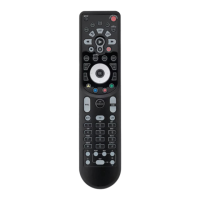
Pioneer RC310TG - User Manual

Pioneer RC310TG
11 pages
Print Icon
To Next Page IconTo Next Page
Loading...
Operating Instructions
The display and some features of the remote control may
vary according to the model of the system.
The shape and positions of the buttons and indicators may
vary according to the model of the system, but the features
and functionality would remain the same.
The unit will confirm the successful reception of each button
command with a beep.
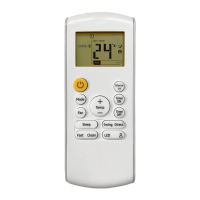
Remote Buttons Overview
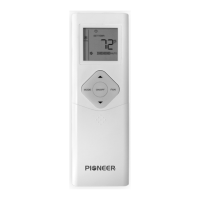
Button Description
Turns the air conditioner on or off
Activates/deactivates the ECO feature
Configures the automatic on/off times
Toggles the system’s Sleep Mode
Turns the LED display on or off
Activates the up-down louver motor
Activates the left-right louver motor
Puts the system into silent mode
Press MODE+TIMER for child-lock
Activates the system’s Follow Me mode
Long press to activate the 46°F “Away
from Home” freeze protection setting.
Decreases set temperature, set timing,
or navigates the functional menu
Increases set temperature, set timing,
or navigates the functional menu
Selects the mode of operation (Auto,
Cool, Dry, Fan, and Heat modes)
Configures the fan speed
(Auto, Low, Mid, and High)
Activates/deactivates the TURBO
feature, which allows the system to
reach set temperatures quicker
MODE
TEMP
TEMP
DISPLAY
SWING
MUTE
LOCK
I FEEL
TURBO
FAN
TIMER
SLEEP
ECO
SWING

Question and Answer IconNeed help?

Do you have a question about the Pioneer RC310TG and is the answer not in the manual?

Overview

This document outlines the operation and features of a PIONEER air conditioner system, controlled via a remote.

Function Description

The PIONEER air conditioner offers various operating modes to suit different environmental needs:

  • COOLING Mode: Cools the room and reduces humidity.
  • HEATING Mode: Heats the room. This mode includes a periodic defrost cycle (2-10 minutes) to clean frosting off the condenser and recover heat exchange capability. A forced defrost can be triggered by pressing ECO 10 times within 8 seconds.
  • DRY Mode: Rapidly reduces humidity/moisture in the room with an automatic preset.
  • FAN-ONLY Mode: Provides air ventilation without heating or cooling. Fan speed can be adjusted.
  • AUTO Mode: The system automatically determines the running configuration based on the set temperature and current room temperature.

The system also includes several special features:

  • ECO Feature (Energy Saver): Automatically manages operation to save energy. Available in both COOLING and HEATING modes.
  • TURBO Option: Operates at the highest fan speed to maximize output and quickly reach the set temperature.
  • 46°F Freeze Protection Function: Designed to prevent freezing when the user is away. It sets the system to maintain 46°F. If the unit is in standby, it starts heating when the room temperature is 46°F or lower and returns to standby when it reaches 48°F. This feature is canceled if the room temperature reaches 64°F or higher. Activated by long-pressing ECO for 3 seconds.
  • MUTE Mode: Operates the indoor unit at its lowest fan speed to minimize noise. The remote displays AUTO fan speed. Some models also include a "Gentle Wind" function, which auto-closes the vertical louver for a softer breeze, activated by pressing MUTE and FAN together for 3 seconds. MUTE mode cannot be activated in DRY mode.
  • I FEEL Feature: The remote acts as the temperature sensor, relaying the current air temperature from its physical location in the room to help reduce thermal drift. This feature automatically de-activates after 2 hours.
  • SELF-CLEAN Feature: Helps remove accumulated dust, dirt, bacteria, and other microbial contents from the indoor evaporator. Activated by pressing SWING and SWING<> buttons together until a beep is heard. It runs for approximately 30 minutes and is recommended for use every 3 months when indoor temperature is under 86°F and outside temperature is between 41°F and 86°F.

Important Technical Specifications

  • Batteries: Requires 2x AAA batteries. Non-rechargeable batteries should be used. Old batteries should be replaced when the display is no longer legible. Batteries should be removed if the system will not be used for a long time to prevent leakage.
  • Temperature Units: Configurable between Celsius (°C) and Fahrenheit (°F) using manual dip-switches under the battery compartment (on some models).
  • Control Type: Configurable between Cooling Only or Heat Pump using manual dip-switches (on some models).
  • Timer Increments: Time delays for TIMER ON/OFF are set in 30-minute increments.
  • Defrost Cycle: In HEATING mode, the defrost cycle lasts 2-10 minutes.

Usage Features

Remote Control:

  • Power ( ): Turns the air conditioner on or off.
  • TEMP (∧/∨): Decreases/increases set temperature, set timing, or navigates the functional menu.
  • MODE: Selects the operating mode (Auto, Cool, Dry, Fan, Heat).
  • ECO: Activates/deactivates the ECO feature. Long press activates 46°F "Away from Home" freeze protection.
  • TURBO: Activates/deactivates the TURBO feature for quicker temperature reach.
  • FAN: Configures fan speed (Auto, Low, Mid, High).
  • TIMER: Configures automatic on/off times.
  • SLEEP: Toggles Sleep Mode.
  • DISPLAY: Turns the LED display on or off.
  • SWING ( ): Activates the up-down louver motor. Press again to stop movement at the current angle.
  • SWING (<>): Activates the left-right louver motor. Press again to stop movement at the current angle.
  • I FEEL: Activates the system's Follow Me mode.
  • MUTE: Puts the system into silent mode.
  • LOCK (Child-Lock): Press MODE+TIMER together to activate/deactivate. Displays a lock icon and disables all other buttons.

Airflow Control:

  • The system pulls in "return air" through a grille, passes it through a filter, and then cools/dehumidifies/heats it via a heat exchanger.
  • Air output direction is controlled by a motorized louver (up/down) and manually controlled vertical deflectors (left/right). Some models have "dual-swing" capability for both horizontal and vertical motorized airflow.
  • Vertical deflectors can be manually adjusted to fix airflow before turning the system on.
  • Caution: Do not manipulate louvers manually to avoid damage. Deflector adjustments should only be made when the system is off. Never poke fingers or objects into air inlet/outlet vents.

Timer Functionality:

  • TIMER ON: Sets a time delay for the system to turn on. Requires setting time, operating mode, fan speed, and temperature.
  • TIMER OFF: Sets a time delay for the system to turn off. Requires setting time.
  • Timer programming will cancel if no buttons are pressed after 5 seconds. The TIMER button can cancel the setting at any time in Timer Off mode.

Remote Controller Placement:

  • Ensure no objects obstruct the signal between the remote and the indoor unit's receptor.
  • Keep the remote at least 3 ft away from televisions and other electrical appliances.
  • Always direct the remote toward the air conditioner.
  • Avoid exposing the remote to sunrays.

Maintenance Features

  • Battery Replacement: Replace AAA batteries when the display is no longer legible. Dispose of old batteries separately as unsorted municipal waste.
  • SELF-CLEAN Feature: Helps maintain the cleanliness of the indoor evaporator by removing dust, dirt, bacteria, and other microbial contents. Recommended every 3 months.

Pioneer RC310TG Specifications

General IconGeneral
BrandPioneer
ModelRC310TG
CategoryRemote Control
LanguageEnglish

Related product manuals