EasyManua.ls Logo

Pioneer S-DV222 - User Manual

Pioneer S-DV222
91 pages
Print Icon
To Next Page IconTo Next Page
Loading...
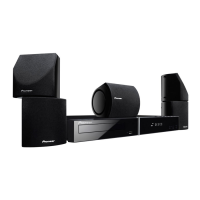
DVD/CD Receiver
XV-DV222
Speaker System
S-DV222
Operating Instructions
cover & anki.fm 1 ページ 2003年12月11日 木曜日 午後2時35分

Table of Contents

Question and Answer IconNeed help?

Do you have a question about the Pioneer S-DV222 and is the answer not in the manual?

Summary

Important Safety Information

Safety Warnings and Precautions

Consolidates warnings about electric shock, water exposure, and safe usage.

System Operation and Environment

Ventilation Requirements

Specifies the necessary space around the unit for heat radiation.

Energy-Saving Design

Notes the low power consumption of the system in standby mode.

Operating Environment Guidelines

Details recommended temperature and humidity for optimal operation.

Before You Start

System Features Overview

Highlights key features like DAC compatibility, audio performance, and special scan modes.

Introduction to Home Theater Sound

Explains the concept of home theater sound and the system's role.

General Disc Compatibility

Lists compatible disc formats and logos supported by the player.

PC-Created Disc Compatibility

Discusses potential compatibility issues with discs created using personal computers.

WMA Audio Format

Explains the Windows Media Audio format and system compatibility.

Compressed Audio File Compatibility

Details compatibility for MP3 and WMA files, including bitrate and DRM restrictions.

JPEG File Compatibility

Specifies requirements for JPEG image files, including resolution and format.

Controls and Displays

Front Panel Controls and Indicators

Identifies and describes the buttons and indicators on the unit's front panel.

Display Indicators Explained

Details the meaning of various symbols and lights shown on the unit's display.

Speaker Output Indicators

Illustrates how speaker output is shown for different surround sound modes.

Other Display Indicators

Explains indicators like PRGSVE, DTS, kHz/MHz, and character display functions.

Remote Control Layout and Basic Functions

Identifies key buttons on the remote control and their primary functions.

Remote Control - Sound and TV Functions

Describes remote functions for sound adjustments, TV control, and surround modes.

Remote Control - Menu Navigation and Setup

Explains remote functions for menu navigation, system setup, and timers.

Getting Started

Initial Power-On and TV Setup

Guides users through the first steps of powering on the system and setting the TV type.

Setting the System Clock

Instructions for setting the clock, essential for timer functions.

Remote Control TV Setup

Details how to program the remote to control the TV using preset codes.

Room Setup for Surround Sound

Guides optimal surround sound configuration based on room acoustics and speaker placement.

Using On-Screen Displays (OSD)

Explains how to navigate the system's graphical on-screen menus and interfaces.

Basic Disc Playback Operations

Covers fundamental controls for playing DVDs, CDs, and other disc formats.

Basic Playback Controls Explained

Details specific remote control buttons used for disc playback functions.

Advanced Playback Controls and Memory

Explains functions like pause, stop, scan, and the Resume/Last Memory feature.

Disc Playback FAQs and DVD Menus

Addresses common playback issues and explains navigation of DVD-Video disc menus.

Video CD;Super VCD PBC Menus

Describes how to navigate Playback Control (PBC) menus for Video CD/Super VCDs.

Listening to the Radio

Instructions on tuning into FM and AM radio stations and selecting bands.

Radio Tuning and Reception Improvement

Covers tuning modes, improving FM reception, and memorizing radio stations.

Station Presets and External Sources

Explains how to select preset stations and connect external audio/video components.

Home Theater Sound

Listening Modes Overview

Introduces Auto listening mode and general surround sound listening.

Dolby Pro Logic II Music Settings

Details adjustments for Center Width, Dimension, and Panorama in Music mode.

Stereo Listening Mode

Explains how to select stereo listening and downmix multichannel sources.

Headphone Listening and Surround Effects

Covers listening with headphones and using Advanced Surround effects.

Advanced Surround Effect Adjustment

Guides on setting the effect level for Advanced Surround modes and enhancing dialogue.

Enhancing Dialogue

Using Dialogue Enhancement to make dialogue stand out in soundtracks.

Virtual Surround Back Speaker Setup

Explains how to simulate a surround back channel for immersive audio.

Quiet and Midnight Listening Modes

Describes modes for reducing harshness or enjoying sound at low volumes.

Adjusting Bass and Treble

Instructions for adjusting the overall tone of the audio output.

Bass Level Boosting Options

Details bass modes (Music, Cinema, P. Bass) to enhance low frequencies.

Muting the Sound

Explains how to use the MUTE button to temporarily silence audio output.

Playing Discs

Disc Playback Introduction and Navigation

Overview of disc playback and using the Disc Navigator for content browsing.

Using the Disc Navigator for Content Browsing

Browsing disc contents (titles, chapters, tracks, folders) to find desired playback parts.

Disc Scanning and Slow Motion Playback

Covers fast scanning discs and playing them in slow motion at various speeds.

Frame Advance;Reverse and Looping Playback

Explains frame-by-frame movement and setting A-B repeat loops for sections.

Repeat Playback Options

Details various repeat play modes like Title, Chapter, Disc, and Track Repeat.

Random Playback Modes

Explains how to play disc content in a random order using OSD or front panel.

Creating and Managing Program Lists

Guides on creating, editing, and managing custom playback sequences.

Program List Editing and Other Functions

Covers editing program lists, cancelling playback, and using other OSD menu functions.

Disc Searching and Program List Clearing

Explains how to search discs by various criteria and clear program lists.

Switching Audio, Subtitles, and Channels

Guides on changing audio language, subtitles, and audio channels for different disc types.

Screen Zooming and Camera Angle Selection

Explains how to zoom the screen and switch camera angles during playback.

Displaying Disc Information

How to show track, chapter, and title information on-screen.

Disc Information Displays and Front Panel Info

Details information displayed for different disc types and on the front panel.

JPEG Disc Display Details

Shows how file and folder names for JPEG discs are displayed on the front panel.

Viewing JPEG Discs

JPEG Slideshow Playback

Instructions for starting and controlling a slideshow of JPEG pictures.

JPEG Navigation and Photo Browser

Guides on finding and viewing JPEG files using the Disc Navigator and Photo Browser.

Zooming JPEG Images and Photo Browser Usage

Explains how to zoom JPEG images and use the Photo Browser for detailed viewing.

More Tuner Features: RDS

Introduction to Radio Data System (RDS)

Explains the RDS system for FM radio, its information types, and program searching.

Displaying and Searching RDS Information

Guides on viewing RDS data (RT, PS, PTY) and searching for programs by type.

Using the Timer

Setting the Wake-Up Timer

Instructions for setting the system to turn on and play a source at a specific time.

Managing Wake-Up Timer and Sleep Timer

Covers enabling/disabling the wake-up timer and setting the sleep timer.

Sleep Timer Options and Settings

Details available sleep timer options (Auto, 90, 60, 30 mins, Off).

Surround Sound Setup

Setting Up Surround Sound Environment

Guides on fine-tuning surround sound settings for optimal listening.

Dynamic Range and Dual Mono Settings

Explains controls for dynamic range adjustment and dual mono audio playback.

Setting Channel Levels

Details how to fine-tune speaker channel levels using test tones.

Video Adjust Menu

Video Adjust Settings and Custom Presets

Covers selecting standard video settings or creating custom picture presets.

Adjusting Picture Quality Settings

Instructions for adjusting Contrast, Brightness, and Chroma Level.

Initial Settings Menu

Initial Settings Overview and TV Screen Setup

Guides on initial configuration, including TV screen aspect ratio.

AV Connector Out Configuration (European Model)

Setting for SCART connector used for TV connection.

Video Output Options and Component Out

Selecting video outputs (Video, S-Video, RGB) and component output settings.

Understanding Progressive Scan Video

Explanation of progressive scan video technology for improved picture quality.

S-Video Output Settings and Audio Language

Setting S-Video output format and preferred audio language for DVDs.

Subtitle and DVD Menu Language Settings

Setting preferred subtitle language and language for DVD disc menus.

Subtitle Display and OSD Settings

Controlling subtitle display and configuring OSD language, screen display, and angle indicator.

Parental Lock Setup

Initial setup for Parental Lock level, password, and Country code.

Password Management for Parental Lock

Registering and changing the password for Parental Lock features.

Setting Parental Lock Level and Country Code

Adjusting the Parental Lock level and setting or changing the Country code.

PhotoViewer Setting for Mixed Discs

Configuring PhotoViewer to manage discs containing both audio and JPEG files.

Other Connections

Connecting External Antennas

Instructions for connecting AM and FM antennas for improved reception.

Connecting Auxiliary Components

Guides on connecting external devices like VCRs, MD players, or CD-R recorders.

Audio and Digital Connections

Details connecting TV/VCR audio, LINE 1 inputs/outputs, and LINE 2 optical digital input.

Reducing Signal Levels

Adjusting signal levels using attenuators to prevent distortion from sources.

Recording Mode and S-Video Output

Explains enabling recording mode and connecting via S-Video output for better picture.

Component Video and SCART AV Outputs

Guides on connecting via component video and SCART AV outputs for improved video quality.

Switching TV Audio Input (SCART to RCA)

Selecting the TV audio input source between RCA and SCART connections.

SCART Pin Assignment Diagram

Provides a diagram and table for SCART connector pin assignments.

Additional Information

Demo Feature, Child Lock, and Clock Format

Covers switching off the demo, enabling child lock, and changing clock format.

TV Format Settings

Setting the system's TV format (AUTO, PAL, NTSC) for optimal picture display.

TV System Settings and Frequency Step

Details TV system settings and changing the tuner frequency step.

System Reset and NTSC on PAL TV

Procedures for resetting the system and troubleshooting NTSC discs on PAL TVs.

Disc Structure, Regions, and Handling

Explains disc organization, region codes, and proper handling/storage techniques.

Discs to Avoid and Installation Guidelines

Warns against using damaged discs and provides installation placement recommendations.

Condensation, Unit Moving, and Power Cord Safety

Addresses condensation issues, safe unit movement, and power cord precautions.

Troubleshooting - General Problems

Provides solutions for common general issues like power, sound, and image problems.

Troubleshooting - Player and Settings Issues

Solutions for disc ejection, playback errors, settings cancellation, and aspect ratio problems.

Troubleshooting - Playback Disturbances and Disc Types

Addresses picture disturbances, volume differences, and issues with WMA/MP3/JPEG discs.

Troubleshooting - Tuner and Error Messages

Solutions for tuner problems and explanations of system error messages.

Screen Formats and Language Selection

Explains screen aspect ratios and how to select languages using code lists.

Language and Country Code Lists

Comprehensive lists of language and country codes for system configuration.

Preset Code List for Remote Control

A list of manufacturer codes for setting up the remote control to operate TVs.

Preset Code List (Continued)

Continuation of the manufacturer codes for remote control setup.

Glossary - Audio and Video Terms

Definitions of audio and video related terms like Analog Audio, Aspect Ratio, Dolby Digital.

Glossary - File Formats and Disc Information

Definitions of file formats (JPEG, MP3, WMA) and disc-related terms.

Glossary - WMA Format

Definition of the WMA (Windows Media Audio) compression technology.

Specifications

Amplifier, Disc, Tuner, and General Specs

Technical specifications for amplifier, disc, tuner sections, and general unit details.

Receiver and Speaker System Accessories

Lists included accessories for the DVD/CD receiver and speaker system.

Subwoofer and Speaker System Accessories

Technical specifications for the subwoofer and listed accessories for the speaker system.

Summary

Important Safety Information

Safety Warnings and Precautions

Consolidates warnings about electric shock, water exposure, and safe usage.

System Operation and Environment

Ventilation Requirements

Specifies the necessary space around the unit for heat radiation.

Energy-Saving Design

Notes the low power consumption of the system in standby mode.

Operating Environment Guidelines

Details recommended temperature and humidity for optimal operation.

Before You Start

System Features Overview

Highlights key features like DAC compatibility, audio performance, and special scan modes.

Introduction to Home Theater Sound

Explains the concept of home theater sound and the system's role.

General Disc Compatibility

Lists compatible disc formats and logos supported by the player.

PC-Created Disc Compatibility

Discusses potential compatibility issues with discs created using personal computers.

WMA Audio Format

Explains the Windows Media Audio format and system compatibility.

Compressed Audio File Compatibility

Details compatibility for MP3 and WMA files, including bitrate and DRM restrictions.

JPEG File Compatibility

Specifies requirements for JPEG image files, including resolution and format.

Controls and Displays

Front Panel Controls and Indicators

Identifies and describes the buttons and indicators on the unit's front panel.

Display Indicators Explained

Details the meaning of various symbols and lights shown on the unit's display.

Speaker Output Indicators

Illustrates how speaker output is shown for different surround sound modes.

Other Display Indicators

Explains indicators like PRGSVE, DTS, kHz/MHz, and character display functions.

Remote Control Layout and Basic Functions

Identifies key buttons on the remote control and their primary functions.

Remote Control - Sound and TV Functions

Describes remote functions for sound adjustments, TV control, and surround modes.

Remote Control - Menu Navigation and Setup

Explains remote functions for menu navigation, system setup, and timers.

Getting Started

Initial Power-On and TV Setup

Guides users through the first steps of powering on the system and setting the TV type.

Setting the System Clock

Instructions for setting the clock, essential for timer functions.

Remote Control TV Setup

Details how to program the remote to control the TV using preset codes.

Room Setup for Surround Sound

Guides optimal surround sound configuration based on room acoustics and speaker placement.

Using On-Screen Displays (OSD)

Explains how to navigate the system's graphical on-screen menus and interfaces.

Basic Disc Playback Operations

Covers fundamental controls for playing DVDs, CDs, and other disc formats.

Basic Playback Controls Explained

Details specific remote control buttons used for disc playback functions.

Advanced Playback Controls and Memory

Explains functions like pause, stop, scan, and the Resume/Last Memory feature.

Disc Playback FAQs and DVD Menus

Addresses common playback issues and explains navigation of DVD-Video disc menus.

Video CD;Super VCD PBC Menus

Describes how to navigate Playback Control (PBC) menus for Video CD/Super VCDs.

Listening to the Radio

Instructions on tuning into FM and AM radio stations and selecting bands.

Radio Tuning and Reception Improvement

Covers tuning modes, improving FM reception, and memorizing radio stations.

Station Presets and External Sources

Explains how to select preset stations and connect external audio/video components.

Home Theater Sound

Listening Modes Overview

Introduces Auto listening mode and general surround sound listening.

Dolby Pro Logic II Music Settings

Details adjustments for Center Width, Dimension, and Panorama in Music mode.

Stereo Listening Mode

Explains how to select stereo listening and downmix multichannel sources.

Headphone Listening and Surround Effects

Covers listening with headphones and using Advanced Surround effects.

Advanced Surround Effect Adjustment

Guides on setting the effect level for Advanced Surround modes and enhancing dialogue.

Enhancing Dialogue

Using Dialogue Enhancement to make dialogue stand out in soundtracks.

Virtual Surround Back Speaker Setup

Explains how to simulate a surround back channel for immersive audio.

Quiet and Midnight Listening Modes

Describes modes for reducing harshness or enjoying sound at low volumes.

Adjusting Bass and Treble

Instructions for adjusting the overall tone of the audio output.

Bass Level Boosting Options

Details bass modes (Music, Cinema, P. Bass) to enhance low frequencies.

Muting the Sound

Explains how to use the MUTE button to temporarily silence audio output.

Playing Discs

Disc Playback Introduction and Navigation

Overview of disc playback and using the Disc Navigator for content browsing.

Using the Disc Navigator for Content Browsing

Browsing disc contents (titles, chapters, tracks, folders) to find desired playback parts.

Disc Scanning and Slow Motion Playback

Covers fast scanning discs and playing them in slow motion at various speeds.

Frame Advance;Reverse and Looping Playback

Explains frame-by-frame movement and setting A-B repeat loops for sections.

Repeat Playback Options

Details various repeat play modes like Title, Chapter, Disc, and Track Repeat.

Random Playback Modes

Explains how to play disc content in a random order using OSD or front panel.

Creating and Managing Program Lists

Guides on creating, editing, and managing custom playback sequences.

Program List Editing and Other Functions

Covers editing program lists, cancelling playback, and using other OSD menu functions.

Disc Searching and Program List Clearing

Explains how to search discs by various criteria and clear program lists.

Switching Audio, Subtitles, and Channels

Guides on changing audio language, subtitles, and audio channels for different disc types.

Screen Zooming and Camera Angle Selection

Explains how to zoom the screen and switch camera angles during playback.

Displaying Disc Information

How to show track, chapter, and title information on-screen.

Disc Information Displays and Front Panel Info

Details information displayed for different disc types and on the front panel.

JPEG Disc Display Details

Shows how file and folder names for JPEG discs are displayed on the front panel.

Viewing JPEG Discs

JPEG Slideshow Playback

Instructions for starting and controlling a slideshow of JPEG pictures.

JPEG Navigation and Photo Browser

Guides on finding and viewing JPEG files using the Disc Navigator and Photo Browser.

Zooming JPEG Images and Photo Browser Usage

Explains how to zoom JPEG images and use the Photo Browser for detailed viewing.

More Tuner Features: RDS

Introduction to Radio Data System (RDS)

Explains the RDS system for FM radio, its information types, and program searching.

Displaying and Searching RDS Information

Guides on viewing RDS data (RT, PS, PTY) and searching for programs by type.

Using the Timer

Setting the Wake-Up Timer

Instructions for setting the system to turn on and play a source at a specific time.

Managing Wake-Up Timer and Sleep Timer

Covers enabling/disabling the wake-up timer and setting the sleep timer.

Sleep Timer Options and Settings

Details available sleep timer options (Auto, 90, 60, 30 mins, Off).

Surround Sound Setup

Setting Up Surround Sound Environment

Guides on fine-tuning surround sound settings for optimal listening.

Dynamic Range and Dual Mono Settings

Explains controls for dynamic range adjustment and dual mono audio playback.

Setting Channel Levels

Details how to fine-tune speaker channel levels using test tones.

Video Adjust Menu

Video Adjust Settings and Custom Presets

Covers selecting standard video settings or creating custom picture presets.

Adjusting Picture Quality Settings

Instructions for adjusting Contrast, Brightness, and Chroma Level.

Initial Settings Menu

Initial Settings Overview and TV Screen Setup

Guides on initial configuration, including TV screen aspect ratio.

AV Connector Out Configuration (European Model)

Setting for SCART connector used for TV connection.

Video Output Options and Component Out

Selecting video outputs (Video, S-Video, RGB) and component output settings.

Understanding Progressive Scan Video

Explanation of progressive scan video technology for improved picture quality.

S-Video Output Settings and Audio Language

Setting S-Video output format and preferred audio language for DVDs.

Subtitle and DVD Menu Language Settings

Setting preferred subtitle language and language for DVD disc menus.

Subtitle Display and OSD Settings

Controlling subtitle display and configuring OSD language, screen display, and angle indicator.

Parental Lock Setup

Initial setup for Parental Lock level, password, and Country code.

Password Management for Parental Lock

Registering and changing the password for Parental Lock features.

Setting Parental Lock Level and Country Code

Adjusting the Parental Lock level and setting or changing the Country code.

PhotoViewer Setting for Mixed Discs

Configuring PhotoViewer to manage discs containing both audio and JPEG files.

Other Connections

Connecting External Antennas

Instructions for connecting AM and FM antennas for improved reception.

Connecting Auxiliary Components

Guides on connecting external devices like VCRs, MD players, or CD-R recorders.

Audio and Digital Connections

Details connecting TV/VCR audio, LINE 1 inputs/outputs, and LINE 2 optical digital input.

Reducing Signal Levels

Adjusting signal levels using attenuators to prevent distortion from sources.

Recording Mode and S-Video Output

Explains enabling recording mode and connecting via S-Video output for better picture.

Component Video and SCART AV Outputs

Guides on connecting via component video and SCART AV outputs for improved video quality.

Switching TV Audio Input (SCART to RCA)

Selecting the TV audio input source between RCA and SCART connections.

SCART Pin Assignment Diagram

Provides a diagram and table for SCART connector pin assignments.

Additional Information

Demo Feature, Child Lock, and Clock Format

Covers switching off the demo, enabling child lock, and changing clock format.

TV Format Settings

Setting the system's TV format (AUTO, PAL, NTSC) for optimal picture display.

TV System Settings and Frequency Step

Details TV system settings and changing the tuner frequency step.

System Reset and NTSC on PAL TV

Procedures for resetting the system and troubleshooting NTSC discs on PAL TVs.

Disc Structure, Regions, and Handling

Explains disc organization, region codes, and proper handling/storage techniques.

Discs to Avoid and Installation Guidelines

Warns against using damaged discs and provides installation placement recommendations.

Condensation, Unit Moving, and Power Cord Safety

Addresses condensation issues, safe unit movement, and power cord precautions.

Troubleshooting - General Problems

Provides solutions for common general issues like power, sound, and image problems.

Troubleshooting - Player and Settings Issues

Solutions for disc ejection, playback errors, settings cancellation, and aspect ratio problems.

Troubleshooting - Playback Disturbances and Disc Types

Addresses picture disturbances, volume differences, and issues with WMA/MP3/JPEG discs.

Troubleshooting - Tuner and Error Messages

Solutions for tuner problems and explanations of system error messages.

Screen Formats and Language Selection

Explains screen aspect ratios and how to select languages using code lists.

Language and Country Code Lists

Comprehensive lists of language and country codes for system configuration.

Preset Code List for Remote Control

A list of manufacturer codes for setting up the remote control to operate TVs.

Preset Code List (Continued)

Continuation of the manufacturer codes for remote control setup.

Glossary - Audio and Video Terms

Definitions of audio and video related terms like Analog Audio, Aspect Ratio, Dolby Digital.

Glossary - File Formats and Disc Information

Definitions of file formats (JPEG, MP3, WMA) and disc-related terms.

Glossary - WMA Format

Definition of the WMA (Windows Media Audio) compression technology.

Specifications

Amplifier, Disc, Tuner, and General Specs

Technical specifications for amplifier, disc, tuner sections, and general unit details.

Receiver and Speaker System Accessories

Lists included accessories for the DVD/CD receiver and speaker system.

Subwoofer and Speaker System Accessories

Technical specifications for the subwoofer and listed accessories for the speaker system.

Pioneer S-DV222 Specifications

General IconGeneral
BrandPioneer
ModelS-DV222
CategoryHome Theater System
LanguageEnglish

Related product manuals