EasyManua.ls Logo

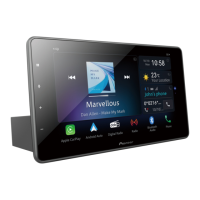
Pioneer SPH-EVO950DAB - User Manual

Pioneer SPH-EVO950DAB
113 pages
Print Icon
To Next Page IconTo Next Page
Loading...
English
SPH-EVO950DAB
RDS AV RECEIVER
Operation Manual

Other manuals for Pioneer SPH-EVO950DAB

Question and Answer IconNeed help?

Do you have a question about the Pioneer SPH-EVO950DAB and is the answer not in the manual?

Summary

Precaution

Important Safety Information

Safety warnings and precautions for product installation and operation.

Parts and Controls

Main Unit

Identifies and describes the main unit and its controls.

Basic Operation

Starting Up the Unit

Step-by-step guide to powering on and initially setting up the device.

Bluetooth

Bluetooth Connection

Procedure for establishing a Bluetooth connection with a mobile device.

Wi-Fi

Wi-Fi Connection

Steps to connect the unit to a Wi-Fi network for internet access.

CarAVAssist

Before You Start

Preparations and compatibility information for using the CarAVAssist app.

Source;Application

Supported Source and Application

Lists all available audio and video sources and compatible applications.

Digital Radio

Digital Radio Tuner Operations

Instructions for operating the digital radio tuner and receiving stations.

Radio

Starting Procedure

Steps to access and start using the Radio function.

USB

Plugging;Unplugging a USB Storage Device

Instructions for connecting and disconnecting USB storage devices.

iPhone

Connecting Your iPhone

Guides for wired and wireless connection of an iPhone to the unit.

Smartphone (Android)

Connecting Your Android Device

Instructions for wired and wireless connection of Android smartphones.

WebLink

Using WebLink

Information on operating WebLink compatible applications.

Apple CarPlay

Using Apple CarPlay

General information and usage guidelines for Apple CarPlay.

Android Auto

Using Android Auto

General information and usage guidelines for Android Auto.

Weather

Using Weather

How to access and use the weather forecast function.

AUX

Starting Procedure

Steps to connect and configure an AUX audio/video source.

External Component

Camera View

How to display video from connected cameras.

Vehicle Equipment Information

Using the Vehicle Bus Adapter

How to connect and use the Vehicle Bus adapter for vehicle data.

Settings

Displaying the Setting Screen

How to access the main settings menu.

Favourite Menu

Creating a Shortcut

How to register menu items as shortcuts for quick access.

Other Functions

Setting the Clock Display

How to adjust time and date formats and settings.

Appendix

Troubleshooting

Common problems, their causes, and solutions for product operation.

Summary

Precaution

Important Safety Information

Safety warnings and precautions for product installation and operation.

Parts and Controls

Main Unit

Identifies and describes the main unit and its controls.

Basic Operation

Starting Up the Unit

Step-by-step guide to powering on and initially setting up the device.

Bluetooth

Bluetooth Connection

Procedure for establishing a Bluetooth connection with a mobile device.

Wi-Fi

Wi-Fi Connection

Steps to connect the unit to a Wi-Fi network for internet access.

CarAVAssist

Before You Start

Preparations and compatibility information for using the CarAVAssist app.

Source;Application

Supported Source and Application

Lists all available audio and video sources and compatible applications.

Digital Radio

Digital Radio Tuner Operations

Instructions for operating the digital radio tuner and receiving stations.

Radio

Starting Procedure

Steps to access and start using the Radio function.

USB

Plugging;Unplugging a USB Storage Device

Instructions for connecting and disconnecting USB storage devices.

iPhone

Connecting Your iPhone

Guides for wired and wireless connection of an iPhone to the unit.

Smartphone (Android)

Connecting Your Android Device

Instructions for wired and wireless connection of Android smartphones.

WebLink

Using WebLink

Information on operating WebLink compatible applications.

Apple CarPlay

Using Apple CarPlay

General information and usage guidelines for Apple CarPlay.

Android Auto

Using Android Auto

General information and usage guidelines for Android Auto.

Weather

Using Weather

How to access and use the weather forecast function.

AUX

Starting Procedure

Steps to connect and configure an AUX audio/video source.

External Component

Camera View

How to display video from connected cameras.

Vehicle Equipment Information

Using the Vehicle Bus Adapter

How to connect and use the Vehicle Bus adapter for vehicle data.

Settings

Displaying the Setting Screen

How to access the main settings menu.

Favourite Menu

Creating a Shortcut

How to register menu items as shortcuts for quick access.

Other Functions

Setting the Clock Display

How to adjust time and date formats and settings.

Appendix

Troubleshooting

Common problems, their causes, and solutions for product operation.

Pioneer SPH-EVO950DAB Specifications

General IconGeneral
DAB+Yes
Apple CarPlayYes
Android AutoYes
BluetoothYes
USB InputYes
RCA Pre-outs3 (Front, Rear, Subwoofer)
Camera InputYes
Audio FormatsMP3, WMA, AAC, FLAC, WAV
Steering Wheel ControlYes
Aux InputYes
Installation TypeDouble DIN
Power Output4 x 50W
Radio TunerFM/AM/DAB+
Weight1.5 kg

Related product manuals