Need help?
Do you have a question about the Pioneer VSX-424-K and is the answer not in the manual?
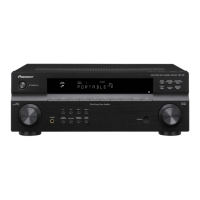
Description of the physical buttons, dials, and indicators on the receiver's front panel.
Covers INPUT SELECTOR, Listening Mode buttons, and ECO settings.
Details RECEIVER, STANDBY/ON, MASTER VOLUME, SPEAKERS, DIMMER, and DISPLAY buttons.
Details status lights and indicators on the front panel.
Explains MCACC, HDMI, iPod indicators, and SIGNAL SELECT.
Details DTS and Dolby Digital indicators.
Explains the operation of the remote control buttons for playback and settings.
Covers SLEEP, RECEIVER, INPUT SELECT, and SIGNAL SEL buttons.
Details sound control buttons and listening mode selection.
Additional information on remote usage, including battery loading and range.
Covers VOLUME, MUTE, and DISP controls.
Guides on speaker placement and connection.
Hints on optimal speaker positioning for best sound quality.
Instructions for connecting speakers using bare wire.
Details on connecting various cables for audio and video sources.
Information on HDMI cables and features supported by the receiver.
Using RCA, coaxial, and optical cables for audio connections.
How to connect playback devices and external sources.
Connecting HDMI-equipped devices to the receiver and TV.
Connecting devices without HDMI and portable music players.
Connecting antennas and plugging in the receiver.
Connecting AM loop and FM wire antennas.
Plugging in the receiver and safety precautions for power cord handling.
Steps for setting up the receiver, including OSD display.
Ensuring OSD display via composite connection.
Changing TV format if OSD is displayed incorrectly.
Details the MCACC setup process for acoustic calibration.
Explains the purpose of MCACC for speaker calibration.
Step-by-step guide for performing the Auto MCACC setup.
Information on the automatic power-off function.
How to disable or adjust the automatic power-off timer.
Advice for issues encountered during MCACC setup.
Addressing issues like background noise or interference.
Instructions for playing audio from various sources.
Steps to select input and start playback.
Choosing HDMI, Analog, or Digital audio input for sources.
How to tune and save radio stations.
Steps for tuning FM and AM stations.
Memorizing and naming radio station presets.
RDS and radio frequency step settings.
Explains Radio Data System (RDS) and its features.
How to search for stations by program type (PTY).
Connecting and playing audio from USB devices.
Instructions for connecting and playing files from USB.
Lists supported compressed audio file formats.
Selecting various audio playback modes based on source or environment.
Using the AUTO SURROUND feature for automatic mode selection.
Explains different surround sound options available.
Enhancing audio playback with advanced features.
Details various surround effects for different content types.
Pure audio reproduction and quality restoration features.
Fine-tuning sound settings through the AUDIO PARAMETER menu.
Improving sound clarity with phase correction measures.
Accessing settings like EQ, Sound Delay, Loudness, and others.
Overview of the menu for detailed system settings.
How to access and navigate the Home Menu.
Lists available settings like Auto MCACC and Manual SP Setup.
Detailed speaker configuration and fine-tuning.
Adjusting speaker size and configuration.
Setting crossover frequencies and speaker levels.
Setting speaker distances for proper delay calculation.
Assigning inputs and managing power settings.
How to assign sources to the ANALOG IN1 terminal.
Setting the automatic power-off timer.
Configuring HDMI audio return channel and standby settings.
Adjusting ARC and Standby Through functions.
General guidance for resolving operational issues.
Troubleshooting receiver not turning on or switching off.
Addressing issues like no sound, no image, or display problems.
Troubleshooting subwoofer, surround speakers, and radio noise.
Specifics on iPod, USB, and HDMI connections.
Important notes on HDMI setup and compatibility.
Explanations for common device error codes.
Resetting, cleaning, and technical specifications.
Procedure for factory reset and unit care instructions.
Technical specifications for the VSX-424 model.
Technical specifications for the VSX-329 model.
 General
| Channels | 5.1 |
|---|---|
| HDMI Inputs | 4 |
| HDMI Outputs | 1 |
| 3D Support | Yes |
| 4K Ultra HD Pass-through | Yes |
| Auto Speaker Calibration | MCACC |
| AM/FM Tuner | Yes |
| Frequency Response | 10 Hz - 100 kHz |
| Total Harmonic Distortion | 0.08% |
| Network Support | No |
| Bluetooth | No |
| Wi-Fi | No |
| Power Output per Channel | 80 W |
| Audio Formats Supported | Dolby TrueHD, DTS-HD Master Audio |
| Input Sensitivity/Impedance | 200mV/47k ohms |
| Video Inputs/Outputs | Composite: 2 In / 1 Out |
| Digital Audio Inputs | 2 Optical, 1 Coaxial |
| USB Port | 1 |
| Signal-to-Noise Ratio | 98 dB (Line, IHF-A) |

 To Next Page