EasyManua.ls Logo

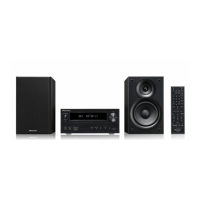
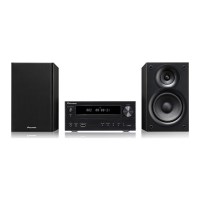
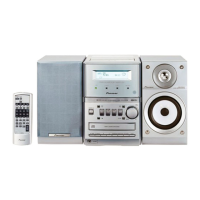
Pioneer X-NM1 - User Manual

Pioneer X-NM1
80 pages
Print Icon
To Next Page IconTo Next Page
Loading...

Table of Contents

Question and Answer IconNeed help?

Do you have a question about the Pioneer X-NM1 and is the answer not in the manual?

Summary

1 Before You Start

Initial Setup and Remote Operation

Checking accessories, using the manual, installing batteries, and operating the remote control.

2 Connecting Up Your System

Connecting Main Components

Initial setup for connecting the system, speakers, and antennas.

Speaker Wire Connection

Detailed guide on how to properly connect speaker wires to the terminals.

4 Getting Started

Initial Setup: Clock and Power

Setting the clock, changing format, and automatic power-on features.

CD Playback Basics

How to play, pause, stop, and select tracks on a CD.

6 More tuner features

Station Preset Management

Manually and automatically saving radio station presets for easy access.

7 Making tape recordings

Automated CD to Tape Recording

Recording entire CDs or playlists to tape using synchro recording.

8 Using the timer

Setting the Wake-Up Timer

Configuring the system to wake up to audio playback at a set time.

Record Timer Setup

Programming the system to record radio broadcasts at scheduled times.

9 Additional Information

Troubleshooting Guide

Solutions for common issues with CD playback, audio, tuning, and remote control.

Summary

1 Before You Start

Initial Setup and Remote Operation

Checking accessories, using the manual, installing batteries, and operating the remote control.

2 Connecting Up Your System

Connecting Main Components

Initial setup for connecting the system, speakers, and antennas.

Speaker Wire Connection

Detailed guide on how to properly connect speaker wires to the terminals.

4 Getting Started

Initial Setup: Clock and Power

Setting the clock, changing format, and automatic power-on features.

CD Playback Basics

How to play, pause, stop, and select tracks on a CD.

6 More tuner features

Station Preset Management

Manually and automatically saving radio station presets for easy access.

7 Making tape recordings

Automated CD to Tape Recording

Recording entire CDs or playlists to tape using synchro recording.

8 Using the timer

Setting the Wake-Up Timer

Configuring the system to wake up to audio playback at a set time.

Record Timer Setup

Programming the system to record radio broadcasts at scheduled times.

9 Additional Information

Troubleshooting Guide

Solutions for common issues with CD playback, audio, tuning, and remote control.

Pioneer X-NM1 Specifications

General IconGeneral
Speaker Type2-way speakers
Weight3.5 kg
Power Output50 W
ConnectivityBluetooth, USB, AUX
Radio TunerFM/AM
Supported Audio FormatsMP3, WMA

Related product manuals