

EasyManua.ls Logo

PITA AG-PITA - User Manual

PITA AG-PITA
22 pages
Print Icon
To Next Page IconTo Next Page
Loading...
製品証情
Changes or modifications not expressly approved by the party responsible for compliance could void the
user's authority to operate the equipment.
This equipment has been tested and found to comply with the limits for a Class B digital device, pursuant to
Part 15 of the FCC Rules. These limits are designed to provide reasonable protection against harmful
interference in a residential installation. This equipment generates uses and can radiate radio frequency
energy and, if not installed and used in accordance with the instructions, may cause harmful interference to
radio communications. However, there is no guarantee that interference will not occur in a particular
installation. If this equipment does cause harmful interference to radio or television reception, which can be
determined by turning the equipment off and on, the user is encouraged to try to correct the interference by
one or more of the following measures:
-- Reorient or relocate the receiving antenna.
-- Increase the separation between the equipment and receiver.
-- Connect the equipment into an outlet on a circuit different from that to which the receiver is connected.
-- Consult the dealer or an experienced radio/TV technician for help
This device complies with part 15 of the FCC rules. Operation is subject to the following two conditions
(1)this device may not cause harmful interference, and (2) this device must accept any interference received,
including interference that may cause undesired operation.
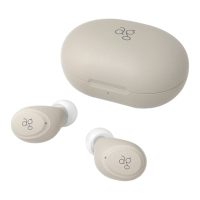
Our product TWS Bluetooth Earphone AG-PITA, ag ,doesn't have enough space to print the product name, model,
trademark, MIC ID and MIC Logo on the product itself, thus we locate them on user manual and product
packaging.
Product : TWS Bluetooth Earphone
Model number : AG-PITA
FCC ID : 2AX2R-PITA
Complies with
IMDA Standards
DA108470
210-195917
Question and Answer IconNeed help?

Do you have a question about the PITA AG-PITA and is the answer not in the manual?

Summary

Product Certification Information

Package Contents

Earphone Units

Lists the earphone units included in the package.

Charging Case

Lists the charging case included in the package.

Ear Tips

Lists the different sizes of ear tips provided.

USB Type-C Charging Cable

Lists the USB Type-C charging cable included.

Parts Identification

USB Port

Identifies the USB port on the charging case for charging.

Microphones

Identifies the microphones on the earphone units.

LED Indicator

Identifies the LED indicator on the earphone units.

Reset Button

Identifies the reset button on the earphone units.

Touch Control Panel

Identifies the touch control panel on the earphone units.

Power and Charging Guide

Charging the Charging Case

Instructions for charging the charging case and understanding its LED indicators.

Charging the Earphones

Instructions for charging the earphones and understanding their LED indicators.

Power ON Operation

Bluetooth Pairing Procedure

First-Time Pairing

Step-by-step guide for initial device pairing.

Re-pairing or Second Device Pairing

Instructions for re-pairing or connecting to new devices.

Power OFF Operation

Charging Case LED Indicators

Factory Reset Procedure

Touch Control Panel Functions

Ear Tip Fitting Guide

Safety Precautions

DANGER Warnings

Critical warnings about risks of death or serious injury from product misuse.

WARNING Warnings

Serious warnings about risks of death or serious injury from product misuse.

CAUTION Warnings

Warnings about risks of personal injury or property damage from product misuse.

Troubleshooting: Power, Control, and Connectivity

Earphones Will Not Turn ON

Steps to take when earphones do not power on.

Earphones Will Not Turn OFF

Steps to take when earphones do not power off.

Touch Sensor Not Functioning

Solutions for when the touch sensor is unresponsive.

Earphones Cannot Be Charged

Troubleshooting steps for charging issues.

Earphones Cannot Be Detected or Paired

How to resolve issues with device detection and pairing.

Interrupted Music Playback

Solutions for sound interruptions during music playback.

Troubleshooting: Sound and Performance Issues

Sound Only From One Side

Steps to resolve when audio only plays from one earphone.

Uneven Battery Consumption

Explains reasons for differing battery drain between earphones.

Noise Cancelling Ineffective

Tips for improving noise cancelling performance.

Maintenance and Disposal

Maintenance

Instructions for cleaning the dust filter on the earphones.

Disposal Regulation

Information on how to dispose of the product responsibly.

Warranty and After Service Policy

Contact and Support Information

Charging Case LED Indicator Details

Earphone Reset Method

Touch Sensor Controls Explained

Ear Tip Selection Guide

Safety Precautions

DANGER Warnings

Critical warnings about risks of death or serious injury from product misuse.

WARNING Warnings

Serious warnings about risks of death or serious injury from product misuse.

CAUTION Warnings

Warnings about risks of personal injury or property damage from product misuse.

Troubleshooting: Power and Operation Issues

Earphones Not Turning ON

Steps to resolve power issues, including battery and sensor contact.

Earphones Not Turning OFF

Steps to resolve issues where earphones fail to power off in the case.

Touch Sensor Unresponsive

Solutions for touch sensor issues due to incorrect operation or dirt.

Troubleshooting: Charging and Connectivity Problems

Earphones Not Charging

Steps to resolve charging issues related to contacts, case battery, or ear tips.

Pairing and Detection Failures

How to fix issues with device pairing and detection.

Sound Interruption Issues

Solutions for sound interruptions caused by external interference.

Troubleshooting: Sound and Performance Issues

Sound Only From One Side

Steps to resolve when audio only plays from one earphone.

Uneven Battery Consumption

Explains reasons for differing battery drain between earphones.

Charging Time Excessive

Tips for reducing charging time, including using the correct adapter.

Touch Sensor Malfunction

Solutions for touch sensor issues caused by dirt or moisture.

Noise Cancelling Effectiveness

Tips for improving noise cancelling performance by adjusting ear tips.

Maintenance and Disposal

Maintenance

Instructions for cleaning the dust filter on the earphones.

Disposal Precautions

Information on recycling and disposing of the product.
Warranty and After Service

Contacting Us

PITA AG-PITA Specifications

General IconGeneral
BrandPITA
ModelAG-PITA
CategoryHeadphone
LanguageEnglish