Page 3For technical questions, please call 1-800-444-3353.SKU 00239
Operating Instructions
Read the ENTIRE IMPORTANT
SAFETY INFORMATION section at the
beginning of this manual including
all text under subheadings therein
before set up or use of this product.
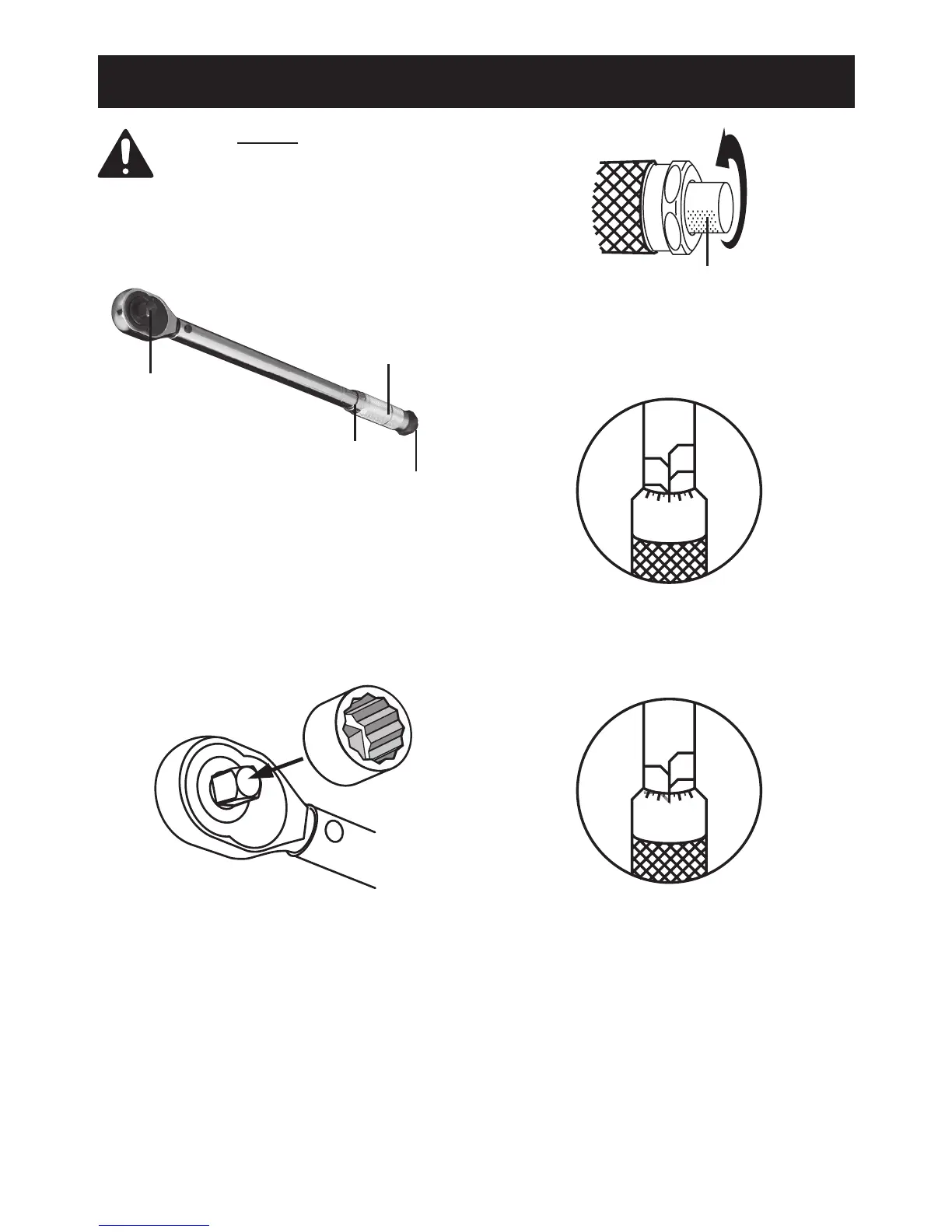
Controls
1.
Drive Anvil
Torque Settings
Knurled Handle
Lock Knob
Wear ANSI-approved safety goggles
and heavy-duty work gloves.
2. Clean and/or repair the threads that will be
tightened. Damaged or dirty threads will
result in a misleading torque reading.
3. Select the desired socket and verify it ts
properly on the nut or bolt being tightened.
4.
Press the socket rmly onto the drive anvil.
5.
Lock Knob
Turn the Lock Knob at bottom of the
Handle counterclockwise until it stops.
6. Turn the handle to set the torque.
To set to 55, for example:
a.
50
2
0
1
8
9
(A)
70
60
80
Turn the knurled handle (CW or CCW) until
the “0” graduation on the bevel edge lines
up with 50. See illustration (A), above.
b.
50
7
5
6
3
4
(B)
The 50 line is shown in grey because
it will likely be hidden at this point.
70
60
80
Continue turning the knurled handle about
a half turn clockwise until the “5” graduation
mark lines up with the centerline. It is now
set for 55. See illustration (B), above.


 To Next Page
 Loading...