
 Need help?
Do you have a question about the pivo Lite and is the answer not in the manual?
The part of the Pivo Pod that securely grips a smartphone.
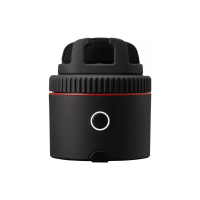
Visual indicator for the Pivo Pod's status.
Button used to turn the Pivo Pod on and off.
Adjustable legs for stability and positioning of the Pivo Pod.
Mechanism to secure the smartphone in the holder.
Port for charging the Pivo Pod's battery.
Indicator for ensuring the Pivo Pod is level.
Standard mounting point for tripods or other accessories.
Indicates the Pivo Pod is turned off.
Shows the Pivo Pod is active and ready to pair.
Confirms a successful connection with the smartphone.
Indicates the Pivo Pod is currently charging.
Signifies that the Pivo Pod battery is full.
Alerts that the battery is low and needs charging.
Indicates the Pivo Pod is in remote pairing mode.
Initiates the setup process by launching the Pivo app.
Process for registering a new user account with email.
Accessing the account after registration and confirming permissions.
Prerequisite step to activate Bluetooth on the smartphone.
Action to put the Pivo Pod into Bluetooth pairing mode.
Finalizing the Bluetooth connection via the Pivo app.
Instructions for mounting the smartphone onto the Pivo Pod.
Securing the mounted smartphone using the grip fastener.
Gesture to access the Pivo Pod's settings menu.
Gesture to access the Pivo Pod's main menu.
Function of the '+' button on the remote.
Function of the '^' button on the remote.
Function of the '>' button on the remote.
Function of the 'v' button on the remote.
Function of the '<' button on the remote.
Function of the '<<' button on the remote.
Function of the '>>' button on the remote.
Function of the 'II' button on the remote.
Function of the 'M' button on the remote.
Press the power button 3 times for the LED to turn white, indicating readiness.
Press and hold the '+' button until 3 quick beeps are heard.
Overview of settings controllable via the Pivo Remote.
Details on the remote's range and pairing capabilities.
Links for additional support and documentation.
Links to official Pivo YouTube channel and support page.
Warning about modifications affecting user authority.
Details on device compliance with FCC Rules.
Guidelines for safe installation and operation regarding RF exposure.
 General
| Brand | pivo |
|---|---|
| Model | Lite |
| Category | Cell Phone Accessories |
| Language | English |

 To Next Page