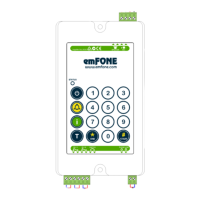
Flush mount the EM-1 (Inc. speaker & microphone if EM-1/SM
model) and ensure they are inline with respecve COP cutouts.
Program the unit using the on-board keypad (Default PIN: 123)
Referencing the Installaon Diagram (back page), connect the:
a) Alarm Buon (Dry Contact) into Alarm Buon 1
b) Speaker & Microphone (If EM-1/SM model)
c) If available wire your External Alarm LED or Pictograms
d) Phone Line
e) Power Supply (Upon power up you will hear 3 beeps & Status
LED will blink RED).
Record a voice Locaon ID message by entering;
#
#
9
PIN
To hear a playback of your recording, enter
9
*
Wait for 2 beeps to commence
1
To program a single emergency help number, enter;
To verify, enter
#
9
*
HELP NUMBER
#
PIN
0
*
Installation & Setup
Once you complete your recording, press to end.
0
2
3
4
5
!
When recording speak 10-15cm from the microphone
0
The EM-1 is now ready for use.
Incoming & outgoing test calls should be made
to ensure clear communicaon with your service
provider.
To program mulple emergency help numbers please refer to the
Advanced Programming Guide.


 To Next Page