English
05 06
English
Once turning on, the OLED display shows the memorized
parameters of the previous use, and the light works based
on these parameters.
Note:
USAGE
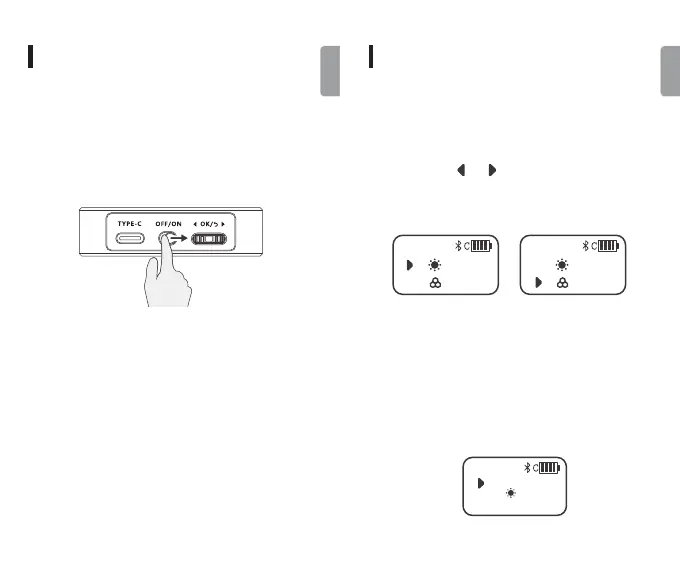
Push up to[ON], the LED light is turned on according
to the relevant parameter values shown on the OLED
display. Push down to [OFF], the OLED screen and the
light will turn off.
1. Turn on The Power
2. Working Mode Setting
Press the adjustment dial wheel[OK]for 1 second
to cycle through CCT color temperature mode/HSI
mode/RGB mode/Scene mode.
USAGE
3. Color Temperature Mode Regulation (CCT)
4. Full-Color Gamut Mode Adjustment(HSI)
8500 K
100%
CCT
8500 K
100%
CCT
765
H
S
0%
100%
HSI
Short press the adjustment dial wheel[OK]to set
the brightness or color temperature. Then rotate the
adjustment dial [ ][ ]to adjust brightness from 0%
to 100% (The light is off when 0% is displayed), or color
temperature from 2500K to 8500K.
Short press adjustment dial wheel[OK]to choose from
hue adjustment /brightness adjustment/ saturation
adjustment. H-Hue: support the setting of each color in
0-765 tones. Brightness: support 0~100%. S-Saturation:
support 0~100%.



 To Next Page