1. Download the Pixie App from the App Store and create
your Pixie Account
2. Turn ON Bluetooth, Location Services, and Sound.
3. Open the Pixie App on your iPhone and Register.
4. Watch the tutorial. Tap ‘Tutorial’ on the main App menu.
5. First let’s pair your Phone Pixie point. Choose one point that will
be attached to your phone. All Points are identical so you can
choose any color you want for your My Phone Point.
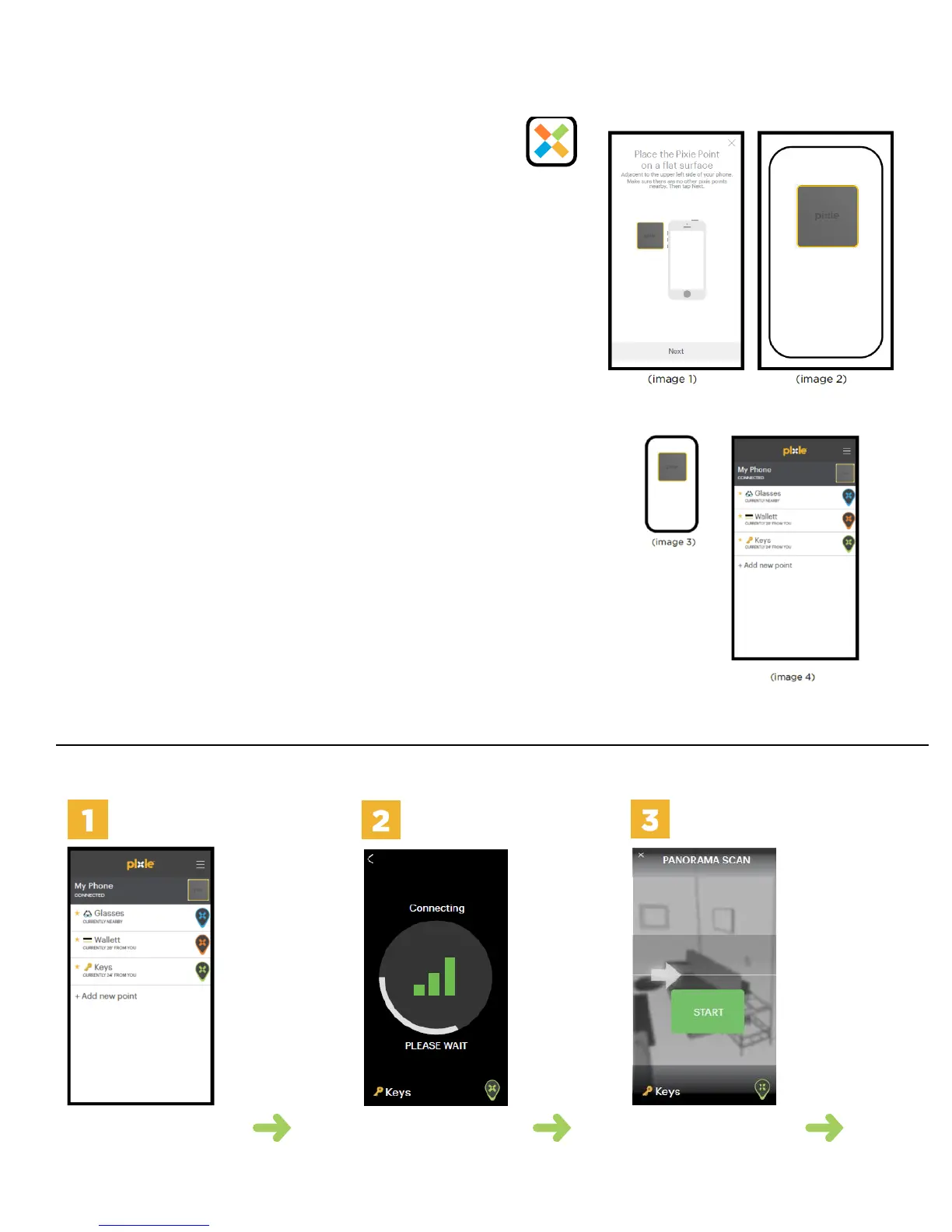
Follow the in-App instructions to pair. This operation can take up
to 45 seconds. (image 1 and 2)
Place the chosen Point on a flat surface adjacent the upper left side of
the phone (image 1). Do NOT hold the Point in your hand.
Make sure ONLY the Point you want to pair is adjacent to the upper
left side of your iPhone while the others are at least 4 feet away.
6. Place the paired Pixie Point inside the Phone Case. Alternatively,
peel off the adhesive backing and attach it to the upper side of
the phone as shown. (image 3)
7. Pair the remaining Points for your valuable things like a wallet,
keys etc... we call it Pixifying your items. (image 4)
8. If you are pairing more than 4 Pixie Points, swipe the Point icon
to the left to choose Point as a favorite Point
That’s it! Now you’re all set up.
Open the app, watch the tutorial, and experience Pixie! - Happy Finding!
HOW TO FIND PIXIEFIED ITEMS
Tap on the
Pixie Point
you want to
find from the
Pixie App
home screen.
The App
will connect
to your item.
When the App
has a strong
signal (3 bars),
the Pixie App
will move to
the panorama
scan screen.
Stretch your
arm out away
from your body
and slowly
perform a the
Panorama Scan
by pressing the
START button.
The App
will provide
guidance on
how to use
the Panorama
Scan feature
Follow the
in-App
instructions



 To Next Page
 Loading...