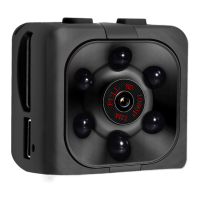
Recording video with a resolution of 1280X720P (720P mode)
1) Press 1x on the «on/off» button to turn on (standby) the mini camera - blue LED on -
the mini camcorder is in video standby 720P mode.
2) Press 1x on the «on/off» button to record video. Blue led blinks 3x and turns off and
starts recording in 720P mode. (During recording you see no led’s) Recordings are
automatically saved every 5 minutes.
3) Press 1x on the «on/off» key to stop recording. (Standby = Blue led)
Recording video with a resolution of 1920X1080P (1080P mode)
1) Press 1x on the «on/off» button to turn on the mini camera (standby = blue led)
2) Press 1x on the «mode» button to activate the 1080P video recording mode. (The red
and blue led's are on at the same time = standby 1080P)
3) To start recording in 1080P press 1x «on/off» button. (blue and red led will blink 3
times and go off)
Recordings will be automatically saved every 5 minutes.
4) Press 1x on the «on/off» button to stop recording. (Blue and red led = standby)


 To Next Page
 Loading...