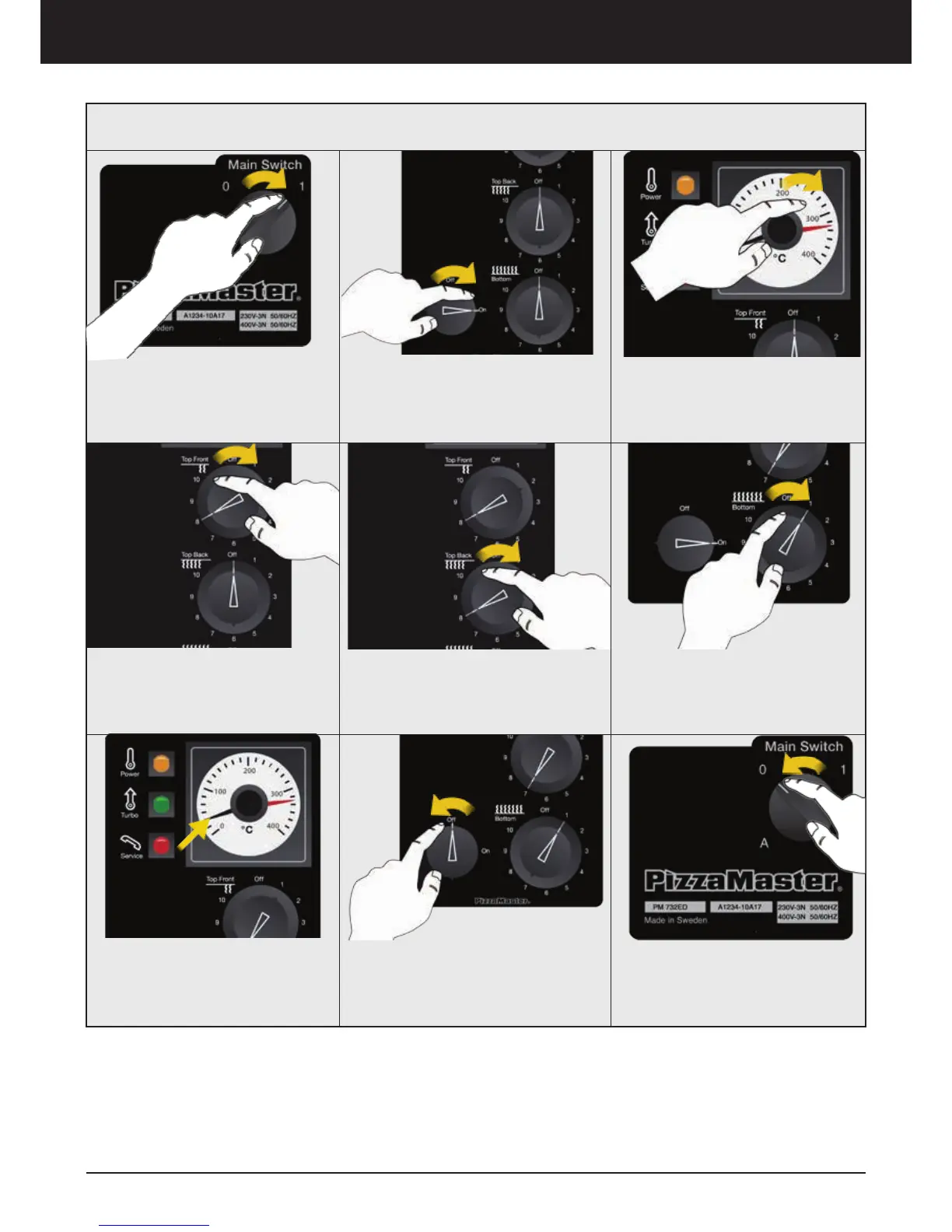
Oven operation – Display E
1. Turn ON the oven
Place the Main Switch to position
”1” to turn ON the oven
5. Set the Top Back Heat Zone
Rotate to adjust the Top Back Heat
intensity.
0 = Off / 10 = Maximum
6. Set the Top Bottom Heat
Zone
Rotate to adjust the Bottom Heat
intensity.
0 = Off / 10 = Maximum
3. Set Temperature
Rotate the knob to modify the
desire temperature
7. Real time temperature
indicator
Check the ”Black” Indicator to
know the Real Temperature at
anytime
8. Turn ”OFF” the deck
Rotate to turn OFF the deck
9. Turn OFF the oven
Place the Main Switch to position
”0” to turn OFF the oven
2. Turn ON the deck
Turn the knob to ON position
4. Set the Top Front Heat Zone
Rotate to adjust the Top Front
Heat intensity.
0 = Off / 10 = Maximum
Classic Control Panel



 To Next Page