~ 98 ~
3.2 Control panel
Fig. similar: modifications are possible.
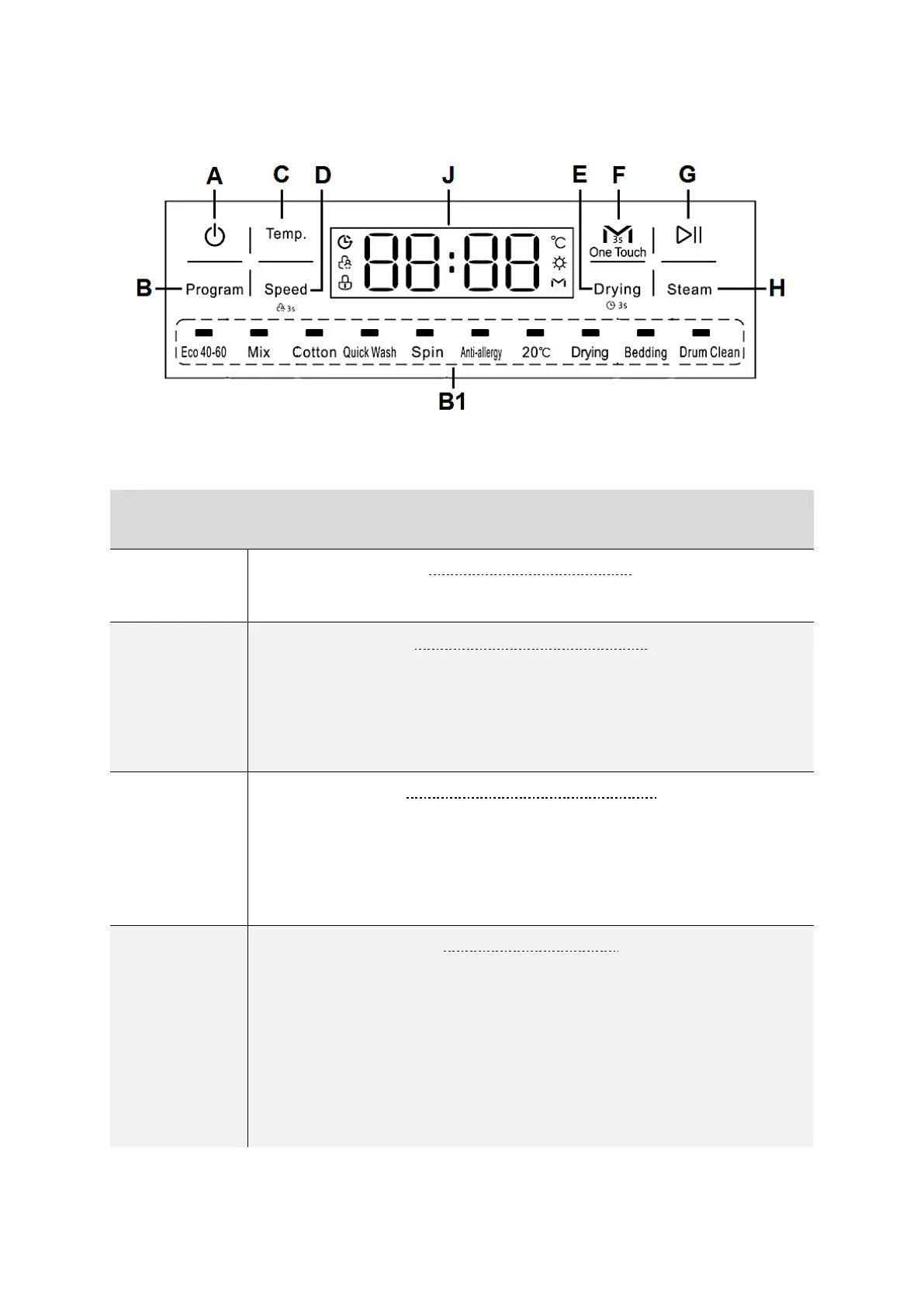
« ON / OFF » - BUTTON
➢ Switches on / off the appliance
« PROGRAMME » - BUTTON
➢ Button to select a WASHING PROGRAMME according to fibre
type and degree of soiling.
➢ Press this button repeatedly to switch through the different
washing programmes.
« PROGRAMME INDICATOR »
➢ Indicates the set washing programme.
➢ Eco 40-60 / Mix / Cotton / Quick wash / Spin / Anti-allergy
/ 20 °C / Bedding / Drum Clean.
➢ See below chapter 4. THE WASHING PROGRAMMES.
« TEMP. » - BUTTON
➢ Button to change the TEMPERATURE of a washing programme.
➢ Press this button repeatedly to switch through the different
temperatures.
➢ In some washing programmes the settable temperature range
is limited: depending on model.
➢ See also chapter 5.3 SELECTION OF THE ADDITIONAL
FUNCTIONS et seq.


 To Next Page