14
Wall-mount instruction
Preparing To Install The Optional Wall Mount Arm (not
included)
This TFT LCD Monitor can be attached to a wall mounting
arm you can purchase separately.
Turn the power OFF then disconnect the cables from the TFT
LCD Monitor before performing the procedure below.
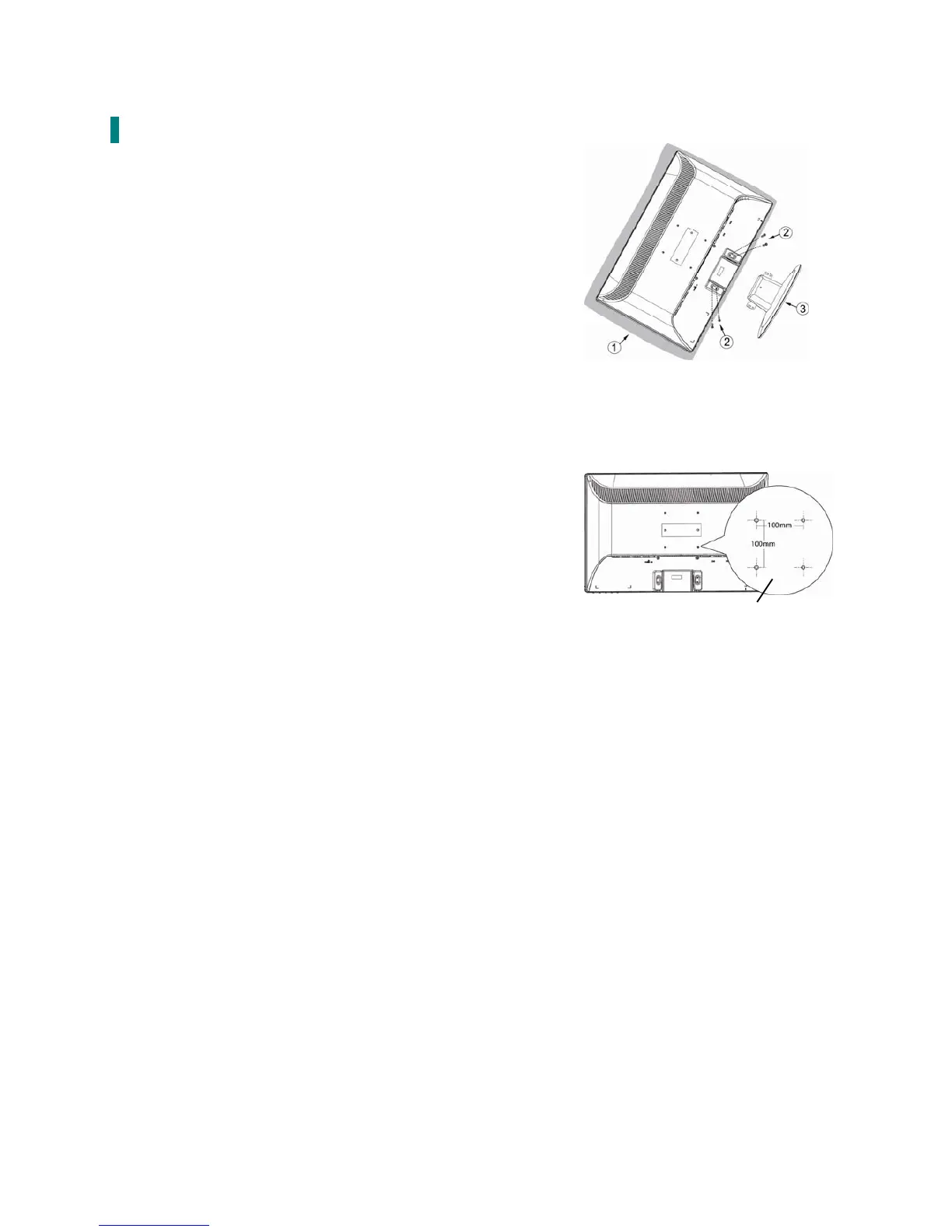
1. Lay the TFT LCD Monitor face down on a soft surface.
2. Remove the 4 screws holding the stand to the hinge.
3. Remove the stand.
Attaching The Optional Wall Mount Arm (not supplied)
Follow these steps to finish installing the wall mounting arm:
1. Place the wall mounting arm onto the back of the TFT LCD
Monitor. Line up the holes of the arm with the holes in the
back of the monitor.
2. Insert the 4 screws into the holes and tighten.
3. Reconnect the cables. Refer to the User’s Guide that came
with the optional wall mounting arm for instructions on
attaching it to the wall.
NOTE
100mmx100mm VESA high hole (n=4), M4, pitch =0.7 mm
screw mounting kit not included.
4mm, 0.7 pitch
threaded holes x 4
100mm x 100mm Screw
Mounting Options


 To Next Page