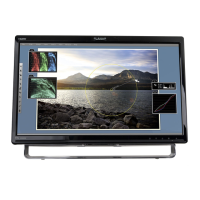
Need help?
Do you have a question about the Planar PXN2770MW and is the answer not in the manual?
Steps to attach the monitor stand base for initial setup.
Instructions on how to turn the LED LCD Monitor on and off using the power button.
Guide to navigating and adjusting settings via the On-Screen Display menu.
Steps to diagnose and resolve issues related to the monitor not turning on.
Solutions for when the monitor powers on but displays no image.
 General
| Screen Size | 27 inches |
|---|---|
| Panel Type | IPS |
| Refresh Rate | 60 Hz |
| Contrast Ratio | 1000:1 |
| Aspect Ratio | 16:9 |
| Viewing Angle | 178°/178° |
| VESA Mount Compatibility | 100 x 100 mm |
| Power Consumption (Standby) | 0.5W |
| Adaptive Sync | No |
| Resolution | 1920 x 1080 |
| Ports | HDMI, VGA, DVI |
| Built-in Speakers | Yes |

 To Next Page