Turn Unit on/off, Change the Source
• Press the /SRC button to turun on the unit. Press and hold the /SRC
button to turn off the unit.
• Press the /SRC button to select the different modes: Radio, USB(with
USB device inserted), AUX-IN(auxiliary input) and BT(Bluetooth) modes.
Adjust the volume (VOL)
Rotate the VOL knob to increase or decrease the volume level.
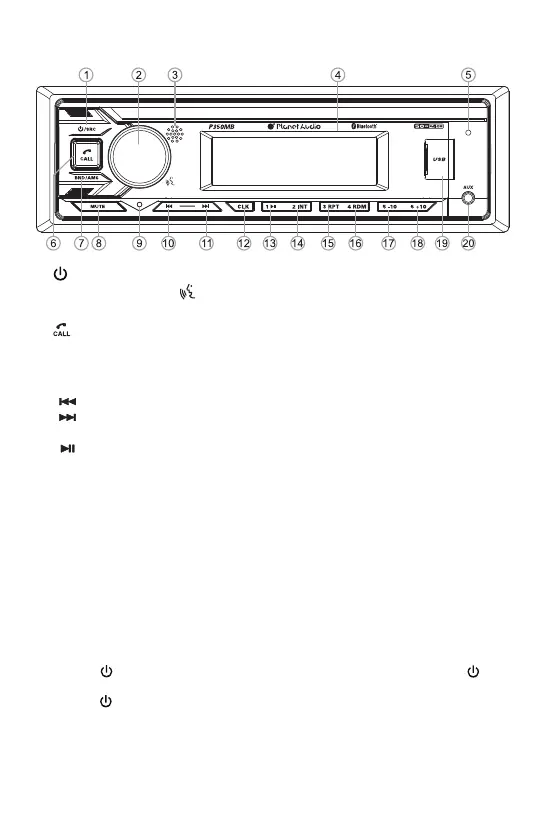
Overview of the Components
General Operation
(power On/Off) / SRC (source) button
3. IR remote sensor 4. LCD Display 5. Hands-free Microphone
6. (Answer Call / End Call) button
7. BAND button, AMS(automatic store, automatic music search) button
8. MUTE button
9. Reset button
10. (tune/seek down, previous track, fast reverse) button
11. (tune/ seek up, next track, fast forward) button
12. CLK(clock setting) button
13. (pause/play), Preset station 1 button
14. INT(intro), Preset station 2 button
15. RPT(repeat), Preset station 3 button
16. RDM (random), Preset station 4 button
17. -10(previous 10 tracks), previous folder, Preset station 5 button
18. +10(next 10 tracks), next folder, Preset station 6 button
19. USB Port
20. AUX IN (auxiliary input) jack
1.
2. VOL (volume) knob, (Push-To-Talk) button and SEL (select/menu) button


 To Next Page