EasyManua.ls Logo

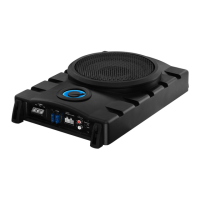
Planet Audio P8AW - User Manual

Planet Audio P8AW
13 pages
Print Icon
To Next Page IconTo Next Page
Loading...

Questions and Answers

  • H
    Hannah DiazAug 17, 2025
    How to troubleshoot Planet Audio Subwoofer with no power?
    • B
      Benjamin TorresAug 17, 2025
      To troubleshoot a Planet Audio Subwoofer with no power, first, ensure it's properly grounded by checking for a clean contact point on the chassis and a secure ground connection. Then, verify there's at least 3V DC remote input on the REM terminal and at least 12V input on the +12V terminal. Check all fuses, replacing any faulty ones with the same type and rating. If the red LED is on, power the subwoofer off briefly and then on again. Finally, if using a high-level input connection, ensure the auto power on feature is activated by pressing the Auto Turn-On switch on the subwoofer.
  • J
    janetmullinsAug 20, 2025
    What to do if the Protection/Red LED lights up on Planet Audio P8AW Subwoofer?
    • D
      Deborah HillAug 20, 2025
      If the Protection/Red LED lights up on your Planet Audio Subwoofer, try turning down the volume on your head unit to prevent overdriving. If that doesn't work, reset the subwoofer by turning it off and on again. If the protection light still appears, the subwoofer may be faulty and require servicing.
  • S
    Steven WaltonAug 22, 2025
    How to fix distorted sound on Planet Audio P8AW Subwoofer?
    • E
      Eric ThorntonAug 22, 2025
      If your Planet Audio Subwoofer has distorted sound, check that the input gain control is set to match the output level of your head unit, keeping it as low as possible. Also, verify that the frequency pass filter is set correctly and inspect the speaker wires for any short circuits.
  • T
    Tonya WilliamsAug 26, 2025
    What to do if Planet Audio Subwoofer has no sound?
    • W
      Warren PerezAug 26, 2025
      If your Planet Audio Subwoofer has no sound, check that the audio input connection is correctly and securely made. If you're using a low-level input connection, ensure the RCA cables are correctly and securely plugged. If you're using a high-level input connection, check the connection with the speaker wires of your head unit.
  • M
    Mark BrooksAug 28, 2025
    Why is my Planet Audio Subwoofer making alternator whine noise?
    • J
      John WigginsAug 28, 2025
      To address alternator whine in your Planet Audio Subwoofer, check that the black ground wire of the unit is properly connected to the metal frame of the vehicle when using a high-level input connection. Also, ensure that your head unit is properly grounded, the negative speaker wires are not touching the vehicle chassis, and the RCA grounds are not shorted to the vehicle chassis.
  • C
    christina62Aug 31, 2025
    Why is my Planet Audio P8AW output so low?
    • G
      grhodesAug 31, 2025
      If your Planet Audio Subwoofer has low output, first, adjust the remote subwoofer level control to increase the sound level. If that doesn't help, reset the input level control, as the input gain level may be too low. Finally, check the frequency pass filter settings.
  • M
    Matthew LeonSep 2, 2025
    Why does my Planet Audio P8AW get so hot?
    • S
      Shane ThompsonSep 3, 2025
      If your Planet Audio Subwoofer gets very hot, verify that the minimum speaker impedance for the subwoofer is correct. Also, ensure there is good air circulation around the subwoofer; adding an external cooling fan may be necessary in some cases.
  • Y
    ymillsSep 5, 2025
    How to stop Planet Audio Subwoofer from hissing?
    • C
      Caleb RodriguezSep 5, 2025
      To troubleshoot a hissing sound in your Planet Audio Subwoofer, disconnect the audio inputs (e.g., RCA cables) from the subwoofer and power it on to identify the faulty or noisy component. Additionally, try setting the head unit volume as high as possible (without distortion) and setting the input gain level of the subwoofer as low as possible.
  • M
    maciasamandaSep 8, 2025
    Why does my Planet Audio P8AW Subwoofer have engine noise (static type)?
    • M
      michael44Sep 8, 2025
      Engine noise (static type) in your Planet Audio Subwoofer is usually caused by poor quality RCA cables, which can pick up radiated noise. Use only high-quality RCA cables and route them away from power cables, large wire loops, and electric fans.
  • S
    Stephanie ZimmermanSep 12, 2025
    Why is auto power on not working on my Planet Audio P8AW Subwoofer?
    • E
      Elizabeth MccannSep 12, 2025
      If the auto power on feature is not working on your Planet Audio Subwoofer, make sure a high-level input connection is made and that a remote wire connection is not made. Also, verify that the auto power on feature is activated by pressing the Auto Turn-On switch on the subwoofer.

Summary

Getting Started

Product Overview

Details the P8AW subwoofer's design, features like LPF, bass boost, phase control, and input options.

Package Contents

Lists all items included with the amplified subwoofer for initial setup and use.

Safety and Important Notes

Important Safety Precautions

Crucial warnings regarding product repair, water exposure, volume levels, and operational anomalies.

Installation Precautions

Guidelines for safe installation, including professional consultation, battery disconnection, secure mounting, and fuse usage.

Environmental Care

Instructions for responsible disposal of the product at its end of life.

Controls and Setup Guide

Panel Controls and Features

Identifies and explains the function of each control and port on the subwoofer unit.

Subwoofer Setup Procedure

Step-by-step guide for correctly installing and configuring the subwoofer for optimal performance.

Installation, Wiring, and Power

Protection Mode

Explains the conditions that trigger protection mode and the measures to take.

Mounting Instructions

Detailed steps and considerations for securely mounting the subwoofer in a vehicle.

Wiring Guide

Instructions for connecting audio inputs (low-level/high-level) and ensuring proper wiring.

Power Connection

Detailed steps for connecting the subwoofer's power supply through a fuse to the vehicle battery.

Operation, Level Control, and Troubleshooting

Subwoofer Level Control Connection

Instructions for connecting and using the remote subwoofer level control for volume adjustment.

Troubleshooting Guide

Lists common problems and their solutions for diagnosing and resolving issues.

Product Specifications

Audio Specifications

Details audio performance parameters like output power, driver size, impedance, and frequency response.

General Specifications

Covers general aspects such as power supply, current consumption, fuse type, protection, and dimensions.

Planet Audio P8AW Specifications

General IconGeneral
Woofer CompositionPolypropylene
Surround MaterialFoam
Size8 inches
Impedance4 ohms
Voice Coil Diameter2 inches

Related product manuals