C S 3
37
ELECTRONICS
NAV IGAT ING T HE USE R INTE RFACE
FIG.1
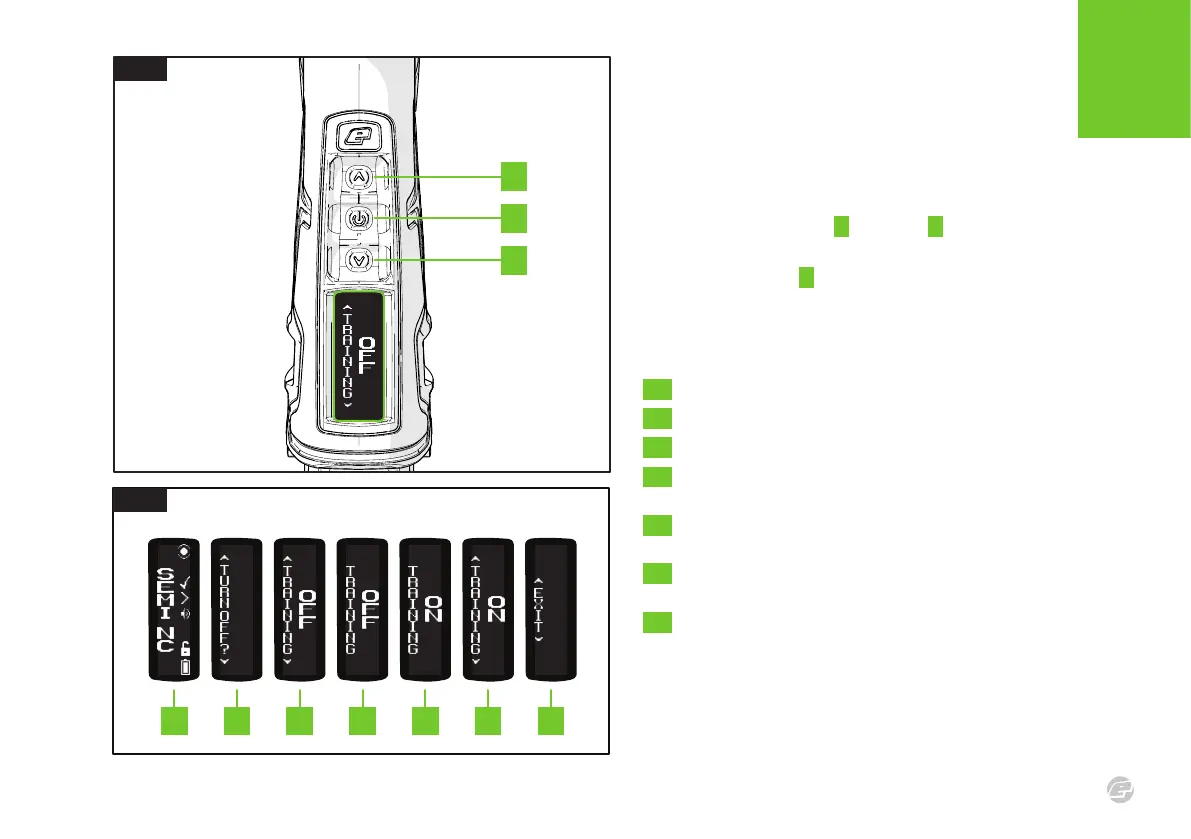
Once in a menu use the Up A and Down C buttons to navigate
through the menu items.
Use the Select button B to select the item. If the item is an
adjustable parameter then it can be adjusted with the Up and Down
buttons and accepted with another push of the Select button.
FIG.2 EXAMPLE - CHANGING THE TRAINING PARAMETER
1 Turn the marker on and wait for the run screen to appear.
2 Push and hold Select until TURN OFF? appears on screen.
3 Use Up or Down to navigate to the TRAINING parameter.
4 Press Select to confirm the TRAINING parameter for
adjustment. The arrows above the parameter will disappear.
5 Use Up and Down to scroll through the TRAINING parameter
options (ON/OFF).
6 Use the Select button to confirm selection.
The arrows above the parameter will now reappear.
7 Use Up or Down to find EXIT and press Select to return to the
run screen.
1 2 3 4 5 6 7
FIG.2
FIG.1
A
B
C















 To Next Page