C S 3
60
ELECTRONICS
E- PORTAL ( V ERS I ON 4.5 O R L ATE R)
E-Portal is a PC application that lets you connect to your marker via a
USB cable. Amongst other things you can use E-Portal to:
1 Upgrade the marker firmware.
2 Change the start-up splash screen.
3 Modify control parameters.
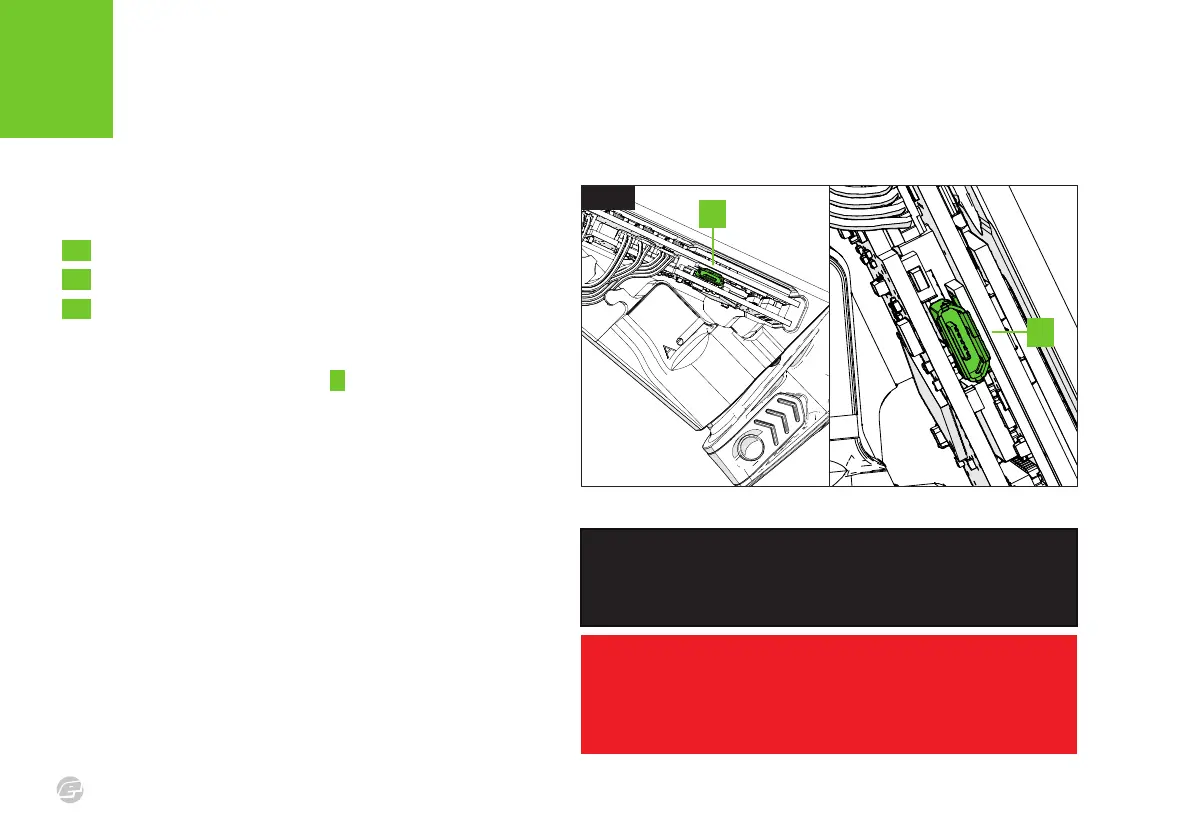
FIG-1
To access the USB Micro-B connector A remove the grips (see page
16) and connect the correct USB cable.
For E-Portal instructions and software download information visit
planeteclipse.com/eportal.
SYSTEM REQUIREMENTS
Monitor Resolution - 1024x768 or higher.
1GHz processor.
1Gb RAM.
Microsoft
®
Windows
®
7 / 8 / 10 / 11.
10Mb of storage space.
A USB data cable is required to connect the marker to a PC.
Be wary of charging cables that may not have the necessary data
connections. No USB cable is supplied with the marker.
WARNING!
Always make sure that the marker is fully unloaded and the air system is
disconnected, with a barrel blocking device installed, before connecting to a PC.
DOWNLOAD:
PL A NE TEC LI P SE. COM/ EP ORTAL
A
FIG .1
B















 To Next Page