SWITCHING ON THE GEO2
To switch on the Geo2 press the button twice in quick
succession, referred to elsewhere in this manual as ‘double-
clicking’. The Geo2 can also be switched on by pushing and
holding the button FIGURE 3.1.
1
SWITCHING OFF THE GEO2
Press and hold the button until the display shows “TURN
OFF
”. Release the button and re-press it to turn o the
Geo2. Alternatively double click the button to enter the
menu tree then press to turn o the Geo2.
1
FIRING THE GEO2
Pull the Trigger to re the Geo2. The entire ring sequence
is controlled electronically by the Geo2 Circuit Board,
enabling any user to easily achieve high rates of re.
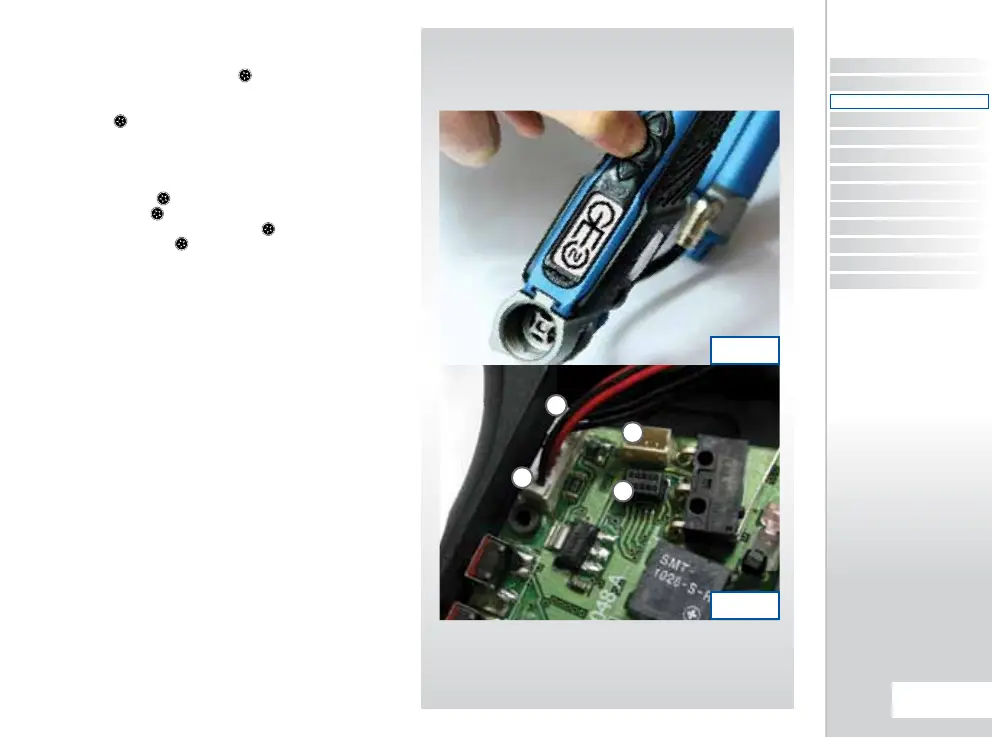
THE GEO2 CIRCUIT BOARD
There are four sockets on the Geo2 Circuit Board; the BBSS
socket
A
, the Geo2 Solenoid socket
B
, the Auxiliary
socket to which third party products such as loaders and
RF transmitters can be connected using the relevant
wiring harness
C
and the Expansion Board socket which
connects the Eclipse E-Portal USB Daughter Board to the
Geo2
D
SEE FIGURE 3.2.
2,3
1
The double clicking feature is user selectable, factory default is set
to on. It can be turned o using the Double Click parameter in the
Hardware Menu (see page 42).
2
The Auxiliary socket is turned on and o manually via the AUX
OUT parameter in the Hardware menu on page 42.
3
Eclipse E-Portal sold separately (see page 65).
FIG 3.2
FIG 3.1
C
A
D
B
CONTENTS
ORIENTAT ION
QUICK SET-UP
USING YOUR GEO2
ADVANCED SET-UP
MENU TREE
MAINTENANCE
FAULT FINDING
SERVICE CENTRES
PARTS LIST
SPARES & ACCESSORIES
E-PORTAL
INDEX
15.
QUICk SET-UP
QUICK SET-UP
QUICK GUIDE















 To Next Page