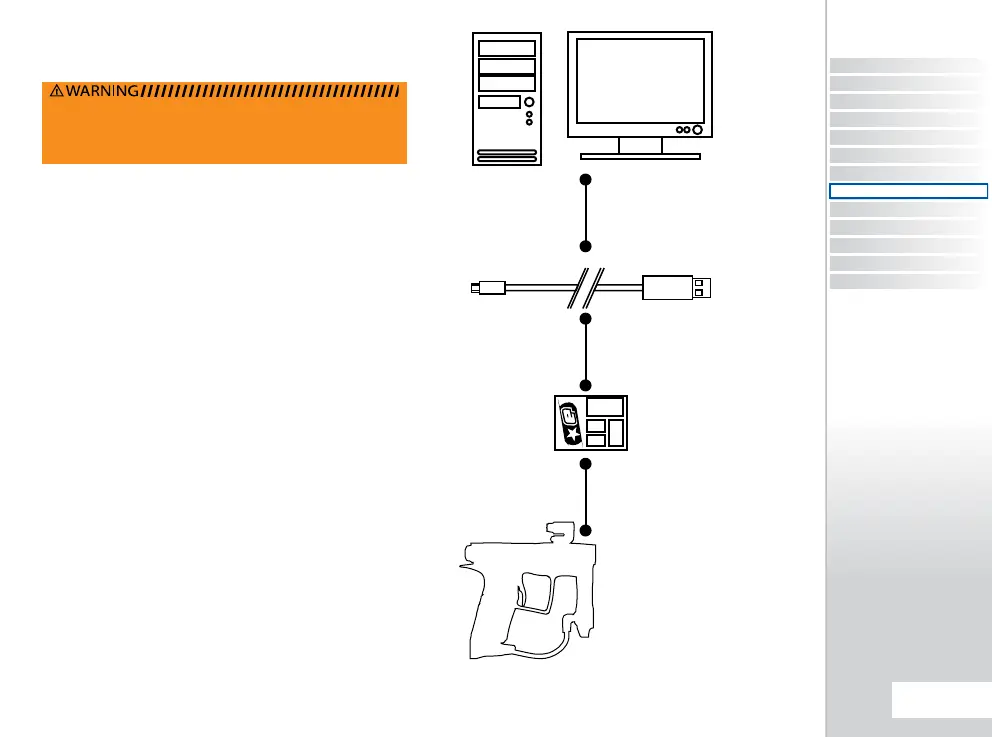
The Geo2 is compatible with Eclipse E-Portal Software. This
software is an upgrade to the Geo2 platform. The Eclipse
E-Portal Software, USB cable and USB daughter board are
sold as a kit, separate from the Geo2.
1
The Eclipse E-Portal allows you to connect the Eclipse Geo2
to a PC, where a number of operations can be performed:
2
UPDATE THE MARKERS FIRMWARE
from time to time new
rmware may be released by Planet Eclipse. You can now
download and install the latest rmware using the Eclipse
E-Portal.
ALTER THE ELECTRONIC PARAMETERS
the Eclipse
E-Portal will give you full access to all of the parameters on
the Geo2 circuit board.
CUSTOMISE SCREEN GRAPHICS
Customise the boot up
screen graphic.
1
If you already own an Eclipse E-portal kit (such as the kit included
with the Eclipse SLS), this kit will be compatible with the Geo2.
2
Minimum system requirements :
Monitor Resolution - 1024x768 or higher, CD-ROM
drive,Keyboard, Mouse, USB socket, 5MB of hard
disk space, 1GHz Processor, 384Mb RAM, Windows
XP/Windows Vista/Windows 7, internet connection
(required for software and rmware updates).
THE ECLIPSE EPORTAL
WARNING: DEGAS YOUR MARKER, DISCHARGING ANY
STORED GAS IN A SAFE DIRECTION, AND REMOVE THE
BARREL, LOADER, AIR SYSTEM AND ANY PAINTBALLS TO
MAKE THE MARKER EASIER AND SAFER TO WORK ON.
WINDOWS® PC
USB CABLE
EXPANSION BOARD
PLANET ECLIPSE
GEO2
CONTENTS
ORIENTAT ION
QUICK SET-UP
USING YOUR GEO2
ADVANCED SET-UP
MENU TREE
MAINTENANCE
FAULT FINDING
SERVICE CENTRES
PARTS LIST
SPARES & ACCESSORIES
E-PORTAL
INDEX
65.
ECLIPSE E-PORTAL
E-PORTAL
QUICK GUIDE















 To Next Page