2
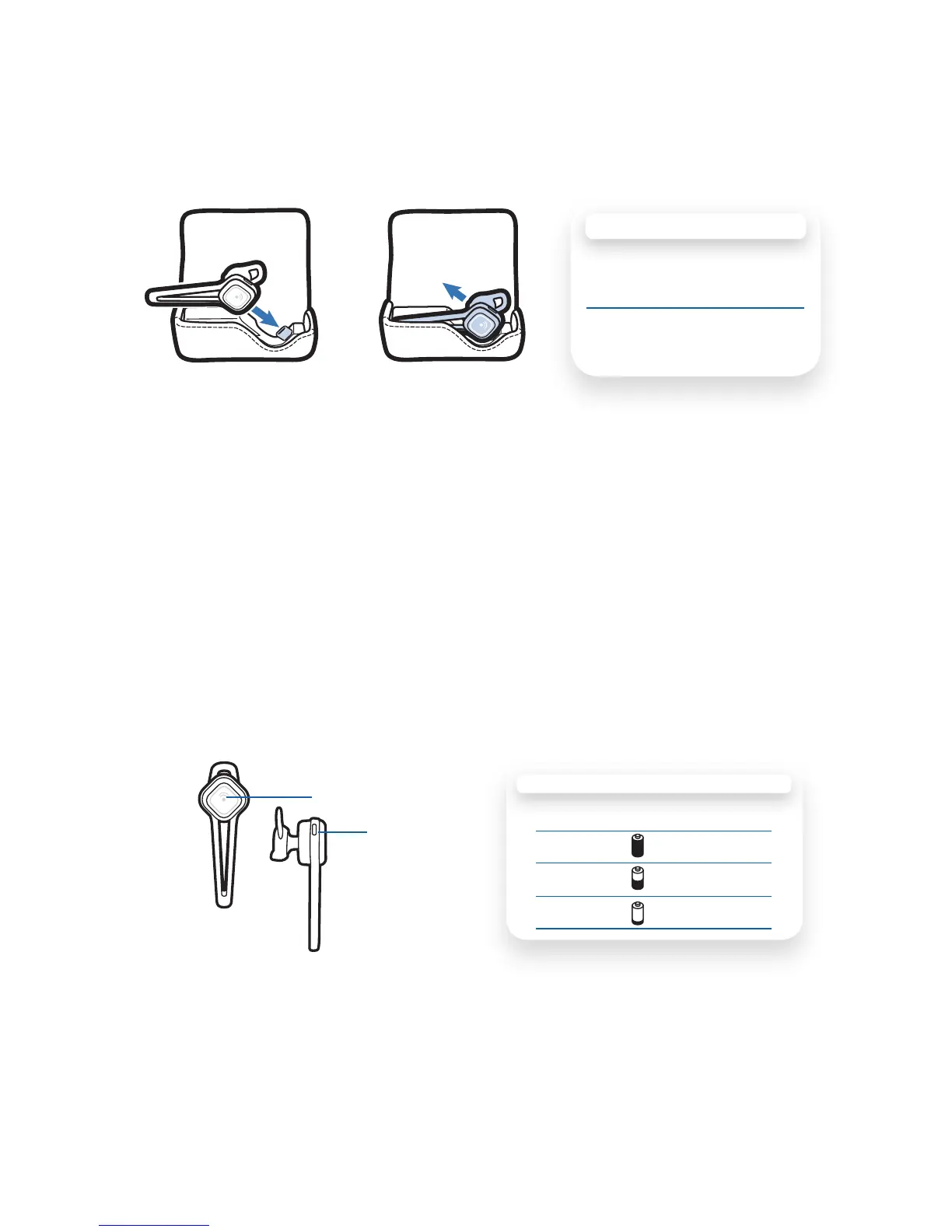
Option C: Using the Charging Case
Open the cover of the case. Align the charging jack on the earpiece with
the micro USB connection in the case. Gently push the earpiece onto
the micro USB connection until you feel it click into place.
IMPORTANT Incorrect removal of the earpiece from the case will
damage the micro USB port in the case. To properly remove the
earpiece, use your thumb to gently push the earpiece in a diagonal,
not vertical, direction away from the micro USB connector.
Checking the Battery Level of Your Earpiece
With the earpiece on, simultaneously press and hold the call control
button and the volume button for about 2 seconds. The indicator light
flashes red to show the charge level.
Charging Your Earpiece
CHARGE INDICATOR LIGHTS
Red Flashes Battery Level
1 Full battery
2 1/3 to 2/3 full
3 Less than 1/3 full
Volume Button
Call Control Button
CHARGING TIME
3 hours ..... Full charge using
charging case
1 hour ....... Minimum charge
before first use




 To Next Page