Properly Wired T568A UTP:
T568B is electrically identical to T568A, but swaps
the green and orange pairs. Either standard will work
as long as the same standard is used at both ends
of a run or patch cable. Mixing “A” and “B” creates
a cross-over cable.
Properly Wired T568A UTP:
T568A Cable with Split Pairs:
A common error in building a cable is to put all the pairs
in pin sequence 1-2, 3-4, 5-6 and 7-8. This will produce
the correct continuity, but the pairs are designated to
be on pins 3-6 and 4-5 in the middle of the connector
for compatibility with phone wiring. This wiring error is
only detected by the split pair test since the designated
pairs are not twisted together.
T568A Cable with Split Pairs:
T568A Cable with a Short and an Open:
The 1-2 pair pins are shorted together and the 7-8 pair
is open. The pins with the errors are flashing. Dash
lines (-) on the bottom (remote) display line indicate
the short, while no numbers on the bottom line indicate
the open pair.
T568A Cable with a Short and Open:
T568A Cable with a Miswire and
unrecognized Continuity:
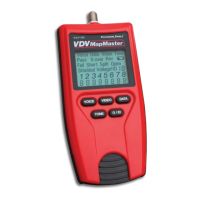
1 and 2 pins on the VDV MapMaster™ are connected to
pins 2 and 1 at the remote-end. The pins with this error
are flashing. The “U” for the remote pin numbers indi-
cates an unrecognizable continuity was detected that is
neither a short or open. An ID remote connected to the
VDV MapMaster™ when in cable test mode would also
show this error.
T568A Cable with a Miswire and
Unrecognized Continuity:
Master Remote
used for network
testing.
Coax Remote Set P/N T120C
ID/MAP 19 video (coax) cables
at one time. Numbered custom
F remotes 1 thru 19 for
easy identification.
Data Remote Set P/N T121C
ID/MAP 19 data (twisted pair)
cables or data ports/jacks at
one time. Numbered custom
RJ45 remotes 1 thru 19 for
easy identification.
Master Remote P/N T124C
The replacement Master
Remote(s) can be used as an
extra Master Remote(s) when
testing networks. Map your
network first to help identify
the extra Master Remote(s).
Toner Cable P/N T125C
RJ45/Alligator
Use when shooting tone via
the data port. Cable conductors
are terminated on contact #1
and #2, so program your VDV
MapMaster to shoot tone on
pair 1 and 2.
NO-Fault Cable P/N T126C
7.5” Special
RJ12 to RJ12
The NO-Fault Cable uses
no-fault RJ12 connectors on
both ends to assure no damage
to the RJ45 jacks. It is the
ideal patch cable to use when
mapping or shooting tone.
RJ45 PortSaver P/N 21025
Extend the life of your tester
by using the RJ45 PortSaver
as your sacrificial cable.
This eliminates the wear
and tear from constantly
plugging in and out of
the tester port.
WIRING and DISPLAY EXAMPLES
MASTER REMOTE
The VDV MapMaster™ Remote
designed for testing both Voice
(RJ12/11) and Data (RJ45) networks.
Patch cables can be tested without
removing the remote from storage.
NOTE: extra master
remotes can be
used simultane-
ously if mapping
is done first so
each master
remote can be
identified.
ACCESSORIES
Additional accessories to help make testing easier.
www.platinumtools.com
©2011 Platinum Tools Inc. All rights reserved. 1/11
3
=
FLASHING
8
1


 To Previous Page
 Loading...