EasyManua.ls Logo

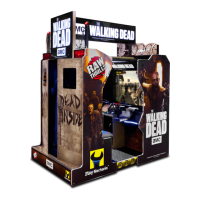
Play Mechanix amc The Walking Dead - User Manual

Play Mechanix amc The Walking Dead
49 pages
Print Icon
To Next Page IconTo Next Page
Loading...
The Walking Dead © 2016 AMC Film Holdings LLC. All Rights Reserved.
The Walking Dead© Game Software Copyright 2016 Play Mechanix™ Inc.
This software is based in part on the work of the Independent JPEG Group.
This product includes software developed by the OpenSSL Project for use in the OpenSSL Toolkit. (
http://www.openssl.org/)
This product includes cryptographic software written by Eric Young (eay@cryptsoft.com)
Setup and Operation
Service Manual
Revision TWD-1.1-7.11-1

Questions and Answers

  • A
    Adam FranklinAug 12, 2025
    What to do if Play Mechanix Arcade Game Machines show 'Dongle Not Present'?
    • R
      Robert CantrellAug 12, 2025
      If your Play Mechanix Arcade Game Machine displays a 'Dongle Not Present' message, it could be due to the dongle being missing, disconnected, or a faulty USB port. First, locate the dongle USB connection and reseat it in the USB port. If that doesn't work, try connecting the dongle to a different USB port.
  • R
    robertevansAug 27, 2025
    Why does Play Mechanix amc The Walking Dead exit Test Mode every 3 seconds?
    • J
      julianjacksonAug 28, 2025
      If your Play Mechanix Arcade Game Machine exits Test Mode every 3 seconds, the test button might be stuck in the ON position. To resolve this, slide or toggle the button off after the Test Menu appears.
  • P
    paul53Sep 3, 2025
    How to fix a Play Mechanix Arcade Game Machines coin meter that doesn't click during the test?
    • M
      Mary BrownSep 3, 2025
      If the coin meter on your Play Mechanix Arcade Game Machine doesn't click during the test, it could be due to a lack of pulse to the meter or a faulty meter. Begin by checking all wiring from the meter to the I/O board. If the wiring is correct, consider replacing the coin meter.
  • J
    John ThomasSep 10, 2025
    What to do if Play Mechanix Arcade Game Machines display 'Connect I/O Board or I/O Board Missing'?
    • J
      Jessica MeyerSep 12, 2025
      If your Play Mechanix Arcade Game Machines show 'Connect I/O Board' or 'I/O Board Missing', several issues could be the cause. First, check the USB connection from the PC to the I/O board and try connecting to a different USB port. Also, verify the 5V and 12V fuses are not blown. Check for proper voltage (+5V, +12V) at the RIO P2 connector. Finally, try replacing the RIO board with a known functional board.

Play Mechanix amc The Walking Dead Specifications

General IconGeneral
BrandPlay Mechanix
Modelamc The Walking Dead
CategoryArcade Game Machines
LanguageEnglish

Related product manuals