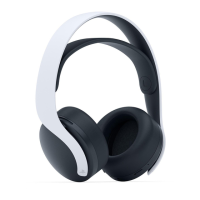
Need help?
Do you have a question about the PlayStation PULSE 3D CFI-ZWH1 and is the answer not in the manual?
Important warnings regarding children, magnets, usage, and hearing protection.
Advice on avoiding damage, misuse, and cleaning the headset.
Precautions for handling, charging, and disposing of the built-in battery.
Information on battery lifespan and charging environment.
Guidelines for storing the headset when not in use.
Advice on avoiding extreme temperatures and direct sunlight during storage.
Information on potential RF interference and troubleshooting steps.
Identifies the headband, strap, microphones, and status indicator.
Details the CHAT/GAME, MONITOR, VOLUME, and mute buttons.
Locates the USB Type-C port, audio jack, and power switch.
Connect the USB cable to charge the headset.
Plug the adaptor into a PS5 or PS4 USB port.
Slide the power switch to connect the headset and adaptor.
Keep system software updated and use up to two headsets.
Explains connection loss/restoration beeps and on-screen icons.
Details 3D audio compatibility with PS5 games.
How to mute the microphone and enable mic monitoring.
Adjusting the balance between chat and game audio.
Connecting to PS VR or USB devices like PCs.
Using the headset with other devices via an audio cable.
Information on headset charging time and methods.
Explains status and audio indicators for battery levels.
Details status indicator behavior during charging with/without adaptor.
Advice on charging environment, USB ports, and power preservation.
Explains headset indicator colors, behavior, and meanings.
Explains adaptor indicator colors and behaviors.
Step-by-step guide to reset the headset and wireless adaptor.
Information about the rating label and its location.
Instructions for removing and reattaching the earpad.
Lists power, battery, dimensions, weight, and communication specs.
Details battery life, communication range, and package contents.
Information on the 12-month manufacturer's guarantee.
Guidelines for proper disposal of the product and battery.
Statement of compliance with RE Directive 2014/53/EU.
Details on wireless frequency bands and output power.
 General
| Audio Technology | 3D Audio |
|---|---|
| Type | Over-ear |
| Connectivity | Wireless |
| Battery Life | Up to 12 hours |
| Frequency Response | 20Hz - 20kHz |
| Compatibility | PlayStation 5, PlayStation 4, PC, Mac |
| Connection | 3.5 mm jack |
| Microphone | Dual noise-canceling microphones |
| Impedance | 32 Ohm |
| Surround Sound | Tempest 3D AudioTech |
| Weight | 292 grams |
| Wireless Range | Approx. 10m |
| Controls | On-ear controls for volume and mute |
| Wireless Technology | 2.4GHz wireless, Bluetooth |
| Charging Time | Approximately 3 hours |


 To Next Page