2
1
16 7
1
2
3
Turn off the POWER switch on the rear of the
PX-EH.
If the switch is already off, turn it on and then off again.
IMPORTANT!
If you have the above environment, turn this
page to proceed to page 2.
PX-EH Series
Quick
Setup Guide
Before Setting Up...
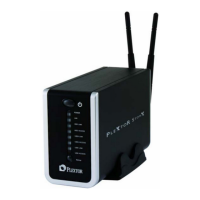
Check the model of your PX-EH.
PX-EH Series
Straight LAN Cable
Manual CD-ROM
AC Adapter
Power Cable
Important Infomation
Quick Setup Guide
Check the computer you are using.
Confirm that a LAN interface is installed and
operating properly.
When Turning Off the Power...
The shut down will start.
Check the POWER lamp (green) on the front of the PX-EH.
Power off
n Start blinking
o Turn off
All unsaved data are
written to the internal or
external hard disk drive.
Please wait.
(Shut down is started) (Shut down is complete)
When the shut down is complete, the power will be cut off
automatically and the POWER lamp will turn off.
z If an external hard disk or printer is connected, turn off its power by
following the order below: Turn off the power to the PX-EH by following
steps 1 to 3 above Î Turn off the power to the external hard disk or
printer.
z We recommend that you disconnect the power cable from the power
socket if the PX-EH will not be used for a prolonged period.
If you already have the environment
specified below, you can start using your
PX-EH simply by making the necessary
connections.
You need a network having a DHCP server* equipment (broadband
router, router-type DSL modem, etc.), as illustrated below.
Wired
network
Wireless
network
Broadband router
that functions as a
DHCP server
Modem Internet
Hub
PX-EH
* What is the DHCP server?
The DHCP server is an equipment that can automatically assign the IP address to a computer or other equipment
on the network.When the PX-EH is connected to a network having a DHCP server, the IP address will be
automatically assigned to your PX-EH. Once the IP address is assigned, the PX-EH can be used on the network.
(The default setting of your PX-EH allows it to automatically obtain the IP address from a DHCP server).
If you don't have the network environment specified above, are using a Mac computer, or want to add a shared user,
refer to the Online Manual provided in the CD-ROM.
(Turn this page for an explanation on how to read the Online Manual.)
FAQ http://www.plextor.com/english/support/support_faqs.html
RMA
http://www.plextor.com/english/support/support_warranty.html
E-mail techsupport@plextor.com
Tel 510.440.2000

 Need help?
 General

 To Next Page