
 Need help?
Do you have a question about the Plikc ASTRO WIFI and is the answer not in the manual?
Advises users to carefully read and follow all instructions during installation and use.
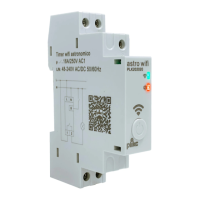
Illustrates the timer's power input and load output terminal connections.
Details the physical button's use for manual control and device reset procedures.
Guides users to download the app via QR code or search in app stores for device management.
Outlines creating an account, verifying email with a code, and setting a secure password.
Details the steps to add the device in the app by pressing "Add devices" or the "+" icon.
Guides selecting the Wi-Fi network and entering the password to establish a connection.
Explains proceeding through "forward" and "End" screens upon successful device pairing.
Automates device operation based on local sunrise and sunset times.
Guides setting up the astronomic function by geolocating the device and saving the configuration.
Guides users through connecting their Plikc account to Amazon Alexa for voice control.
Details the process of finding and adding the "plikc astro" device within the Alexa application.
Guides on using verification codes and copying them for Google Assistant setup.
Details initiating device setup via the Google Home app and searching for services.
Guides pasting the PIN, accepting, and selecting the "plikc astro" device for integration.
Lists voltage, current, power consumption, and load ratings of the device.
Emphasizes disconnecting power and ensuring correct wiring to prevent damage and injury.
States that Plikc S.r.l. is not liable for injuries or damages from instruction non-compliance.

 To Next Page
 General